
What the interactive screens service delivers
Define the input and the result: a destination name that returns directions, an object selection that opens an explanation, or preferences that produce a comparison. Build the interface around that result, with organised content and clear ways to go back, get help and end the session.
The development scope specifies input, data sources and behaviour when something fails or connectivity drops. The proposal identifies equipment, licences, installation, training and support. Ask your interactive screens provider to describe these deliverables and demonstrate the task on a configuration that represents public use.
Choose a touchscreen, kiosk or conventional display
Establish where visitors will stop and how long the task takes before selecting a screen size. A directory kiosk needs a clear approach and room for a waiting person and passing traffic. A screen used by a staff member to explain choices can follow a guided flow, with a reliable way to return to the start.
| Task | Option to evaluate | Decision test |
|---|---|---|
| Find a gallery and obtain directions | Kiosk for a repeatable self-service task | Can a visitor approach, start and understand the result? |
| Explore an object or compare options | Independent or staff-assisted interactive screen | Are the choices, return path and stopping time suitable? |
| Read a shared message from a distance | Conventional display or sign | Can people read it without input or waiting? |
For a shared vertical scene, compare the Interactive Wall Service. For participation around a surface, consider the Interactive Tables Service.
Uses for visitor centres, museums and showrooms
A directory for a visitor centre
The visitor searches a gallery name or browses destinations. The result shows their current position and the first landmark on the route. Test success by asking them to reach the gallery, recording hesitation and requests for help. If reliable directions are unavailable, provide approved alternative guidance, such as where to find the information desk.
An object explorer for a museum
Selecting an object opens a specific fact, with audio description if included in the scope. The curator approves the information and image or recording rights. Ask visitors to explain the feature they explored, and provide another way to access essential information when the primary interaction does not work for them.
A comparison in a showroom
The visitor chooses a criterion and compares relevant options, with a way to change or cancel the selection. Staff may guide this flow during a discussion, or visitors may use it independently. Check whether the person can identify a difference relevant to their needs, and make help available when no suitable option appears. These are proposed project scenarios to test in a pilot.
Plan search, directions and recovery
Map the start, language choice, search, result and return or exit. Give actions recognisable names, and distinguish changing the destination from restarting the session. A search with no result should offer another query, a destination list or assistance.
For directions, record official gallery names and approved aliases. Test both languages and compare the labels with signs in the building. The “You are here” point depends on the installed device, so each location needs directions that begin there and a recognisable landmark at the first decision point.
A Taiwan museum kiosk study examined the transition from on-screen information to finding a place in the building. Its recommendations included reducing screen information and improving signs at decision points. A proposed wayfinding pilot should therefore include walking the route after using the screen. Lin and Liu's study
Select the device, input and installation position
Compare wall mounting, a standalone kiosk and existing equipment against the task. Record the proposed model, operating system, resolution, orientation, input and application launch method. Run the core journey on the device before accepting reuse or specifying a replacement.
| Area | Check during the device and venue trial |
|---|---|
| Reading | Text length and size, glare, distance and viewing angle |
| Control | Reach, input accuracy, essential actions and return |
| Operation | Launch, connection, licensing and restart after interruption |
| Installation | Mounting, power, cables, stopping space and maintenance access |
Facilities should review mounting and circulation. A working application on a design computer does not establish compatibility with every display or operating system. When comparing interactive display companies, separate the device specification from the interface and content work your project needs.
Make Arabic and English usable on the installed screen
Test Arabic reading order, mixed text and numbers, map labels and longer translated names. Link both language labels to the same destination ID. Agree whether switching language preserves the current selection or returns to a clear starting point, then test that behaviour.
For web interfaces, assess applicable WCAG 2.2 requirements for contrast, visible focus, keyboard operation and alternatives to dragging. A state such as “closed” needs more than colour alone, and help and return controls should remain understandable. Web Content Accessibility Guidelines
Physical access needs a separate check of approach, sightlines and reach from seated and standing positions. Smithsonian exhibition guidance can inform that review, while a venue specialist confirms dimensions and site requirements. An accessible interface does not establish that its mounting position is accessible to everyone. Accessible exhibition design guidance
Define the content and publishing workflow
Give each destination a stable ID, an approved name, search aliases and the required language versions. Add hours, closure status and verification time when the task depends on them. Name the authoritative source and the people permitted to edit, review and publish its information.
Test one complete update: an authorised editor changes a sample gallery status, an approver checks both languages, and staff verify the correct release on each intended screen. Include a rejected edit and restoration of the last approved version. After the administration system confirms publishing, verify the release on the intended device.
If the scope includes an existing directory or catalogue, review field mappings, permissions and refresh behaviour with its owner. Try a missing record and a delayed source, and agree on what visitors see when current information cannot be confirmed. Use that trial to define the integration scope; support for an arbitrary system is not assumed.
Set shared-session and data boundaries
A public directory can answer a location query without asking for the visitor's name. Review any other workflow that needs personal information with the venue, specifying what the task requires, what is retained or transmitted and who can access it.
Agree on what clears at exit or after inactivity, including a warning and opportunity to continue where needed. Test a visitor walking away halfway through: the next person should be able to start as designed without inheriting someone else's selections. Lost connectivity or a delayed source needs a clear message, return path or approved alternative assistance.
Prototype a visitor journey and a staff update
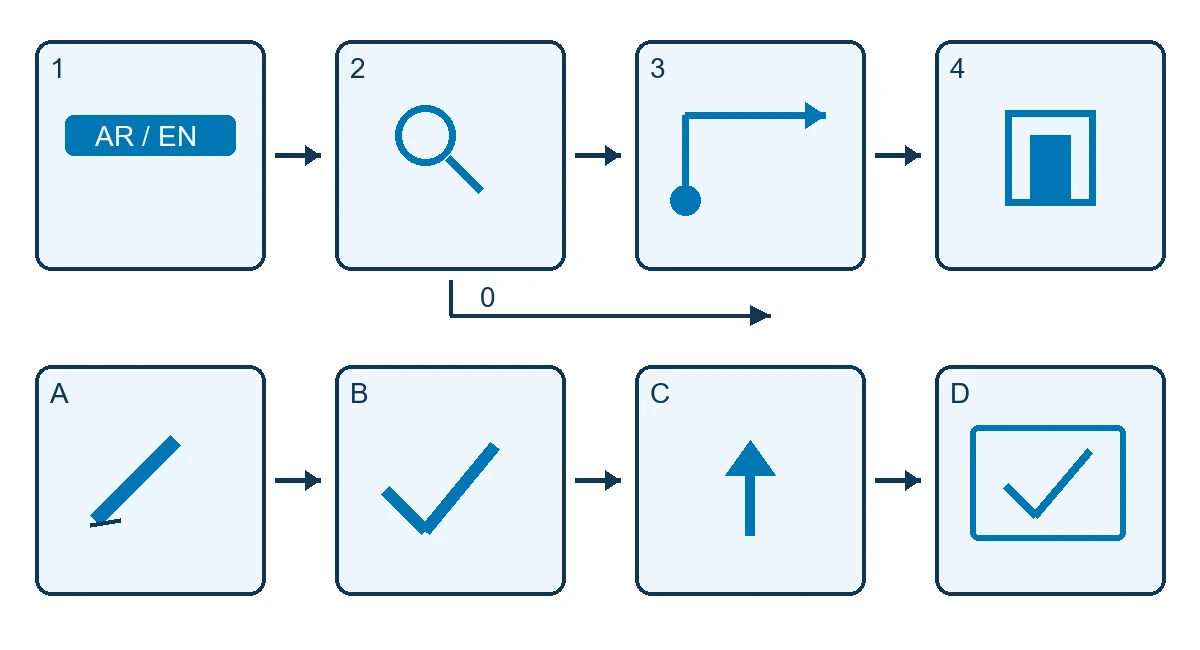
Prepare a sample gallery record with an official name and alias, a representative map and a first landmark. Observe a new visitor selecting a language and searching without coaching, then following the directions in the building. Record the first action, result and any hesitation or help needed along the route. Also test an unsuccessful search, a different destination and return.
For the staff journey, mark the sample gallery temporarily closed, approve both languages and check the installed device. Test a representative connection loss, restart and reversion to the approved release. Use test records so the trial does not change guidance being used by the public.
The diagram follows language choice, search, “You are here” and the first landmark, with a separate path for no results. The staff flow runs from editing through approval and publishing to checking the screen. Approach and reach from seated and standing positions need a venue trial.
Bring one task and one content update to prototype, with an example query, the field staff need to change and the acceptance owner.
Development, installation and handover
- Define the visitor task, audience and content owner, and survey the operating position.
- Design a prototype with test records and try both the visitor and publishing journeys.
- Approve the device, interface, content, rights and languages.
- Develop the agreed flows and integrations, then test the named configuration.
- Review installation and run venue acceptance with the responsible approvers.
- Hand over the release, operating and recovery guidance, and training included in the proposal.
Interactive screens implementation requirements include the plan, device count, power, connectivity, content, languages and installation window. Provide specifications for existing screens. For interactive screens in Riyadh or elsewhere in Saudi Arabia, ask the proposal to confirm survey, installation and support for the named venue.
Discuss an interactive screen for your venue with the task, site plan, data source and available equipment. The proposal should state file rights, licences, responsibilities and handover materials.
Agree on task and update acceptance
Set acceptance thresholds, sample size and retest responsibility before producing every flow. Measure starting a task separately from completing it and reaching a physical destination. Treat publishing accuracy as another test, distinct from visitor usability.
| Test | Expected result | Evidence to retain |
|---|---|---|
| Search an approved name or alias | Correct destination in the selected language | Query, result and help needed |
| Follow directions | Arrival from the installed device's position | First landmark, hesitation and actual destination |
| Search with no result | Clear recovery or assistance | The route the visitor takes next |
| Update gallery status | Approved version on the specified devices | Record, language, source and application versions |
| Delayed or unavailable source | Valid information or agreed fallback | Connection state and what the visitor saw |
| Departure or restart | Clear start and verified recovery | What cleared, what remained and recovery steps |
Keep device and location details, application version, data state, observed outcome and approver. Touch counts alone cannot establish whether directions worked. Report a success rate only after measuring the defined task.
What affects cost and lead time
The proposal depends on device and location count, tasks, languages, content readiness, administration, integration, licences and site work. Separate discovery, prototype, interface development, translation and data migration from equipment, mounting, transport, operation and support.
Compare development on a compatible existing screen with a new installation, and a single kiosk with releases across several venues. A touch screen kiosk rental or interactive touch screen rental quote should identify the device and hire dates, delivery and removal, mounting, application setup, content, testing and support. Confirm availability and terms for that project.
The schedule depends on asset, data and device approvals and access to the venue for trials. Agree how an extra language, task or integration after prototype approval changes the cost and programme.
Daily operation, recovery and support
Name who checks device operation and information currency, who approves edits and who receives fault reports. Separate responsibility for the display, application, data and connection in the support agreement. Specify how to restore a working release after an unsuitable update.
When the source is unavailable, some tasks may allow the last approved record; others need obsolete directions removed and alternate assistance shown. Have the content owner approve the fallback rule, then test it alongside restart before opening.
A temporary event needs setup, testing and removal tied to its schedule. A permanent installation also needs service access, content reviews and agreed update windows. Support response and warranty coverage must be stated in the proposal for the project.
Two external examples and Saudi pilot ideas
A wayfinding kiosk at Taiwan's National Museum of Prehistory
Lin and Liu observed 12 first-time visitors using a kiosk and finding a destination, then interviewed them. They recommended reducing on-screen information and strengthening signs at decision points. The IASDR 2011 paper was deposited in 2022; its small sample and single building limit transfer. Museum wayfinding study
At a Saudi visitor centre, test an official gallery name and an alias, with directions beginning at a visible landmark such as a lift. Ask the visitor to reach the gallery, recording whether hesitation comes from wording, a physical sign or a turn. This checks the interface and building together without assuming the study predicts the local result.
Wise Stones at MM Gerdau in Brazil
The pilot combined tangible geological samples, a screen and audio description. Its 2018 evaluation involved 13 blind or low-vision participants. The petrified wood description confused two blind participants, prompting clarification of its transformation. This evidence concerns one activity and participant group. Wise Stones chapter
For a Saudi heritage-material station, present the same essential fact through enlarged text and Arabic audio, within the object's rights and conservation requirements. Ask visitors to explain the intended feature and revise words that conflict with what they understand or feel where handling is permitted. These are external examples, not Marafei projects.
Scope your screen project with Marafei
Marafei's interactive screens services cover bespoke experience design and development around the venue, content and user journey. Bring an observable task, installation position and content owner to discuss a pilot and deliverables that can be reviewed before expanding the build.
When choosing an interactive screens company, compare proposals against the same task and device, or configurations with their differences stated. Ask for usability, update and recovery checks, file ownership and equipment and support responsibilities. Discuss your interactive screen project with the audience, languages, device count and opening date.