What the destination commissions
A virtual tourism service can connect a heritage landmark and a scenic viewpoint through an overview and individual stop cards. Visitors explore the places, compare what interests them and follow a link to the responsible operator. The project defines whether those decisions need text and images, panoramic scenes or a more involved interaction.
Specify the stops, media, languages and publishing channels in the delivery schedule. Agree hosting, edit access, source files and support in the proposal. Procurement can use these details to compare the deliverables and the work its team will take on.
Design for the visitor's next decision
| Situation | Information or experience | Task to evaluate |
|---|---|---|
| Planning a trip | Different landmarks with approved visit information | Choose a stop and explain the choice |
| At the destination | A short interpretation reached through an approved link | Find an explanation relevant to the place |
| Exploring remotely | A coherent sequence with an overview and return path | Complete a theme without visiting physically |
Name the next action and its owner at each stop. A visitor may want to read about a building, explore its setting or check the operator's visit page. Arrival and reception instructions belong in a virtual visitor center; interpreting a collection has the scope of a virtual museum.
An official booking link can be included when agreed. Processing a reservation or transferring visitor data needs a separate scope that identifies responsibilities, permissions and acceptance checks.
Choose formats for the audience
| Format | Suitable visitor task | Production and operating considerations |
|---|---|---|
| Short film | Follow a fixed destination story | Capture, editing, language versions and replacement footage |
| Panorama | Look around a place or move between selected scenes | Capture positions, image quality and an alternative when media fails |
| Linked stop itinerary | Compare places and choose an interest | Stop cards, overview, visit status and references |
| Live guided session | Ask questions or choose a point for explanation | Approved route, guide availability, participation rules and stream fallback |
Test a simple card and a richer scene against the same decision. Observe which information helps visitors choose before committing to additional production. General place capture and a standalone building tour have their own production scope.
A regional destination authority
The authority needs a useful way to compare places across a region. Organise stops by a visitor interest and give each an approved name, description and visit status. Assign a fact owner at each site and a publishing owner who keeps the presentation consistent.
A nature site operator
Confirm which locations and viewpoints may be shown, who reviews environmental interpretation and which seasonal conditions affect access. Distinguish the sequence of digital scenes from an approved physical route so visitors can understand the status of each.
A hotel presenting nearby attractions
Select places relevant to the hotel's guests and identify the official information owner for each. Agree who checks links and seasonal changes. Give guests a way to check whether the place is open during their stay.
Prepare a pilot stop list
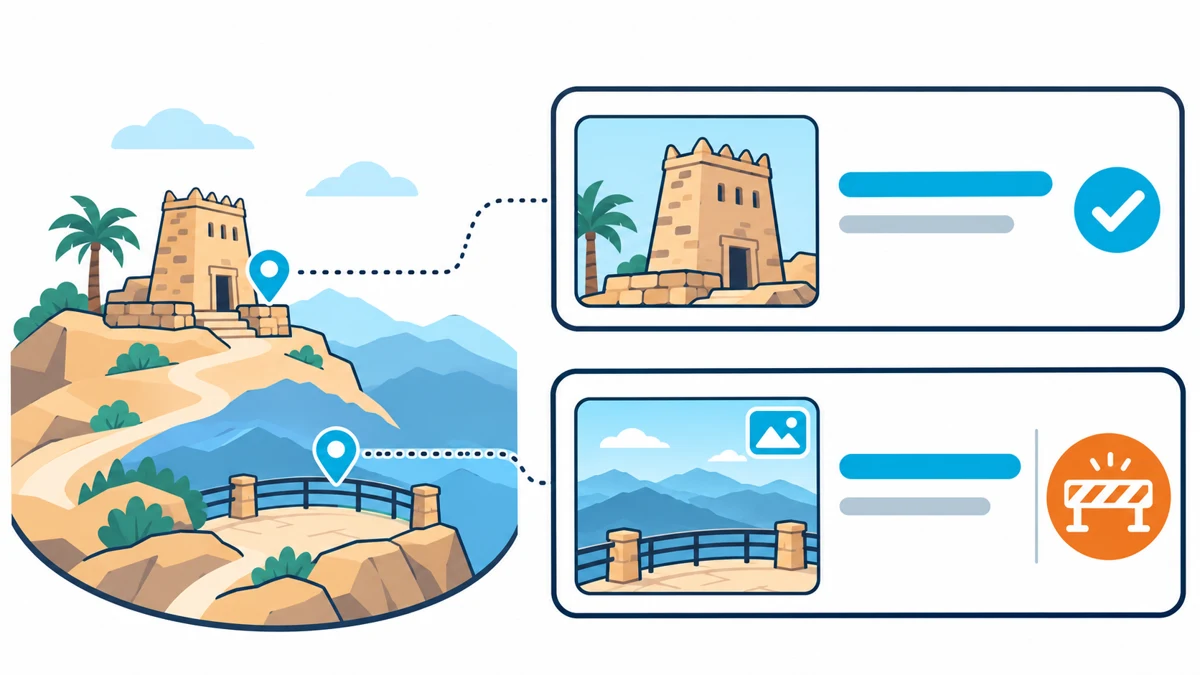
Bring the destination, intended audience, season, proposed stops and publishing channels. Record each stop's official name, information source, rights, media capture date and language versions. Assign someone to approve its physical visit status and record when that status was checked.
Choose two stops with a meaningful difference, such as a heritage building and a natural viewpoint. Both need cleared materials and an available approval owner. Discuss your virtual tourism project with one decision you want the visitor to make after comparing them.
Give each stop a stable identifier in the project records so the team can find its map label, card and language versions when something changes. Identify fast-changing information early, including seasonal access and links managed by another organisation.
Clear capture and interpretation
Agree access, approved viewpoints, capture windows and publication uses with the destination operator and relevant approvers. Record the rights for supplied maps, images, sound and narration, including credit, editing and reuse conditions. Have the site specialist review names, interpretation and sensitive details before release.
If a stop cannot be filmed, use a cleared image, diagram or approved written description. Check whether that alternative still supports the visitor's choice. A separate destination film or media package can be scoped through digital content services.
A route visitors can follow on mobile
Give the overview map and a lightweight stop list access to the same essential information. Each card needs a clear name, short interpretation, visit status and official reference, plus a way back to other stops. Label transitions that belong to the digital sequence. Physical directions, distances and travel times require operator-approved information.
Check official Arabic and English names across map labels, cards and outbound links. Review text alternatives, keyboard operation, visible focus and phone readability against the applicable WCAG 2.2 criteria. Ask a participant to complete the same choice with the panorama unavailable in the test environment.
Keep archived scenes and visit status distinct
Consider a pilot where a viewpoint remains available to explore online with the operator's permission, but is closed to physical visits for a season. Show the scene's capture date separately from the current visit status and its review date. Give visitors an official reference and a route back to an available alternative where confirmed.
Ask someone to explain whether they can visit that viewpoint now. If the preview creates confusion, revise the wording and placement of the status. Recheck the map, direct stop link and both languages after making the change. This illustrative scenario gives the team a specific acceptance task before expanding the route.
Three documented destination examples
United Parks of America: organising multiple locations
The U.S. National Park Service and Google Arts & Culture announced a hub on 25 August 2026 with more than 150 curated stories and 30 virtual tours. These are content counts in the launch announcement, not a measured increase in visits. Launch announcement.
For a Saudi region with heritage and nature sites, a proposed pilot could provide an entry point for each interest. Ask a mobile visitor to compare one stop of each type and explain the choice using an approved fact. Use any confusion to review the categories and card descriptions.
Faroe Islands: a live experience with audience choices
During pandemic travel restrictions, Visit Faroe Islands ran Remote Tourism using live video carried by a local participant. Viewers could direct movement while the destination team answered questions. The project page does not report a booking outcome. Remote Tourism.
For a Saudi nature site, propose two operator-approved stopping points and let viewers choose which one a guide explains. Test whether the audience understands the choice and the reason for the stop. Agree a cleared recording or written alternative if the stream fails.
Al Baha Panorama: distribution through official channels
In June 2026, Al Baha Municipality announced 360-degree views of attractions through Tawakkalna and its portal as part of the summer programme. The announcement describes the service and channels without reporting measured visitor outcomes. Municipality announcement.
For another seasonal destination, use one approved status record before publishing to two channels. Rehearse a stop update and check that the status, review date and official next step agree in both. The three examples belong to the named institutions; these proposed activities are not Marafei project records.
Virtual tourism cost and delivery timing
The virtual tourism price depends on locations, stops, access, media rights and the agreed languages and formats. Request an itemised scope for research, travel and capture, editing, interaction, accessibility and validation. Separate the pilot from a wider rollout and identify hosting, support and seasonal updates as their own commitments.
Existing cleared material can change the production requirements. Weather, access restrictions and approval dates affect scheduling; expired media rights or a changed stop may require more work. The proposal should state these assumptions, review rounds and how changes are priced.
When comparing virtual tourism companies, use the same stop list, publishing channels and visitor tasks. Discuss the project scope against the deliverables and operating responsibilities, including what your team can update after launch.
Pilot the route before expanding it
Once the purpose and permissions are agreed, map the sequence and identify new capture work. Build a representative stop with its lightweight card, chosen media, seasonal status and official reference. Have the operator check the facts before a visitor tests the route.
Ask a participant to compare the stops on a phone without coaching. Record unclear transitions and information they sought outside the card. Review the wording and media, then repeat the task. Identify which changes require a new capture visit and which can be handled through editing before commissioning further stops.
Accept the experience and its handoffs
| Test | Expected outcome | Review owner |
|---|---|---|
| Direct stop link | Understand the location, reach a second stop and return | Content and experience team |
| Seasonal closure | Distinguish a dated preview from current physical access | Site operator |
| Failed panorama | Complete the choice using the card and list | Technical and accessibility team |
| External visit link | Reach the correct place and language | Information owner |
Check names, interpretation, credits and visit status on the agreed phones and computers. Verify official links without making a booking or payment. Record the build, device, expected result, actual outcome and approver; rerun corrected cases before acceptance.
Measure understanding and the next step
Give participants an interest and ask them to choose a suitable stop, name the fact behind that choice and find the official visit reference. Record unaided completion, confusion about physical access and where help was needed. Repeat after revisions and report sample size and testing conditions with the result.
Views, clicks and viewing time describe use; read them alongside the task outcome. If evaluation involves personal data, agree its purpose, necessary fields, access and retention with the responsible team. SDAIA's minimum personal data guidance explains the relationship between collection and purpose. Have the project's privacy owner review the proposed measurement.
Handover and seasonal changes
Specify the delivered build, stop inventory, sources, permissions and language records, plus publishing instructions, edit access and contracted source files. Have the receiving team change a stop's status and check the map, card and official references across languages and channels.
Assign responsibility for confirming reopening, removing expired notices and replacing outdated footage. Support terms should identify maintenance, editing, recapture, hosting and agreed response times. Record those commitments alongside the agreed editing access.
Scope the destination with Marafei
Ask a virtual tourism provider to demonstrate a visitor comparing two stops and understanding their status when panoramic media cannot load. Review the team's update procedure and the changes that would need further production.
When selecting a virtual tourism company, prepare your destination, audience, season, initial stops, languages and channels. Identify cleared materials and an approval owner for each place. Marafei uses these inputs to define the experience, pilot and acceptance tasks before planning expansion.