
What the interactive wall service delivers
Start with something a visitor needs to do: find an object, explore a place or understand a stage in a service. The project defines the wall content and how it responds to visitor input, then tests what participants and spectators understand.
The agreed design scope covers the scene map, starting cues, controls, return paths and session ending. Development and integration specify how touch or movement changes the scene, including conflicting inputs and lost tracking. The proposal identifies equipment supply, mounting, calibration, training and support responsibilities. Equipment rental has its own scope and commercial terms, which can be combined with the experience design in one proposal.
Where a wall fits the visitor journey
Check the viewing distance and the time people can stop. Allow room for the participant and a companion without blocking the route past the exhibit. A short announcement may only need a conventional display. A task involving personal details may be better served by an individual screen in a suitable position.
| Visitor task | Option to evaluate | Decision test |
|---|---|---|
| View a map together and choose a stop | Wall with shared context and selectable detail | Can the companion read the title while the participant reaches the controls? |
| Complete a sequence of individual steps | Dedicated touchscreen | Are the next step and waiting space clear? |
| Read a short message while passing | Static display or playback loop | Is the message understandable without stopping? |
Decide whether a facilitator leads the session or visitors start independently. That choice changes the cues, instructions and rules for moving between scenes.
Uses in museums, visitor centres and exhibitions
Find an object in a museum
The visitor selects an object image and sees its name and location in the gallery. Keep that destination visible to a companion while the participant opens a short description near the controls. Test whether the visitor can find the physical object afterwards. The curator approves the object information and image rights.
Choose a stop on a heritage route
A visitor-centre map presents the route and its stops. Selecting a stop reveals what can be seen there and where to go next. A facilitator can discuss the route with a group, or a starting cue can support independent use. Ask the visitor to identify the next destination to check whether the map made sense.
Understand a service at an exhibition stand
The visitor opens a stage in a service journey to see its requirements and responsible team. The overall sequence remains visible to people waiting. Ask the participant to identify the step relevant to their situation, and have the organisation approve the information before display. These are proposed project scenarios, with outcomes to test during a pilot.
Choose the display and input method
Projection or a direct-view display determines how the image appears. The input system determines how the content responds. Evaluate both on the proposed setup: a readable picture does not establish that sensing works at the required positions.
| Choice | Site considerations | Trial before approval |
|---|---|---|
| Projection | Surface colour and finish, ambient light and projector position | Read text with a participant in place and check shadows |
| Wall display | Reflections, viewing angle, seams where present and maintenance access | Follow a heading and detail from the front and side |
| Touch | Target position, reach and concurrent selections | Select an edge target and return to the map |
| Gesture or movement | Tracking boundary, obstruction and passing traffic | Perform the intended action while someone uses the bypass |
Ask the proposal to identify the equipment, operating system and licences. Confirm capacity, sensing range and compatibility with existing equipment through a representative trial before including them as project commitments.
Design for participants and spectators
Mark the approach, operating position, side viewing point and bypass on the floor plan. Put close controls within the intended reach area. Keep the main heading and selected destination visible to people watching further away. Check the view with someone standing in front of the wall, and test seated as well as standing use.
The Smithsonian exhibition guidance addresses access to controls, readable information and sightlines. Use it as a design reference while the venue specialist reviews dimensions, mounting and local site requirements. Referencing the guidance does not certify an installation. Accessible exhibition design guidance
Build clear content and controls in both languages
Give people a starting cue they can read on approach, such as selecting a visible map stop. Confirm the first action beside the chosen item, show its name and provide a return that preserves the visitor's place in the map. Specify which information stays on the shared scene while someone opens detail.
Test Arabic reading order, mixed text and numbers, and long labels. When adding English, decide whether changing language changes the entire wall or just one independent area. The participation model must support that decision.
For applicable web interfaces, review contrast, keyboard operation and alternatives to gestures or dragging against WCAG 2.2. Also test whether essential information can be understood without performing the physical action. Web Content Accessibility Guidelines
Decide who controls the wall
Choose turn-taking, independent areas or shared control. Turn-taking needs a visible indication of when the next visitor can begin. Independent areas need rules about how an action in one area affects the rest of the display. Shared control needs a defined response when two people try to open different items.
Test a passer-by beside the active user, a companion blocking the sensor and a participant leaving halfway through. Specify feedback when tracking is lost, how the visitor resumes and when the map returns to its starting state. Agree on these behaviours in the prototype before producing the complete scene set.
Interactive wall implementation requirements
Provide a plan and photographs of the wall and surrounding route. Include dimensions, finish and colour where known, mounting constraints, power, cable routes and service access. Record the lighting conditions expected during opening hours. The design team also needs approach and viewing distances, audience age groups, languages and cleared content.
A venue specialist reviews mounting, circulation and physical access. Assign responsibility for changes to the light or surface and name the person who accepts site readiness. For an interactive wall project in Riyadh or elsewhere in Saudi Arabia, include the city, installation window and opening date. Ask the proposal to confirm supply, installation and commissioning for that specific venue.
Discuss an interactive wall for your venue with the visitor task, site plan and available content.
Prototype a scene under venue conditions
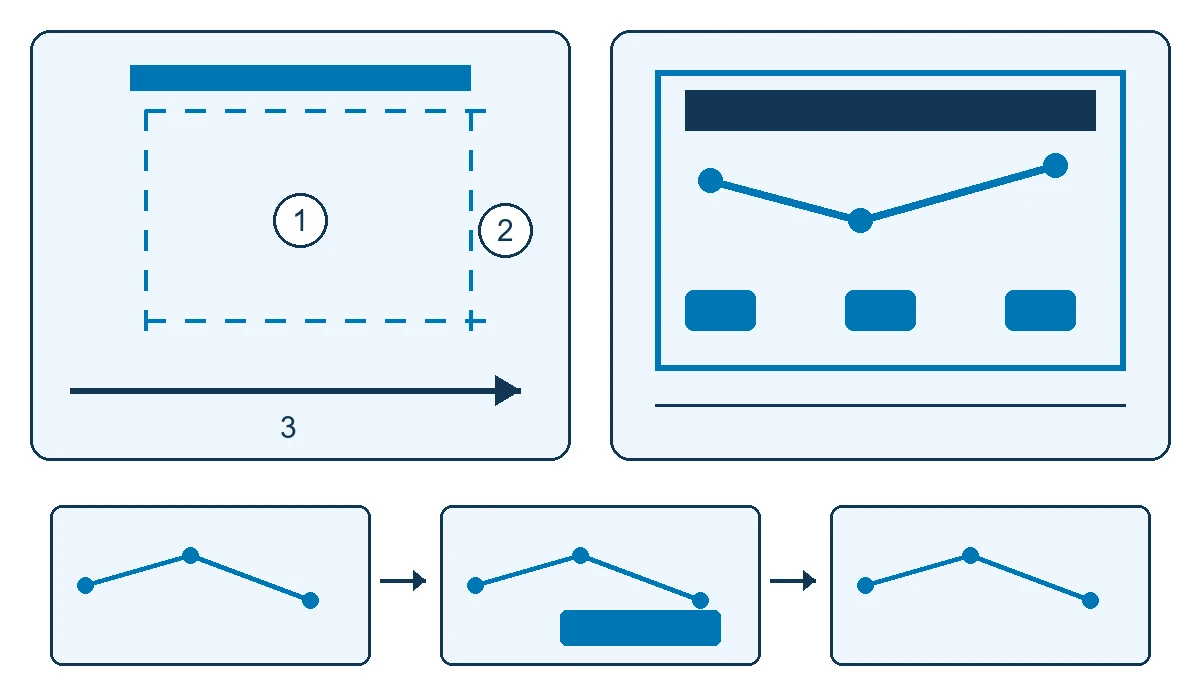
Begin with a map containing two stops and a short fact about each. Try it from the approach, at the controls and from the side. Observe a first-time visitor without coaching, noting where they notice the cue and what they try first.
The diagram identifies three positions: 1 for the participant facing the wall, 2 for side viewing and 3 for passing behind the interaction area. The front view separates the shared heading from selection controls. The scene sequence moves from an idle map to an open stop and back to the start. Site measurements determine the actual distances and heights.
Check edge targets, different light states and an obstructed sensor, then have someone walk outside the operating zone during an active session. Record what happened before changing the cue or control position. Bring one visitor task to prototype, with the result that the participant and companion should each see.
Delivery milestones and handover
- Agree on the visitor task, survey the venue and name the approvers.
- Map the content and identify assets, languages and permissions.
- Develop a prototype on a surface and configuration representative of the site.
- Approve display, sensing and participation rules after resolving prototype findings.
- Produce and integrate the scenes, then calibrate the installed setup.
- Run acceptance checks and hand over the agreed release and operating material.
The proposal lists editable assets, licences, operator guidance and included training. The content owner signs off information and rights; the technical team signs off operation; facilities reviews access, circulation and mounting within its remit.
Accept the interaction and check understanding
Measure discovery, response accuracy and comprehension separately. Someone can start a session successfully yet miss what the chosen stop means. Ask the participant and companion to explain a specific fact after viewing, recording their answers separately from touch counts or dwell time.
| Test situation | Expected behaviour | Record |
|---|---|---|
| First approach | Visitor discovers how to begin | Where the cue was noticed and whether help was needed |
| Stop selection | Intended stop opens with clear confirmation | Input point, light state and any incorrect selection |
| Side viewing | Companion can read the name and destination | Viewing position and obstruction by the participant |
| Passing outside the zone | Session behaves as specified | Walking route and any unintended activation |
| Lost tracking or departure | Clear feedback, then recovery or reset | Recovery steps and the next visitor's starting state |
Record equipment, software version, lighting, positions, actual outcomes and the retest owner. Agree on acceptance thresholds through the pilot for the visitor task, audience and tested configuration.
Cost, timing and quotation scope
Interactive wall development depends on scene count, languages, asset readiness, participation rules and integration. Separate discovery, prototyping, content production, translation and programming from display and sensing equipment, mounting, transport, calibration and support.
Compare adapting an existing wall with a new installation after checking compatibility. A change to the surface, lighting or sensor position can require another test even when the content stays the same. The schedule should show asset approvals, venue access, operational trials and responsibility for changes. Request a quotation for that scope instead of relying on a general price or lead time.
Daily operation, updates and support
Assign someone to start and pause the wall, check calibration and approve content changes. Keep a record of the software release and operating settings. Agree on restart instructions and a fallback display if interaction becomes unavailable.
If offline operation is required, test both the main experience and restart without a connection. Check which content and licences depend on the network. Retest after relocation, changed lighting, a new language or repositioned controls.
Ask what the sensor processes, retains or transmits. Aggregate observations may be sufficient for acceptance; any proposed image or identity recording needs review with the venue before approval. Support hours, maintenance and responsibilities belong in the agreement.
Two external examples and Saudi pilot ideas
Collection Wall at the Cleveland Museum of Art
The original Gallery One multitouch wall displayed images of more than 4,100 objects and let visitors save favourites to a paired device. It connected collection browsing with choices about what to see in the museum. Gallery One account
In a later evaluation published in 2019, more than 400 people completed surveys before and after their visits. ArtLens Gallery visitors reported greater gains in art understanding. This was a self-reported, gallery-level comparison, with visitors choosing where to go; it does not isolate the wall's effect. ArtLens evaluation
For a Saudi museum, prototype a small set of cleared object images and connect each card to its gallery location. Check whether the participant finds the object and the companion can read its destination from the side. The pilot needs approved collection information and a venue map; the published findings do not predict its result.
Looking Glass and noticing interaction while passing
The 2012 Looking Glass study deployed three shop-window displays for three weeks and collected data on 502 interaction sessions. Researchers observed people noticing interaction late and returning, and others starting behind existing users. These findings describe that field setting. Looking Glass study
At a Saudi exhibition entrance, test an early Arabic and English cue with a generic movement preview. Record unaided starts and spectator positions relative to the bypass. Have the venue review any proposed image processing, then adjust the cue position or viewing space from the observations. This is an external research example, not a Marafei project.
Scope your interactive wall with Marafei
Marafei provides bespoke interactive wall services covering design, development and integration. Bring one visitor task, a wall plan and a cleared content sample to discuss the input method, prototype scene and handover scope.
When comparing an interactive wall provider or company, ask for a prototype relevant to your audience, a named configuration and separate content, equipment and site-work items. Compare acceptance criteria, editing rights, training and support as well. Discuss your interactive wall project with the city, opening date, languages and existing equipment.