
Decide what the room needs to explain
Start with the audience task. A group introduction may need a map, a related scene and a guided transition between them. A short explanation viewed from one direction may work on a single screen. Give every proposed surface a purpose before selecting equipment.
Immersive digital room design connects the story to people's positions and the operating sequence. Describe where visitors gather, what draws their attention during a change and how staff prepare for the next group. Use those decisions to scope the content trial and integration quote.
Applications with a defined audience task
An introduction at a visitor centre
A digital room for visitor centres can introduce a location before a group continues its visit. Staff start a map scene, point out a destination and advance to its story. Test whether visitors can identify where to go next. For an experience accessed remotely, see virtual visitor centres.
Interpretation in a museum gallery
A digital room for museums might compare two stages in a place's history. The curator approves the interpretation and media rights; the operator allows time to read before changing scenes. Ask a visitor to explain the difference and record where an essential detail was difficult to see.
A temporary exhibition experience
Select a message that fits the time people can spend inside the stand. Define the staff cue and the route back to the exhibition aisle. Rehearse entry, viewing and reset with the surrounding noise represented. Confirm responsibility for the whole stand separately from the room's audiovisual work.
Instructor-led observation
An instructor can stop a shared scene to discuss a feature or decision. Provide the essential information in another usable form and agree how participants will respond. Skills practice and assessment require their own verified scope through virtual training and simulation; successful playback does not demonstrate a learning gain.
Fit the room to its audience and venue
A permanent room needs a workable daily routine, staff sightlines and a plan for successive groups. A temporary installation also depends on access, rigging approvals, rehearsal and removal windows. Confirm where waiting visitors stand and whether sound from nearby areas affects narration.
Have the venue's specialists establish permitted occupancy. Then test movement and viewing within that limit, including a seated position and a visitor leaving during the presentation. Agree any session with less movement or quieter sound as a separate operating mode, with its own content and route checks.
Compare formats using the same scene
An immersive content room can use different display configurations. Assess projection against ambient light, surfaces and shadows; assess direct-view LED against viewing distance, physical installation and servicing. A sample in representative conditions helps establish what a configuration can deliver.
| Audience task | Option to assess | Decision to test |
|---|---|---|
| Read one explanation from a shared direction | Single screen | Text size, positions and audio |
| See an image fitted to a specific architectural surface | Projection mapping | Alignment, light and audience views |
| Follow a story across a room | Coordinated surfaces, audio and controls | Attention, transitions and reset |
| View content on a direct-view LED configuration | Displays fitted to the room geometry | Viewing distance, seams and service access |
| Control an individual experience | Headsets with an agreed setup | Equipment, assistance and participant management |
Use projection mapping when the main task is fitting content to a surface, or interactive walls when direct input on one wall is central. Meeting-room AV needs a separate brief. Construction, tracking and headset support are project choices rather than assumed components of every room.
Establish the site and commercial boundaries
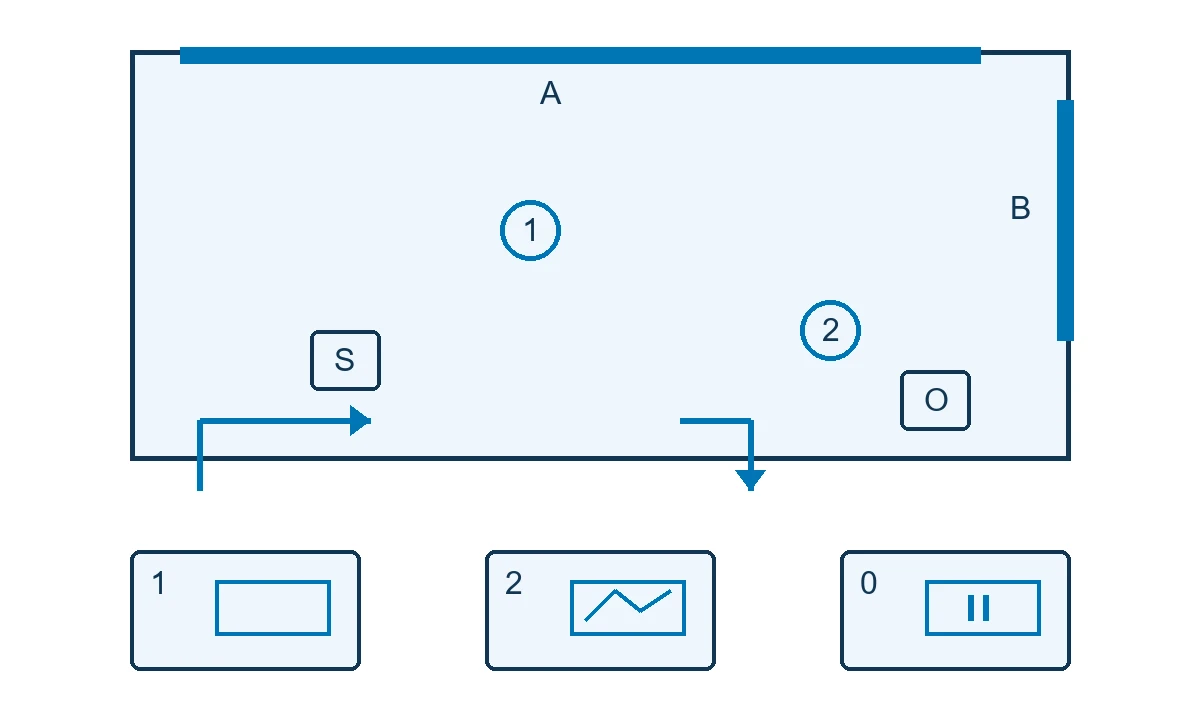
Supply a cleared plan with dimensions, height, useful surfaces, obstacles, entrances, exits and waiting areas. Identify access hours and existing equipment. Facilities should confirm mounting, power, ventilation, lighting and any network provisions needed for the proposed setup.
Ask the quote to separate enabling works, audiovisual integration and content production. Assign owners for site readiness, interfaces, media approval and operation. Check the condition and compatibility of any room or display you intend to reuse before agreeing the remaining installation work.
The illustrative plan marks surfaces A and B, central and side viewing positions, seat S and operator O. Its arrows show a possible entry and exit route. The venue approves the actual layout and occupancy; this illustration is not a measured installation or evacuation plan.
Write the scene and its operating states
For each scene, name the message, audience position, display role, audio cue and transition. Put the essential information where the group can read it, then check whether another surface adds a useful detail. Test the actual labels and narration instead of relying on a storyboard alone.
| State | Display and message | Audio and control | Review task |
|---|---|---|---|
| Welcome | Location name on A; B waits | Operator starts once the group is ready | Visitors know where to look |
| Story | Map on A; related detail on B | Approved narration and transition cue | Read the relationship from central, side and seated positions |
| Approved rehearsal stop | Venue-approved fallback | Operator follows the agreed procedure | Confirm what visitors see and how playback resumes |
| Ready for the next group | Agreed entry screen | Reset audio and controls | Venue staff complete the cycle |
Choose a timed sequence or staff-led cues according to arrivals and supervision. Sensor-led interaction needs a defined input, response and behaviour when several people participate or an input disappears. For bilingual content, compare separate versions with concise captions and test Arabic direction, reading time and voice timing.
Rehearse one scene before full production
Use an opening and a transition on representative surfaces, with the controls staff will use. Inspect legibility from central and lateral positions and speech intelligibility from a seat. Check alignment, seams or shadows where relevant. Record the content version, equipment and lighting covered by the trial.
Have the venue operator stop and restore the scene during a rehearsal authorised by the technical lead. Observe both picture and sound, and note where the operator needs assistance. A successful prototype establishes the tested scope; revised geometry, equipment or lighting needs a corresponding review.
Provide one message, display roles, audience positions and an acceptance owner to scope the pilot. Discuss an immersive room for your venue.
Documented examples and tests for Saudi venues
FRAMELESS: adapting the session
FRAMELESS describes projection and spatial sound in its London galleries. Its Chilled Sessions reduce capacity and volume and adjust lighting without complete darkness. Experience information · Session arrangements
For a Saudi cultural venue, commission an approved Arabic introduction and a reduced-stimulation version. Test the main message from a seated position and rehearse leaving the room in both modes. These are proposed local checks, not evidence that the original arrangements suit every visitor or content choice.
CAVE: designing for a viewpoint
The University of Illinois Chicago Electronic Visualization Laboratory's 1992 CAVE paper describes a surrounding projection environment. It explains viewer-centred perspective and the use of a position sensor to update that view. Primary research
In a Saudi technical education room, test one engineering detail from the intended tracking position and from the side of the group. If an essential feature is unclear off-axis, assess a fixed view with a separate explanation. Confirm stereoscopy and tracking as configuration decisions. Both examples belong to the named institutions, not Marafei's portfolio; no commercial or learning outcome is inferred from them.
Compare initial costs and operating charges
An immersive room project cost depends on the site, content, display and audio configuration, controls and installation access. Request separate lines for survey, enabling works, scene production, language versions, playback, programming, installation and commissioning. Include rehearsal and staff training in the comparison.
Use the same show brief and operating hours when comparing temporary and permanent rooms. A temporary proposal should state transport, installation, removal and staffing, with rental terms if requested. For a permanent venue, distinguish licences, support, content refresh and recalibration from one-off production. Confirm exclusions and supplied infrastructure before comparing totals.
Delivery from survey to commissioning
Agree the objective and responsibilities, survey the venue and approve the layout and scene plan. Trial the prototype before committing to the remaining production and equipment work. Installation and cue setup are followed by a complete run with the staff who will operate the room.
Set an approval owner and required input for each milestone. Revised mounting, room geometry, light or movement space may affect both media and acceptance tests. Build the schedule around site readiness and review dates, and document what happens when those dependencies change.
Accept a complete run and recovery
Define the expected behaviour and test conditions before handover. AVIXA's performance verification framework addresses what to verify, when to verify it, the criteria and reporting. It is a reference for planning the checks, not proof that a room conforms to a standard.
| Task | Test setting | Acceptance record |
|---|---|---|
| Read the main message | Central, side and seated positions | Text, version and any unreadable location |
| Understand narration | Normal operation with expected surrounding noise | Speech clarity and observations |
| Follow transitions | Full run from the operator interface | Display, sound and expected cue |
| Stop and restore | Approved supervised rehearsal | Fallback state and recovery steps |
| Prepare the next group | Venue employee resets the show | Observed time and help needed |
| Access handover materials | Authorised operator account | Available files, version and owner |
If visitor understanding matters to the brief, choose a question or observed task before rehearsal. Record responses with their viewing context. Keep that assessment separate from equipment acceptance and avoid treating a small trial as proof of general learning or sales outcomes.
Daily operation and content updates
Name the person who starts and stops the show, the escalation contact and the owner of approved settings. Agree an as-built configuration, cue sheet, permitted media, rights, operating instructions and acceptance record. Confirm training and support hours in the contract.
Test an authorised scene replacement, including its audio, cues and displayed version. Offline operation depends on playback, controls and licences; list the functions that need a connection and rehearse the approved fallback. For a permanent installation, assign daily checks, technical maintenance, backups and recalibration, and define who approves a new release.
Site approvals, accessibility and rights
The venue's specialists assess occupancy, exits, mounting, loads, ventilation and electrical provisions for the selected configuration. Keep the exit route understandable in each operating state. The Saudi Fire Protection Code, SBC 801 covers fire protection and emergency arrangements; the appointed specialists determine the requirements applicable to the project.
Review seated sightlines, speech, flashing images and rapid movement. Explain the experience before entry and provide an appropriate alternative for essential information. Test an agreed lower-stimulation mode rather than assuming it suits all access needs.
Clear image, audio and text rights, including modification and display. If recording or sensing can produce identifiable data, document what is captured, its purpose and access arrangements. The organisation's privacy lead reviews the actual design against the Personal Data Protection Law and implementing regulation before operation is approved.
Brief Marafei and compare proposals
Start with the venue, audience and purpose of the physical room. Share the city, cleared plan or dimensions, session pattern, languages, existing equipment and operational owner. State what still needs a survey, including access arrangements for a venue in Riyadh or elsewhere in Saudi Arabia.
Give each prospective immersive room designer the same scene and operating assumptions. Ask who owns site work, audiovisual interfaces, media rights, testing and support. Compare the deliverables and exclusions, then agree what the pilot will establish. Discuss an immersive room for your venue using non-sensitive site information.