Help visitors understand an existing place
A linked tour lets visitors look around a captured viewpoint and choose another scene. For a remote event planner, the useful question might be how the entrance connects to the hall and its amenities. Select views and labels that answer that question, including anything hidden from the opening position.
The Smithsonian's tours illustrate room-to-room navigation through arrows and maps, with menus in selected experiences. Museum tour guidance Choose another viewpoint when the opening position hides a useful detail or makes the route difficult to follow.
Property, venue and facility applications
A property preview
For real estate virtual tour services, plan a route from the entrance through the main rooms and one feature the prospective occupant needs to inspect. Confirm which unit is shown and when it was captured. Use approved plans for dimensions that matter to a purchase or fit-out decision.
A venue layout for event planners
Show how the hall, entrance and an amenity connect. Have the venue owner approve the labels and current layout. Test whether a planner can find the amenity and return to the hall without reopening the tour.
A campus introduction
Choose a reception point and facilities relevant to prospective students or families. Agree a scene menu and clear names, with current information owned by the institution. Occupied or restricted spaces need a separate capture decision.
A company or technical facility tour
A company virtual tour can introduce approved areas to visitors before arrival. Give each scene a specific purpose and a plain-language label. The site owner checks every visible direction, including screens and reflections, before the experience is released.
Match the scope to the site and audience
An empty show unit, an operating hotel and a technical facility have different access constraints. Agree capture windows, escort requirements and excluded areas with the owner. In a showroom, the tour explains the space; detailed product information belongs with the item.
For collection-led interpretation, see virtual museum experiences. Virtual visitor centres address visitor information and service pathways, while virtual tourism experiences develop destination narratives. This service defines the capture, connected views and delivery of the site tour.
Choose the format before comparing providers
Terms such as 3D property photography and 3D tour services can describe different outputs. Request a sample and specify the control visitors need.
| Visitor task | Format to assess | Scope to confirm |
|---|---|---|
| Inspect a particular feature | Still photographs | Required angles and explanatory text |
| Look around one position | A 360 panorama | Capture point and hidden areas |
| Choose rooms or viewpoints | Linked panoramic scenes | Transitions, scene list and return path |
| Follow a recorded sequence while looking around | 360 real estate video | Timeline, playback and sound controls |
| Preview an unbuilt design or navigate a spatial representation | A model or spatial scan, according to purpose | Reference information, movement and accuracy requirements |
A photographic tour does not by itself supply verified survey measurements. Commission a measurement method and acceptance criteria separately when dimensions determine the decision. A 360 product spin shows an individual item from different angles and has a different capture scope.
Headset mode, augmented reality overlays and aerial views also need a defined purpose and confirmed configuration. They should have their own price and acceptance checks if requested.
Plan the viewpoints and return paths
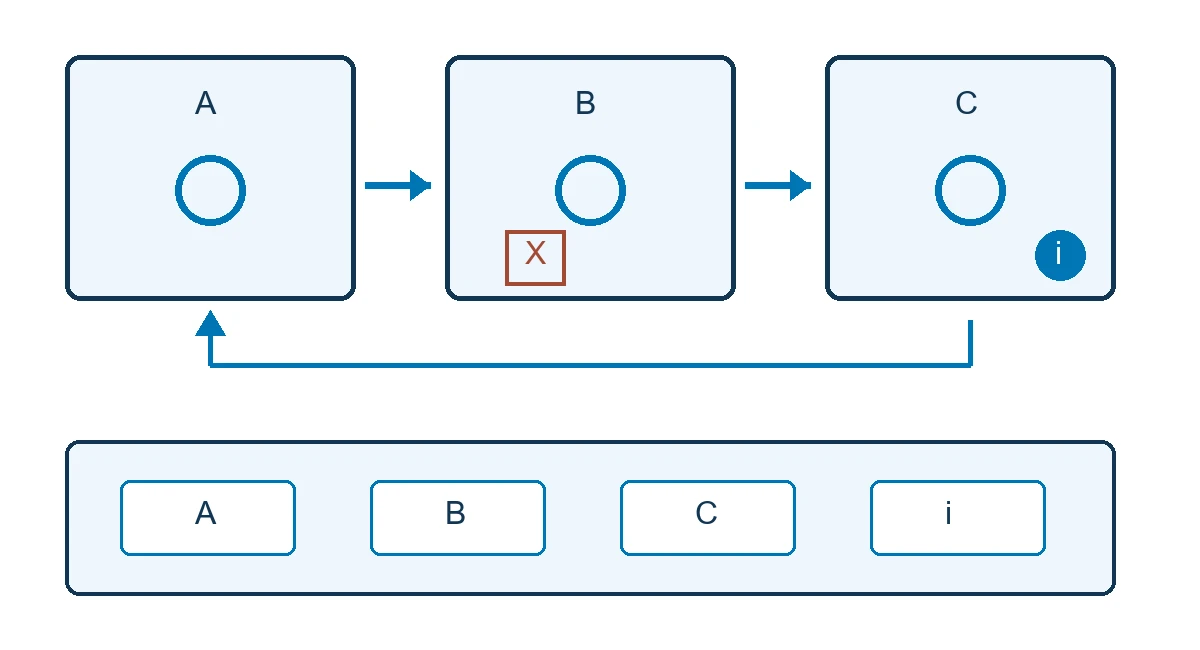
Use a scene register before capture. Give each location a reason to exist, an opening direction, destinations and a permission owner. The following venue route is a proposed pilot, with capture subject to approval.
| Scene | Visitor question | Opening direction and destinations | Approval needed |
|---|---|---|---|
| A, entrance | Where does the visit begin? | Face hall B; provide scene menu | Visible entrance and signage |
| B, main hall | How does the main space connect? | Continue to amenity C or return to A | Layout and excluded views |
| C, amenity | What does this facility provide? | Open information, then return to B | Description and media rights |
The route illustration connects A, B and C and marks an excluded area X. An arrow changes scenes; an i control opens information. A companion text route names the locations and retains the essential facility detail.
Provide the city, site type, floors or zones, capture access, languages and intended publication channel. Use a cleared, non-sensitive plan to identify what still needs a survey. Discuss a 360 tour for your property or venue.
Navigation, information and language choices
Make a scene transition distinguishable from an information hotspot. A larger site may need a floor selector, map or scene menu. Agree English labels and, where included, Arabic translations and RTL layout. Assign someone to maintain both versions after launch.
Specify the purpose and rights of each photo, audio clip or video. Include appropriate text equivalents for essential information. Test keyboard operation, visible focus and an exit from the viewer; provide an alternative to dragging where applicable. WCAG 2.2 is a reference for these checks, not evidence that a selected viewer already conforms.
Give visitors control over audio and movement. An opening scene should allow them to orient themselves without a forced rotation that they cannot stop.
Test a short route on the intended website
Pilot the entrance, hall and amenity before capturing the full site. Ask a participant to find one facility detail and return to the start. Test touch on a representative phone and connection, then keyboard navigation in the actual host page.
Compare the embedded tour with its standalone preview. Check what remains available when the viewer is blocked or fails to load. Agree a readable fallback and a separate link where useful. The acceptance owner records failures and the changes needed before more scenes are commissioned.
Documented examples and Saudi venue adaptations
Smithsonian: finding an exhibit and its label
The National Museum of Natural History offers self-guided tours of selected spaces on desktop and mobile. Its Deep Time tour includes a navigation menu, exhibit labels and additional media. Museum account
For a Saudi gallery, start with one room and an approved bilingual list. Test finding a named object, reading its label on a phone and returning through keyboard controls or the text route. The local task is a proposed acceptance test. The museum account provides no commercial outcome measure here.
NASA Glenn: named viewpoints in a technical facility
The 9 x 15 Low Speed Wind Tunnel tour includes named views such as Test Section and Control Room, with arrows or icons for navigation. NASA's tour
At a Saudi industrial education venue, select two cleared areas and explain each function plainly. The owner reviews all visible directions for restricted details. Then ask visitors to locate a named area and describe its role. These checks address both the explanation and the site's publication boundaries.
National Park Service: retaining a usable alternative
The NPS project page states that its original Statue of Liberty virtual tour is no longer supported on nps.gov from May 2025. A separate page presents a series of panoramic photographs. Project status · Panoramic series
For a Saudi venue, agree a cleared gallery and descriptive route that the owner can retain if the viewer or host changes. Test finding a particular viewpoint with the embed unavailable. This is a continuity requirement to commission, not a claim that the former NPS player still works. All three examples belong to the named institutions, not Marafei's portfolio.
Compare production costs and recurring charges
360 virtual tour pricing depends on site visits, access windows, viewpoint count, stitching, retouching, information and languages. Ask for embedding, account setup and handover to be itemised. A single floor and several buildings can require different travel, coordination and review even when their scene counts are similar.
Separate one-off production from hosting, renewal, updates and recapture. Ask what it costs to replace a changed room and what can be exported or moved to another platform. Compare virtual tour companies against the same scene register and acceptance tasks.
A Google 360 virtual tour cost enquiry needs a channel decision first. Google's publishing documentation concerns 360 photos made publicly viewable on Maps. Official Street View documentation Confirm whether capture, publication support and a branded website version are separate quote items. Do not assume a website-tour package includes Maps publication.
From approved capture zones to final preview
Agree the route, capture rights, access schedule and site contact. Prepare lighting and spaces, remove restricted materials and record areas that must remain outside the tour. The team captures viewpoints, stitches and reviews the images, then connects them and adds approved information.
Review labels, privacy edits and route behaviour before website integration. Record each scene's approval and any revision or exclusion. A new scene, newly visible sensitive detail or change of hosting arrangement needs review by the responsible owner.
Set delivery milestones after those dependencies are known. Ask which approvals or access changes could affect the schedule, rather than relying on a standard turnaround for every property.
Accept the route, content and access
Agree devices, browser versions and network conditions, including a target for the first usable scene. Test the final preview inside the intended page and record the person responsible for fixing and retesting each failure.
| Task | Test setting | Acceptance record |
|---|---|---|
| Open A, reach B and continue to C | Representative phone and connection, inside embed | Completed route and understandable opening directions |
| Read a detail and return | Touch and keyboard | Information reached and control returned |
| Check agreed language versions | English and Arabic where included | Correct labels, destinations and layout |
| Exclude area X and restricted details | Final preview in every direction | Owner approval of edits or removal |
| Find essential information without the viewer | Host page with unavailable embed | Readable fallback and clear route |
| Hand over editing and account access | Named account owner | Agreed files and permissions available |
Observe where representative users get lost and repeat the task after correction. Track scene openings only when reporting is supported and its purpose and data handling are approved. Visits alone do not establish a booking or sales impact.
Hosting, ownership and keeping views current
Compare a provider-hosted link, an embed in your website and client-managed deployment where supported. Confirm control of the account, URL, source images, edited panoramas, authoring project and exports. Ask what happens to each when the hosting term ends, including renewal and transfer arrangements.
Staff may update a label without recapture if the scene remains accurate and the configuration permits editing. A changed entrance or room layout requires review of every affected view and its neighbouring transitions. Recheck language versions and information links after an update.
Agree support hours, escalation and the contents of the handover pack. A cleared image archive and text route can be specified as separate deliverables. Confirm the rights and formats before treating them as a migration option.
Capture permissions, privacy and accessibility
The owner approves the areas, media and intended channels. Inspect people, screens, identity cards, signs and reflections in all directions. Have the responsible reviewer decide whether to recapture, remove or edit a view, then check the result in the publication preview.
Saudi personal data legislation includes images that can identify an individual. Ask the organisation's responsible team to assess the actual capture, publication and hosting arrangements against the Personal Data Protection Law and implementing regulation. Include the scene review in that wider assessment.
For restricted access, test the chosen control with authorised and unauthorised viewers; an unlisted link can still be forwarded. If aerial capture is requested, have the operator verify current aviation and site permissions before scheduling it. The official drone permit service provides a starting point for the aviation enquiry. Confirm accessibility against the actual viewer and host page before making a compliance claim.
Brief Marafei and evaluate the proposal
Marafei's virtual 360 tours service creates a connected site experience around approved locations, content and capture rights. Give the property owner, web team and acceptance owner a shared brief: priority scenes, visitor tasks, languages, publication channels and retained files.
When comparing a virtual tour company near you, confirm the city, access window and availability for that address. Ask to try a representative route on your phone and review renewal, account control and updates alongside the production price. Discuss a 360 tour for your property or venue, using non-sensitive site information to define the first capture and hosting decisions.