Skip to content

Interactive Sandbox

An Interactive Sandbox combines physical sand with a sensor, software and projection that responds to reshaping the surface. It suits schools, museums, science centers and events, with content, space and supervision agreed for each project.

Pricing depends on configuration and project scope

Request a quote
Box dimensions
Defined by layout and access
Sand specification
Material and quantity by configuration
Sensing resolution
Depends on sensor model and coverage
View all specifications

Product details

Specifications

Specifications and how they are set

Sand, sensing and projection define the system concept. Dimensions, material and equipment vary by configuration; space, lighting and access are approved through survey and testing.

Specifications
SpecificationHow it’s determinedConfirmation
Box dimensionsDefined by layout and accessSurvey and approval
Sand specificationMaterial and quantity by configurationTechnical proposal
Sensing resolutionDepends on sensor model and coverageModel documentation and test
Projector mounting heightDepends on model and mountingSurvey and design
LightingTest under operating conditionsOn-site test
Configuration approval details

No universal dimensions, capacity or sensing resolution are published for this configuration.

  • Box dimensions — Enclosure footprint, active sand area, rim height, circulation and transport route.
  • Sand specification — Document the material, inspection, care, storage and replacement; sterilization is not assumed.
  • Sensing resolution — Confirm the model, sensing limits, coverage and center-to-edge alignment.
  • Projector mounting height — Review sensor and projector placement, overhead clearance, shadows and service access.
  • Lighting — Check colors and contours from participant positions in normal venue lighting.

Description

How does reshaping sand change the scene?

An Interactive Sandbox combines a physical sand surface with depth sensing, software and projection. Visitors form a ridge or channel; the sensor reads the changed surface and the software updates the projected scene. It suits schools, science centers, museums and events that want a hands-on visitor activity with content and supervision chosen for their audience.

In an approved terrain scene, sand height can correspond to colors, contour lines and virtual water. The UC Davis Augmented Reality Sandbox project explains this principle. It is a technical reference, not a specification of the equipment or software in a Marafei proposal. Response and available scenes depend on the selected configuration and calibration.
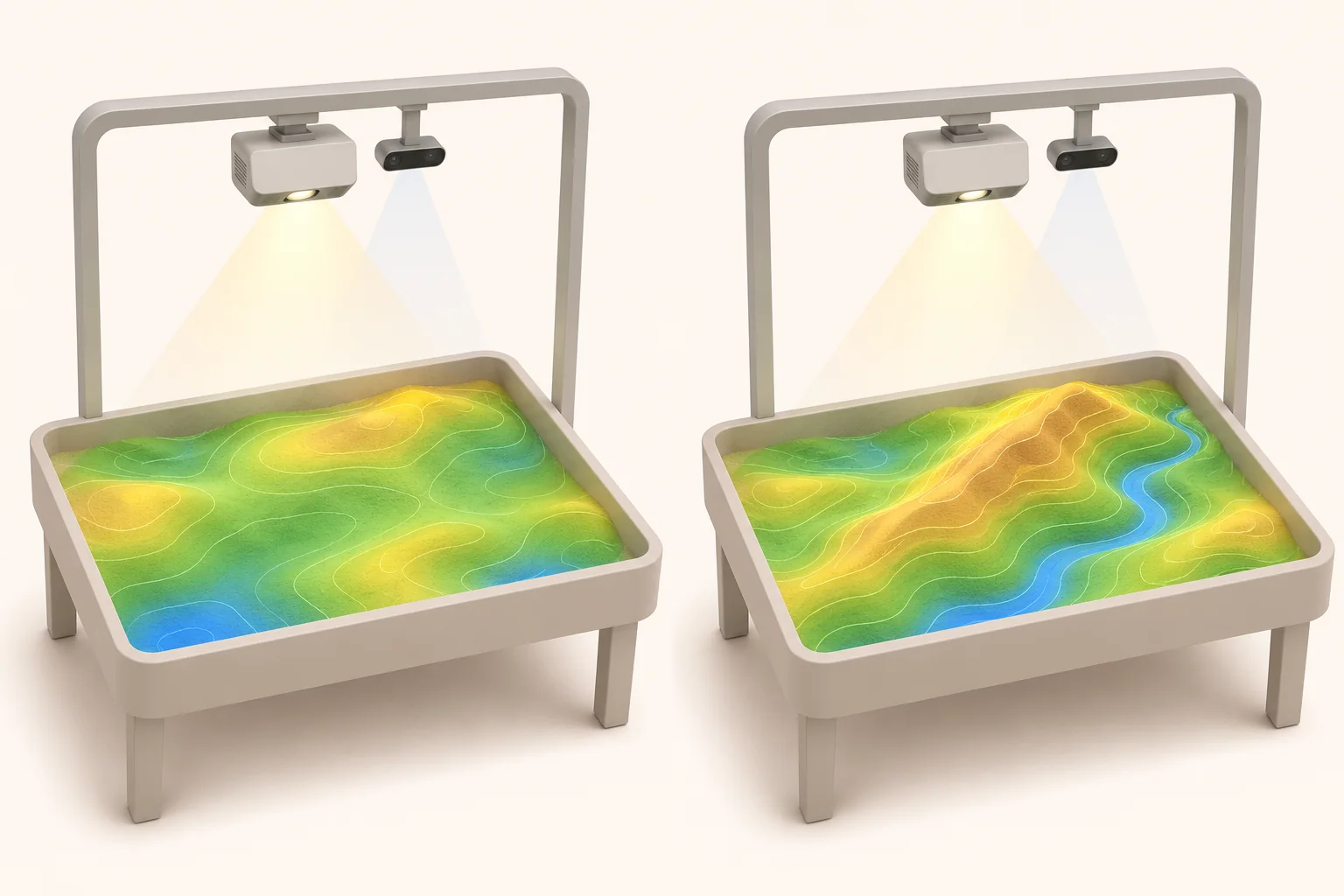
Concept showing sand before and after forming a ridge and channel, with changing projected terrain colors and virtual water
Concept illustration of terrain and projection changes. The shape, equipment and colors do not identify a model offered for sale.

For a custom digital experience beyond sand interaction, explore the Augmented Reality Service to define its scope.

Choose the activity for your audience and venue

A classroom activity needs a clear question and time for observation, led by the teacher. A museum or science center needs brief instructions that a visitor can follow on approaching the box. A family event also needs a plan for group entry, exit and reset between sessions.

Choose the audience, language and subject before selecting the scene. Test whether participants can reach the sand from the intended sides, standing or seated as appropriate. Include space for companions and the operator. Agree group capacity after a representative trial; the box dimensions alone do not establish it. Waiting areas and healthcare settings need a separate review of venue policy, material handling and supervision.

A worked activity: where will rain collect in a wadi?

With an approved terrain and water scene, an educator could introduce a simplified Saudi wadi. Ask the group to predict the flow, shape a ridge and channel, then start virtual rainfall using the program's available controls. Observe where water collects, move one landform and compare the results.

The water in this activity is simulated visually; the example does not require pouring real water into the box. Prepare a discussion prompt and a reset cue. Use the activity for explanation and observation, without presenting it as an engineering flood model or evidence of improved learning outcomes.

What belongs in the proposed configuration?

The underlying arrangement is a sand surface, sensing, processing and projection. Equipment models, dimensions, software and operating accessories vary by project. Request the actual component list and its technical documentation before accepting the proposal.

Components to review in the technical proposal
ComponentPurposeWhat to confirm
Box and sandThe shaping surface and its enclosureOverall footprint, active area, rim height, material, quantity and care instructions
Depth sensorReads the surface shapeModel, coverage, mounting position and sensing limits
Projector and mountingProjects the selected scene onto sandModel, position, visibility in venue lighting and maintenance access
Computer and softwareProcesses data and runs the sceneCompatibility, licensing, scenes, language, network and update requirements
Project servicesPrepares the installation and operationTransport, installation, training, staffing, cleaning and support scope, with an owner for each

Plan more than the box footprint

Record the finished enclosure footprint, active sand area and rim height separately. Allow for participant approach, the next group's waiting area, the operator and equipment service access. Check the route into the building, including doors and lifts where relevant. Operating space does not describe the transport requirements.

Review sensor and projector positions alongside overhead clearance, mounting, cables, power and ventilation. Test colors and contours in normal venue lighting from the participants' positions, including the effect of shadows. There is no universal floor area or mounting height for every configuration; agree dimensions after selecting equipment and reviewing the site.

Identify storage for tools and sand according to its handling instructions, and agree how spilled sand will be managed. The venue specialist should check the applicable access and mounting requirements before installation.

Test the scene, sensing and projection

Request a demonstration of the scene your audience will use, including its language and instructions. For subjects such as volcanoes or weather, see how the interaction works and confirm that the content and its license are included in the agreed scope.

Form a raised area in the center and then near an edge. Check that the projected response appears in the corresponding position and remains readable. Record the equipment, scene, lighting and result. Review alignment after transport or movement of the sensor or projector, and follow the configuration's calibration procedure if alignment drifts. The UC Davis technical FAQ provides reference-design context; its historical hardware and prices are not current project specifications.

Interactive sandbox rental or permanent installation?

Temporary rental planning starts with event dates, venue access, setup and group turnover. If you plan to buy an interactive sandbox for a permanent venue, also plan staff handover, content operation and ongoing care of the sand and equipment. Availability of the requested configuration and commercial terms are confirmed in the proposal.

Scope and responsibilities to agree
ItemTemporary rentalPermanent installation
Access and setupAgree transport, access window, installation, testing and removalApprove the location, mounting, power and maintenance access
Public operationSet operating hours, staffing and group turnoverIdentify operators, training scope and startup and shutdown procedures
Sand careAssign inspection and cleaning during the event and at removalAgree inspection, storage, replacement and consumable supplies
Content and licenseApprove the scene, language and usage rights for the projectReview license duration, updates and the feasibility and cost of additions
SupportAgree how faults are reported and handled during the eventRequest written maintenance, support and warranty terms for the configuration

These are items for defining scope, not services automatically included in every rental or purchase.

What determines the interactive sandbox price?

Compare proposals for the same activity area, audience and scene. The interactive sandbox price depends on the enclosure, sand, sensor, projection, computer and software, as well as custom content and site preparation. For rental, duration, unit count, transport, operating hours and requested services also define the quotation.

Separate setup from operating costs
Cost stageItems to reviewQuestion for the supplier
Initial setupEquipment, enclosure, mounting, transport and initial contentWhat is included, and what must the venue prepare?
OperationOperator time, sand care and consumablesWho supplies each item and pays for it?
Ongoing use and changesMaintenance, replacement sand, content updates and license renewal where requiredWhich charges recur, and which need a separate quotation?

Assess the interactive sandbox cost across setup and operation. Request an itemized proposal covering availability, duration, inclusions and exclusions. This page does not publish a price list or a documented warranty period for a specific configuration.

Before opening, between groups and at shutdown

Before opening: inspect the sand, tools and circulation space, check mounting according to the approved procedure, then start the scene and test visibility and alignment. Set participation rules, audience suitability and group capacity before admitting visitors.

Between groups: level or reshape the sand for the activity, return the scene to its starting point and handle spilled sand according to venue procedures. Reset prepares the next activity; sand cleaning or replacement and equipment servicing are separate tasks.

At shutdown: follow supplier and venue instructions for powering down, tool care and sand storage or covering where applicable. Record suspected contamination and refer it to the responsible person before reuse. The American Academy of Pediatrics guidance is a general reference for inspection and contamination prevention, not evidence of sterilization or medical suitability for this product.

What should you test and receive at handover?

A venue representative should witness response checks at the center and edges, visibility under normal lighting and access from the approved sides. Have the operator perform startup, shutdown and reset, then record any outstanding correction and its owner.

Request the equipment and content list, license terms, operating and care instructions, fault-reporting procedure, and training and support boundaries. Check connectivity and update requirements. Ask what sensor data is processed and whether recording or storage is enabled before approving the operating settings.

Two external examples for planning an activity

The UC Davis Tahoe Science Center describes Shaping Watersheds, where visitors shape terrain and observe virtual water. A Saudi science center could propose a simplified wadi activity and test whether visitors can follow the projected flow from the intended approach.

In a June 2022 workshop documented by JBA Trust, Queen Ethelburga's School students formed terrain and explored contours and virtual rainfall. A Saudi classroom could adapt this into a prediction followed by an observation after moving a ridge. These are external examples, not Marafei projects or proof of guaranteed learning outcomes.

Prepare your quote request

Share the city, dates and intended use, site dimensions and photos, lighting and access route, number of units, audience, language and subject. Include operating hours, expected group size, responsibility for supervision and cleaning, and any access or network requirements.

These details help define the configuration, transport, installation and operating scope, and make rental and purchase proposals easier to compare. Share your venue details to request an Interactive Sandbox quote.

Installation & operation

Box, sand, sensing, and display

Details follow site and audience.

Sandbox

A structure with height, edges, and access selected for the group.

Sand

Material type, quantity, cleaning, and replacement defined in operation.

Depth or terrain sensor

Reads the surface within configuration resolution and coverage.

Projector

Projects the scene onto sand; mounting is approved through design and site review.

Processing and software

Processes surface data to run the content; computer, software and licensing are confirmed in the proposal.

Base and protection

Mounting, services, maintenance access, and spilled-sand control.

From shaping sand to changing the map

Effects vary by software.

Launch the scenario

The operator selects content and checks display and sensing.

Shape the terrain

Users build peaks and valleys in the sand.

Read the surface

The sensor captures a height map within its capability.

Update projection

The system changes colors, water, or effects to match the shape.

Prepare again

The sand is leveled or arranged for the next scenario and group.

A clean and safe space for learning and play

The environment is reviewed before size approval.

Cleanable floor

A surface that supports repeated spilled-sand cleaning.

Suitable access

Height, edges, and routes for the target group and companions.

Overhead mounting

Safe sensing and projection positions outside user reach.

Light and ventilation

Clear projection with dust and heat management.

Storage and maintenance

Space for sand, tools, cleaning, and equipment access.

Permanent installation or carefully planned temporary experience

Transport, sand, and cleaning are central considerations.

Permanent implementation

Agree equipment, mounting, content and the limits of training, maintenance and warranty in the proposal.

Temporary rental

Confirm availability, transport, access window, setup, staffing, cleaning and removal for the event.

Content package

Check feasibility, licensing and cost before approving additional scenes.

From learning subject to ready experience

Timing follows configuration and content.

Define use

Audience, subject, supervision, and session duration.

Survey and design

Size, access, mounting, light, and cleaning.

Prepare and install

Set up box, sand, sensing, display, and content.

Test and hand over

Test center and edges, lighting, access and reset; hand over operating and care instructions and the agreed training and support scope.

Hygiene, supervision, and suitable access

Requirements follow audience and site.

Sand hygiene

Assign inspection, cleaning, storage and replacement according to material instructions and venue policy.

  • Assign inspection, cleaning, storage and replacement according to material instructions and venue policy.
Child supervision

Agree audience, group capacity and participation rules with the operator, including keeping sand out of mouths.

  • Agree audience, group capacity and participation rules with the operator, including keeping sand out of mouths.
Edges and access

Test edges, approach and reach for the intended audience; the venue specialist reviews applicable requirements.

  • Test edges, approach and reach for the intended audience; the venue specialist reviews applicable requirements.
Dust and sensitivity

Review sand material, ventilation, care procedures and audience-specific needs before approving use.

  • Review sand material, ventilation, care procedures and audience-specific needs before approving use.
Sensing privacy

Request a statement of sensor data and any enabled recording or storage; approve settings and access permissions.

  • Request a statement of sensor data and any enabled recording or storage; approve settings and access permissions.

Frequently asked questions

Details follow audience and site.

Can I rent an Interactive Sandbox for an event?

Send the date, city, venue, audience and operating hours. Ask whether the available configuration includes transport, assembly, calibration, a supervisor, cleaning and takedown.

What determines the price of an Interactive Sandbox?

Ask for a breakdown of box size, sensor, display, computer, content, site setup and support. Use the same audience, venue and activities when comparing prices.

What ongoing Interactive Sandbox costs should I budget for?

Check sand and consumable replacement, staff time, servicing and software or content renewals where applicable. Ask which items are included for the stated term.

What should I check before buying an Interactive Sandbox?

Confirm the active surface, access, projection, content, licensing, sand specification, installation, operator training and support in a project quote.

How does the sandbox detect what participants build?

A depth sensor measures the changing surface. The software interprets that shape and updates the projected scene according to the selected content and calibrated setup.

Does the Interactive Sandbox use real sand?

The product uses a physical sand surface. Confirm the material, quantity, approved cleaning and replacement procedures for the specific configuration and venue.

Which scenes can the sandbox show?

Start with terrain or simulated water if supported by the proposed content. Ask for a preview of the chosen scene and language before approving any additional themes.

Does the water activity use real water?

The water in the cited terrain activity is projected simulation. Follow the supplier’s sand and operating instructions for the selected configuration.

Is it different from a sensory table?

A sensory table provides physical play. This setup adds sensing and projected content that responds to changes in the sand. Choose according to the activity and operating needs.

How much floor and overhead space does it need?

Measure the box footprint, clear approaches, staff and queue space, access doors and overhead mounting clearance. Confirm the final layout and service access in the proposal.

How do you choose the height and user capacity?

Test reach and sightlines with the intended audience, including seated or assisted use where required. Set a group size the operator can manage around the approved layout.

Can we use it in a bright room?

Test the selected scene under the venue’s normal lighting and from representative positions. Review glare and shadows before confirming the projection configuration.

Can the content match a school lesson or museum theme?

Give the project team the audience, learning objective, language and session format. Approve a sample before assuming the scenario is included or can be added.

How can a teacher run a short terrain activity?

Ask where virtual rain will collect. Let learners shape a ridge and channel, run the simulation and compare the result with their prediction.

What should staff reset between groups?

Clear the surrounding area, check the surface and equipment for visible problems, level or reshape the sand and return the program to its starting scene. Follow the approved operating instructions.

How should the venue handle cleaning and sand replacement?

Agree a schedule and assign the responsible staff. Follow the approved procedure for cleaning and storage and escalate suspected contamination before reopening.

Does the Interactive Sandbox require internet access?

Check the actual software, licensing, updates and any content downloads in the quote. Demonstrate startup in the venue’s expected network conditions.

Does the depth sensor record participants?

Ask the supplier to explain the data it uses and whether any recording or storage is enabled. Agree the operating settings before opening to the public.

What should we test during handover?

Check alignment and response at the center and edges under normal lighting, confirm the approved scenario and approach, then have staff perform the agreed reset and restart.

Will it need recalibration after a move?

Inspect mounting and alignment after transport or changes to the sensor or projector. Test the displayed response and follow the supplied recalibration procedure when needed.

What should I send for a quote?

Send your city, dates, space and lighting, audience ages, group sizes, theme, language and operating hours. Include staffing and hygiene requirements if the venue has them.

Who handles faults or replacement parts?

Confirm equipment ownership, contact route, support term, replacement responsibilities and what venue staff can check before escalating an issue.

Can the Interactive Sandbox be used outdoors?

Outdoor suitability cannot be inferred from the product concept. Request documentation for the proposed equipment and material, and assess light and mounting before approving an outdoor site.

Is the sandbox sand sterilized?

This page does not establish sterilization of the supplied material. Request its specification, care instructions and inspection and replacement plan; an activity reset does not sterilize sand.

What warranty and delivery time apply to the Interactive Sandbox?

Duration, coverage, exclusions and delivery dates belong in the proposal for the specific configuration. A universal warranty or immediate availability is not assumed.

How should I compare rental with permanent ownership?

Compare transport, installation, removal, staffing, content, licensing, sand care and support for the same use. For ownership, include ongoing operation and maintenance and assign responsibility for each item.

Sources and references

  1. UC Davis: Augmented Reality Sandbox

    UC Davis

    Accessed:

    Reference for the concept, external activity or general care; not a specification of Marafei equipment or commercial inclusions.

  2. UC Davis: technical FAQ

    UC Davis

    Accessed:

    Reference for the concept, external activity or general care; not a specification of Marafei equipment or commercial inclusions.

  3. Shaping Watersheds

    UC Davis Tahoe Environmental Research Center

    Accessed:

    Reference for the concept, external activity or general care; not a specification of Marafei equipment or commercial inclusions.

  4. Learning about hazards in the natural environment

    JBA Trust

    Published/updated:

    Accessed:

    Reference for the concept, external activity or general care; not a specification of Marafei equipment or commercial inclusions.

  5. Safety in the Sandbox

    American Academy of Pediatrics

    Published/updated:

    Accessed:

    Reference for the concept, external activity or general care; not a specification of Marafei equipment or commercial inclusions.

Publisher

Marafei

Publisher: Marafei

This product content was prepared, written and reviewed by Marafei’s team of specialists, consultants and technical engineers.

Marafei team

Don’t hesitate to
contact us.

You can book a demo with us by filling out this information, and we will get in touch with you as soon as possible

Business Hours

Sunday–Thursday
8:00 AM–6:00 PM