Skip to content

Golf Simulator

A golf simulator is an indoor system that reads a golf shot and displays its simulated flight and result on a screen. It suits event and hospitality teams planning an interactive activity, and academies that need shot feedback, subject to the room and configuration meeting the intended use.

Pricing depends on configuration and project scope

Request a quote
Swing clearance
Measured on site
Tracking system
Selected by use
Display and lighting
Tested for the venue
View all specifications

Product details

Specifications

Specifications, configuration and site decisions

Verify each model against its manufacturer reference. The description explains room examples and measurement endpoints; final dimensions require site approval.

Specifications
SpecificationHow it’s determinedConfirmation
Swing clearanceMeasured on siteSite survey
Tracking systemSelected by useConfiguration-dependent
Display and lightingTested for the venueSite survey
Power and networkConfirmed before deliverySite survey
Audio and finishDefined by scopeConfiguration-dependent
Accuracy and discovery requirements
  • Swing clearance — Width, depth, height, and player and audience circulation.
  • Tracking system — Required data, sensor position, and calibration needs.
  • Display and lighting — Screen size, projector position, brightness, and reflections.
  • Power and network — Outlets, loads, connectivity, and updates for selected components.
  • Audio and finish — Acoustic treatment, flooring, identity, and enclosure protection.

Description

How a shot becomes a game or practice session

The player or operator selects an available mode, then the player hits from a mat towards a purpose-made impact screen. The launch monitor records the ball or club data supported by the configuration; the software uses those readings to display the simulated shot. Check the required metrics and modes against the proposed model and software edition. Manufacturer reference

Define the session before choosing equipment. A corporate event needs a short challenge, clear instructions and an orderly change of player. An academy needs the measurements a coach actually uses. A hotel or home installation also needs repeatable starts, a suitable viewing area and an operating routine.
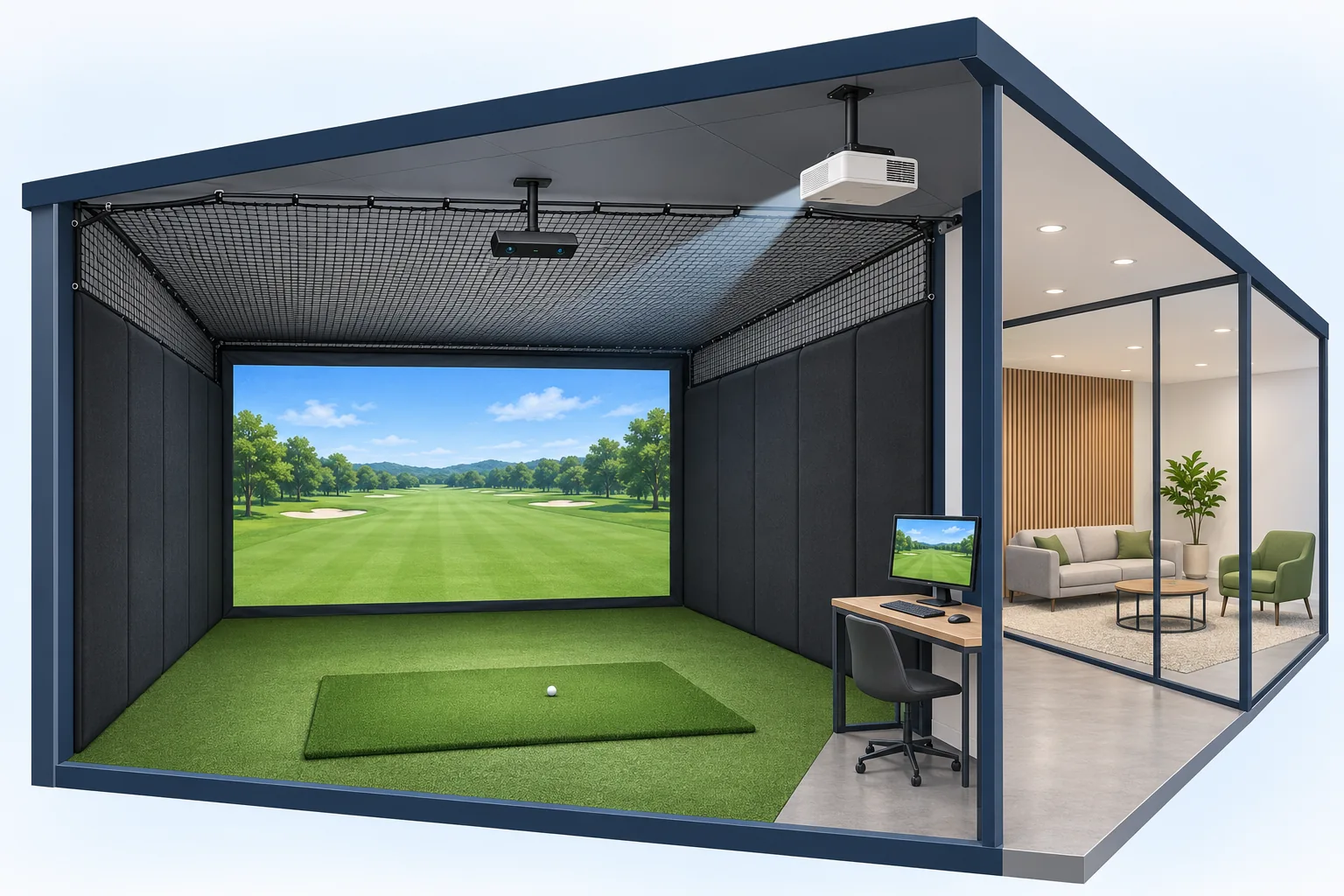
Concept illustration of a hitting bay, impact screen, overhead tracking and adjacent viewing space
Illustrative indoor simulator concept. The project layout determines equipment positions and protection.

What to compare in a complete golf simulator system

Request a bill of equipment that identifies each component, its function and who supplies and installs it. A launch-monitor-only listing has a different scope from a commissioned playing bay. Compare the complete scope before comparing totals.

System components and quote decisions
ComponentFunctionWhat the proposal should identify
Hitting area and protectionHitting mat, impact screen and surrounding protection.Materials, dimensions, screen fixing and player and spectator boundaries.
Launch monitorRecords the shot data supported by its model.Exact model, mounting position, required metrics and calibration procedure.
Computer and softwareRun the simulation and licensed modes.Compatibility, software edition, license term, renewals and account ownership.
Projection and controlsDisplay the course and results and manage a session.Resolution, throw and lighting; any touchscreen or audio included in scope.

Audio, flooring, room finish and branded graphics should be itemized where required. An illustration does not establish package inclusions. Trackman’s specification page requires a current software license for Virtual Golf; the proposal must state what the license and renewal cover. Manufacturer reference

Room requirements depend on the model and layout

Measure finished width, depth and clear height. Mark beams, lights, doors and other obstacles. Locate the impact screen, ball and tracker on a plan, including space behind the screen, swing clearance and waiting areas. Review intended handedness and the longest club in scope during the site assessment.

Trackman planning examples, guide dated 28 January 2026
ModelGuide recommendationMeasurement boundary
Ceiling-mounted Trackman iOScreen to ball: 3.0 m or more; width: 4.6 m or more; height: 3.0 m or more.Allow swing space behind the ball. Screen-to-ball distance is not total room depth.
Trackman 4 behind the ballScreen to unit: 5.5 m or more; width: 4.6 m or more; height: 3.0 m or more.The unit needs space behind the ball. This endpoint differs from the iO example.

These are model-specific planning recommendations, not Marafei package dimensions or approval of a particular room. The general specification page lists a recommended height of 3.1 m or more, while the planning guide gives 3.0 m. Do not automatically select the smaller figure: confirm the installation guidance for the chosen configuration against the measured room and swing clearance. Manufacturer reference; Manufacturer reference

Trackman 4 support guidance separately identifies minimum and optimal ball-to-screen and ball-to-unit distances, and clearance behind the screen. Floor area alone cannot establish fit. Have the installer reconcile measurement endpoints and protection in one site drawing. Manufacturer reference

Choose the setup around the venue and users

For an exhibition, specify the challenge, turn length, access window, removal time and queue location. Trial the changeover between players before estimating participation capacity. In a hotel, have staff demonstrate session start and stop, and check whether guests can read results from the viewing area. For coaching, make the requested shot data part of acceptance.

A home golf simulator needs the same assessment of obstacles, noise and swing clearance. An empty room or high ceiling alone does not establish suitability. An outdoor or partly open event setting needs its own assessment of conditions and equipment suitability; indoor requirements cannot simply be transferred to it.

Event rental or permanent installation?

Base the decision on frequency of use, project duration and operating responsibility. A training configuration describes an application and can be permanently installed. Agree the scope of each item in the proposal.

Rental and permanent installation scope
ItemTemporary event rentalPermanent installation
Site preparationUnit footprint, access, fixing, protection and setup window.Room layout, finishes, utilities and maintenance access.
Transport, installation and removalDelivery trips, handling, calibration, teardown and venue reinstatement.Supply, installation, commissioning and responsibilities of other trades.
Staffing and trainingWhether an operator is included, working hours, turn management and breaks.Staff training and documented start, inspection and shutdown procedures.
Software and licensingRequired modes and license coverage for the agreed event period.Edition, account ownership, term and any renewal fees.
Support and protectionResponsibility for faults, damage, delays and replacement during the event.Maintenance, consumables, replacement, warranty and support terms.

For golf simulator rental, send the venue, dates and operating duration so configuration and availability can be checked. If you plan to buy an indoor golf simulator, ask for equipment supply and room installation as separate lines. The project proposal establishes the contractual inclusions.

Golf simulator prices and ongoing costs

Start with the equipment scope: tracking, screen, protection, mat, computer, projection and software. Add the site work required for mounting, cabling, lighting control and finishes. A change in screen size or projector position can alter the installation, so include dimensions with the price request.

For event hire, request separate treatment of use duration, operator hours, transport, access and teardown windows, and branding. Identify whether the system moves between locations and who handles storage or security between operating periods. These are scope questions, not automatic inclusions.

For a permanent venue, distinguish initial supply and installation from any recurring software or support charges, agreed maintenance and replacement consumables. Compare proposals over the same period, with the same functions and acceptance tests. Ask the quotation to identify taxes and separately priced work. An hourly playing rate or an overseas equipment-only price cannot establish the cost of a system at your venue.

Verify tracking, software and projection together

Name the ball and club metrics users need, then check support in the model and software edition. Test how measurements are displayed and modes selected. Agree the purpose and permissions for player accounts, names or score displays before enabling data capture.

Check course detail and readable numbers under normal operating light, from both playing and viewing positions. The installer should reconcile screen size, throw, projector placement, shadows and computer performance at the proposed resolution. Do not assume 4K is included or universally necessary. Ask which functions require a network connection and how staff recover a session after an interruption.

A documented projection example in Riyadh

BenQ’s July 2026 Marafei Resort case identifies the LK936ST for primary projection and LU935 for secondary uses, with Trackman iO in the project context. These are supplier-published facts about that installation, not standard equipment for every proposed setup. Manufacturer reference

For a hospitality room with more than one use, identify the screen and mode required for golf and what the other use needs. Test switching and image visibility with the operating team. The case’s reported results do not establish a performance promise for a different venue.

Installation, operation and acceptance

Agree the site drawing, component list and responsibility for power, network and lighting before installation. After mounting and calibration, witness representative shots, agreed modes and data, picture checks, player changeover, and stop and recovery procedures. Test both handedness configurations when they are in scope.

Record the expected and observed result, venue conditions, issue owner and retest for each check. Request operating and daily inspection instructions, equipment and license details, and the limits of maintenance, warranty and support. Specify who rechecks alignment after moving equipment or changing the screen or tracker position.

Before admitting participants, the operator should check the screen, protection and hitting area and prevent circulation through the swing zone during play. Review participation, viewing routes and access needs with the venue. The installation and operation tab provides the practical checks.

Information for an installation or rental quote

For a golf simulator in Saudi Arabia, provide the city, venue and target date, followed by finished width, depth, clear height and obstacles. Add site photographs where useful. State whether the request is a temporary event or repeated use, with duration, daily hours, expected participants and the proposed turn arrangement.

Include coaching metrics or game modes, right- and left-handed use, existing equipment, branding and staffing requirements. These inputs support a discussion of configuration, responsibilities, price and availability for your location and dates. If you want a playing session at an existing venue, identify that request separately from supplying a system.
Installation & operation

Layers designed to work as one system

The final list follows the configuration selected after site review.

Hitting area

Flooring, mat, and movement clearance designed around the user and venue.

Impact screen and protection

A display surface and enclosure reviewed against ball travel and audience movement.

Tracking system

Captures the level of shot data required by the approved use.

Display and processing

Projection and computing selected for the screen and ambient lighting.

Simulation software

Provides licensed play, practice, or challenge content within the chosen package.

Control and operation

An operator interface and checks help the team start and manage sessions.

From the shot to the virtual scene

Technical details vary by tracking system and software.

Choose a mode

The user or operator selects an available course, practice mode, or challenge.

Play the shot

The player stands in the defined area and directs the ball toward the screen.

Read the data

The tracking system captures the information supported by the chosen setup.

Present the result

Software turns the data into a visual path and outcome in the virtual environment.

Manage the session

The operator coordinates player changes, system state, and the end of the round.

What is reviewed before approving the simulator?

A site review prevents conflicts between the configuration, circulation, and venue services.

Dimensions and circulation

Measure swing clearance, access, waiting, and spectator positions.

Surfaces and protection

Review the floor, walls, ceiling, and ball-impact areas.

Lighting and display

Control reflections and position the screen and projector.

Venue services

Confirm power, network, ventilation, audio, and maintenance access.

Operation

Define the operator, player changeover, daily checks, and stop procedure.

Rental and installation: agree the scope

Training is an application that may be permanently installed. The proposal defines inclusions and responsibility.

Permanent installation

Ask the venue proposal to define supply, fit-out, mounting, calibration, training, licensing and support.

Temporary rental

Ask for transport, access, setup, operator hours, removal and availability for the event dates.

From the objective to operation

The approved proposal establishes the contractual schedule.

Understand the need

Define audience, objective, operating model, and indicative budget.

Survey and design

Measure the site and select tracking, display, enclosure, and software.

Install and calibrate

Implement components and test shots, image quality, and operating scenarios.

Train and hand over

Train the team and hand over daily checks and the agreed support route.

Safety, access, and privacy

Final requirements follow the selected components and site and do not represent a certification claim.

Safe hitting zone

Separate players and spectators and prevent circulation during a shot.

  • Separate players and spectators and prevent circulation during a shot.
Pre-opening checks

Review the screen, enclosure, tracking, display, and software before use.

  • Review the screen, enclosure, tracking, display, and software before use.
Instructions and supervision

Provide visible guidance and an operator who understands stop and player-change procedures.

  • Provide visible guidance and an operator who understands stop and player-change procedures.
Accessible participation

Plan viewing and participation routes that do not rely only on full physical movement where feasible.

  • Plan viewing and participation routes that do not rely only on full physical movement where feasible.
Limited data

Define purpose, retention, and permissions before enabling accounts, registration, or analytics.

  • Define purpose, retention, and permissions before enabling accounts, registration, or analytics.

Frequently asked questions

These answers support initial fit assessment; the technical proposal confirms the details.

What is included in a complete golf simulator package?

Typically the bay combines the hitting area, impact screen, protection, tracker, computer, software and display. Ask which hardware, room work, licenses and support are included in your quote.

Can I rent a golf simulator for a corporate event?

Ask for the configuration and availability at your venue and date. Clarify access, staffing, queue management, transport, setup and removal.

How are golf simulator rental prices calculated?

Compare event duration, access window, transport, setup, enclosure, staffing, branding, teardown and any extra hours. Use the same venue and operating brief for each estimate.

What should I check before buying an indoor golf simulator?

Confirm your site, planned use and required metrics. Compare protection, tracking, display, software, installation, renewals and handover on a single scope.

What does a commercial golf simulator cost?

Ask for a proposal that splits equipment, site work, license, calibration, staff training and ongoing support. Capacity and room finish can change the scope and cost.

What goes into the cost to install a golf simulator?

Installation may include access and delivery, enclosure assembly, mounting, wiring, projection alignment, calibration and witnessed testing. Confirm which trades and works are included.

How do I enquire about a golf simulator in Saudi Arabia?

Share the city, venue, timing, site dimensions and operating goal. Confirm whether your request is a system for your site or a visit to an existing venue.

What should a mobile golf simulator rental quote include?

Ask about transport, access dimensions, assembly, clearance, operator hours, daily checks and removal. Confirm the site conditions required for the selected setup.

Does a home golf simulator package include room fit-out?

Check which elements are included. A package may cover the tracker and accessories while enclosure, flooring, projection, installation and software are separately priced.

Is an hourly golf simulator rate the same as hiring a system for an event?

An hourly rate usually covers play at an existing venue. An event hire proposal covers a setup at your location for an agreed window and may include staffing and transport.

How much clear room do I need for a golf simulator?

Measure the finished width, depth and height, including fixtures. Confirm swing clearance, screen space, tracking position and spectator circulation with the chosen design.

How does Trackman iO differ from Trackman 4 for room planning?

The iO example measures from screen to ball and mounts overhead. Trackman 4 sits behind the ball and its cited example measures from screen to unit. Use each model’s guide and your actual layout.

Can right- and left-handed players share a golf simulator bay?

Confirm space and hitting positions for both sides, and check whether the tracker or settings need changes. Include an approved trial for both sides if they are in scope.

How should I choose a golf simulator for coaching or events?

Ask a coach to specify useful metrics and modes. For an event, choose a simple round, clear instructions, and a turnover plan the operator can demonstrate.

Does every golf simulator setup include 4K projection?

The display specification depends on the quote, screen, light, throw and computer. Test readable information and image alignment in the venue before accepting the configuration.

Does the quote include the simulator software license?

Check software edition, included modes, license duration, renewal and who controls the account. Confirm computer and network requirements for the proposed features.

What happens if a golf simulator loses its network connection?

Identify which modes depend on the network. Have the installer or operator demonstrate recovery under the approved workflow and provide instructions for a session that cannot resume.

How should a golf simulator venue separate players and spectators?

Use the approved layout to separate the hitting zone and waiting area. Give staff clear instructions for allowing entry, changing players and pausing play when needed.

Can a golf simulator display sponsor branding or scores?

Ask which signs, graphics and software views can be configured. Agree which results or participant information will be shown and who controls any data capture.

What should I test at golf simulator handover?

Witness representative shots, the agreed metrics, display visibility and the changeover between players. Check supported modes and staff recovery steps, and log issues and retests.

What maintenance and support should I request for a permanent golf simulator?

Request the daily check routine, consumable and screen guidance, calibration and support boundaries. Confirm responsibility for software renewals and hardware replacement.

Does a golf simulator need recalibration after moving?

Check the model guide and operator instructions when the screen, ball position or tracker moves. Verify tracking and display alignment before reopening the bay.

What information is needed for a golf simulator quote?

Send city, venue type, dimensions, access dates, expected users, duration, staffing and use. Add any preferred modes, brands or required metrics so they can be checked against the scope.

Does one warranty cover the whole golf simulator?

Request the warrantor, term and exclusions for each component, plus responsibility for transport, replacement and labor. Do not assume equipment, screen and installation cover are identical.

Can an indoor golf simulator be used outdoors?

An outdoor or partly open venue needs a separate assessment of lighting, conditions, protection and equipment suitability. Indoor specifications alone cannot approve it.

Does the golf simulator illustration define package inclusions?

It explains the system concept. Your agreed equipment list and site drawing establish the actual scope.

Is golf simulator installation time fixed?

The schedule depends on site readiness, mounting, connections, calibration and testing. Agree access and removal windows with the event organizer.

Why do Trackman room guides give different golf simulator heights?

The planning guide gives 3.0 m or more, while the general specification page gives 3.1 m or more. Retain each source context and confirm model-specific installation guidance and actual swing clearance rather than automatically using the smaller figure.

Sources and references

  1. Trackman: room planning by model

    Trackman

    Published/updated:

    Accessed:

    Model or case-specific evidence, not commercial availability.

  2. Trackman: launch monitor specifications

    Trackman

    Accessed:

    Model or case-specific evidence, not commercial availability.

  3. Trackman: simulator and computer specifications

    Trackman

    Accessed:

    Model or case-specific evidence, not commercial availability.

  4. Trackman 4: room dimension requirements

    Trackman

    Published/updated:

    Accessed:

    Model or case-specific evidence, not commercial availability.

  5. BenQ: Marafei Resort golf simulator, Riyadh

    BenQ

    Published/updated:

    Accessed:

    Model or case-specific evidence, not commercial availability.

Publisher

Marafei

Publisher: Marafei

This product content was prepared, written and reviewed by Marafei’s team of specialists, consultants and technical engineers.

Marafei team

Don’t hesitate to
contact us.

You can book a demo with us by filling out this information, and we will get in touch with you as soon as possible

Business Hours

Sunday–Thursday
8:00 AM–6:00 PM