Skip to content

Interactive Wall

An Interactive Wall is a vertical display that responds to touch or movement according to configuration. It suits exhibitions, museums and visitor centers offering maps, stories and visitor activities, with space, lighting and controls agreed for the venue.

Pricing depends on configuration and project scope

Request a quote
Surface dimensions
Measured on site
Interaction type
Selected for the scenario
Lighting
Tested
View all specifications

Product details

Specifications

Technology selected after wall review

The product connects visitor input to the display. Equipment and controls vary by configuration; dimensions, lighting and mounting require a survey and testing.

Specifications
SpecificationHow it’s determinedConfirmation
Surface dimensionsMeasured on siteApprove for configuration and site
Interaction typeSelected for the scenarioApprove for configuration and site
LightingTestedApprove for configuration and site
User distancePlanned for the siteApprove for configuration and site
Mounting and servicesConfirmed before deliveryApprove for configuration and site
Specification approval boundaries

There is no universal size, brightness, touch accuracy or concurrent capacity; document values for the selected model and setup.

  • Surface dimensions — Record usable wall dimensions, image footprint, active area and obstructions; the venue lead approves the plan.
  • Interaction type — Specify input method, model and visitor action; test center, edges and unintended activation.
  • Lighting — Test text, glare and shadows under operating lighting from visitor positions.
  • User distance — Separate viewing and control reach or sensing from waiting and circulation; rehearse visitor flow.
  • Mounting and services — Approve supports, power, cables, any network and maintenance access; assign each work item.

Description

What does an Interactive Wall do?

An Interactive Wall is a vertical display that responds to a visitor’s touch or movement, depending on configuration. It suits exhibition teams, museums and visitor centers offering a map, story or activity that visitors can explore. A display surface, input system and software connect the visitor’s action to a visible response.

For example, a visitor selects a place on a map and sees its story. Define that action and the intended response before choosing equipment. A conventional digital display may be sufficient if the audience only needs to watch a video. Review the specifications and venue requirements before agreeing dimensions.

Choose the visitor task first

An exhibition booth needs a clear starting action and room for the next visitor. A visitor center may need a map with routes and stories to explore. A museum should also consider layers of interpretation, image permissions and controls usable from seated and standing positions. Rehearse the proposed activity with the intended audience before producing the remaining content.

Consider an Interactive Floor if the activity begins with foot movement on a horizontal surface, or an Interactive Book if page turning is part of the narrative. For a commissioned experience covering design and integration beyond selection of a product setup, see our Interactive Wall service.

Choose display and input separately

Choose how to display the image, then how visitors will control it. A quote for a screen or video wall should also identify the input system and interactive software if these are required.

Input options to compare
OptionVisitor actionVenue checks
Direct touchSelect an item on the surfaceControl reach and response at the center and edges
Motion sensingPerform an instructed gestureActive zone, passing visitors and unintended starts
Separate controllerChoose on another interface and watch the wallAccessible controls and a clear view for the group

For projection, assess the wall finish, projector position and whether visitors obstruct the image. For a direct-view display, assess reflections, viewing positions and mounting. Epson’s throw-distance guide explains how room configuration affects projector position and image size. This is design context, not a commitment to supply Epson equipment. Identify the actual model, lens and placement in the technical proposal.

How much space does the wall need?

Wall width and height are only part of the plan. Separate the image footprint from the active input area, then allow for viewing, waiting, circulation and maintenance access. These areas depend on the model, display and control method, and requested simultaneous use. Measure the proposed venue rather than applying a universal room size.
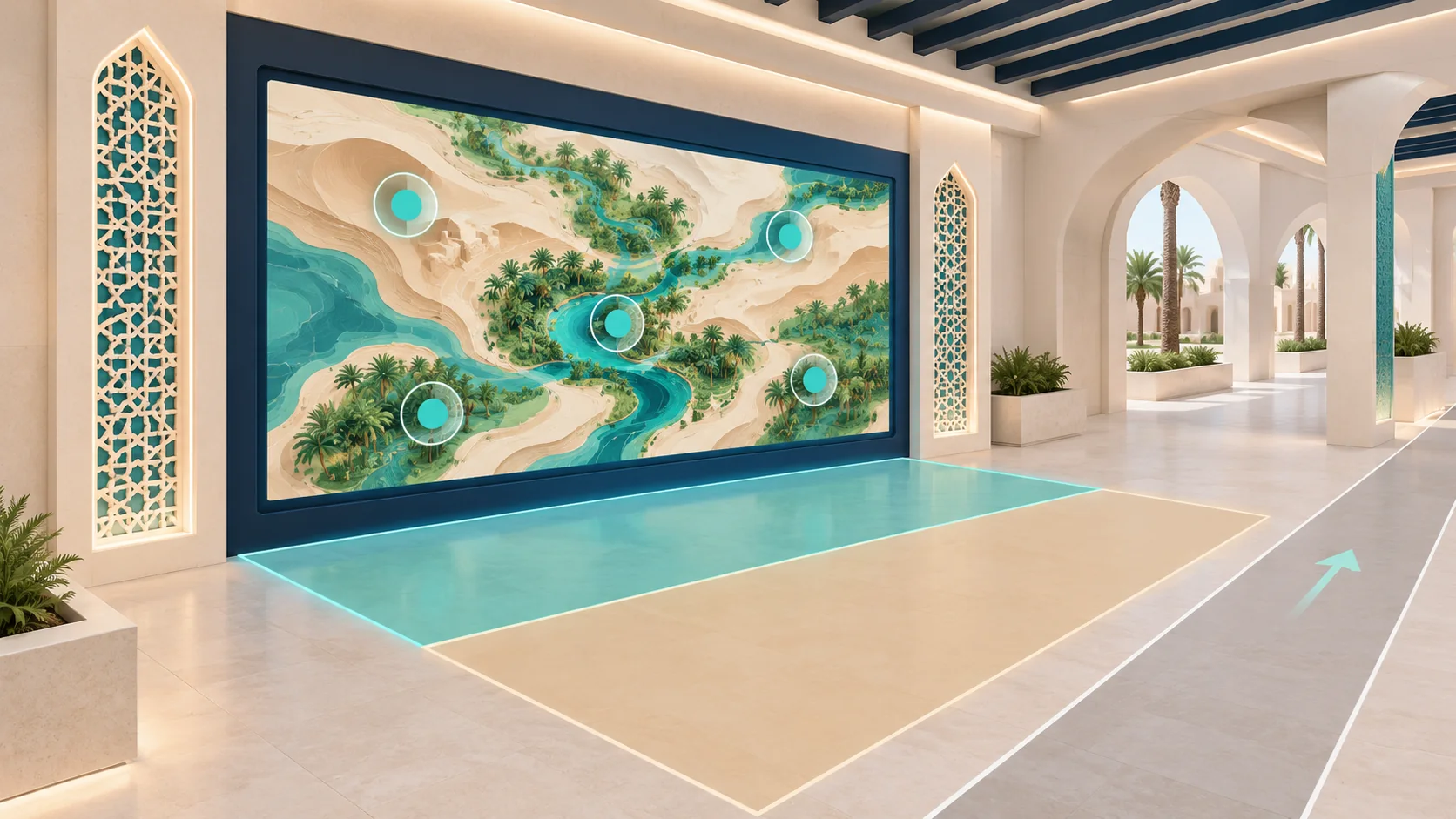
Concept layout showing an interactive wall, active area, spectator space and side aisle
Unscaled concept: turquoise marks the active area, sand marks spectator space, and the side route allows circulation. Final boundaries follow the survey.

Send a plan and recent photographs under operating lighting, showing obstructions, allowed fixings, power, cable routes and access windows. The venue team should approve mounting before installation. Rehearse the proposed visitor flow, including someone waiting and someone passing without taking part.

Specifications and how to approve them

The core function connects a visitor action to a visible response. Equipment, input and content are configuration choices; dimensions, lighting and mounting need a survey and a test. Brightness, touch accuracy, response time and concurrent capacity require identified equipment and verification.

Technical acceptance fields
FieldRecord in the proposalCheck and responsible team
Surface dimensionsUsable wall, image footprint and active areaMeasure obstructions; venue lead approves the plan
Interaction typeVisitor action, model and input boundariesTechnical team tests the expected response
LightingConditions during opening hoursContent team checks reading, glare and shadows
User distanceViewing, control access, waiting and circulationVenue lead witnesses a visitor-flow rehearsal
Mounting and servicesSupports, power, cables and any networkApprove work and responsibilities before delivery

For simultaneous use, agree the participant count, interface layout and acceptance criterion. Capacity reported for a museum installation does not establish capacity for a different setup.

Content, languages and updates

Prototype a complete interaction: starting instructions, visitor action, response and return to the menu. Then agree scenes, languages, images, video and any audio. Test Arabic and English on the actual display, including reading order, numbers and control legibility from the intended positions.

Assign copy review and permissions for images, fonts and footage before production. Agree source-file delivery, licences and update access. Editing text in a template differs from adding new interaction logic. These decisions affect content cost and approval time.

Interactive Wall rental or permanent installation?

Event rental begins with dates, operating days and installation and removal windows. When buying an Interactive Wall for a permanent venue, consider ownership, licences, updates and maintenance as part of the decision. Confirm availability, purchasing options and included work for your specific request.

Compare the same scope
Scope itemTemporary rentalPermanent installation
Venue and durationAccess, rehearsal, event days and removalLong-term location, service access and operating plan
Equipment and contentIdentify equipment, scenes and branding for the hireIdentify ownership, files, licences and editing access
OperationSpecify any operator and attendance hoursSpecify training, documentation and venue operator
Transport and installationCheck inclusion with removal and reinstatementCheck supports, cabling and venue works
SupportAgree intervention during the eventAgree coverage, maintenance, updates and warranty terms

These are comparison points, not automatically included services. Request a price against a written scope, with exclusions and items supplied by the venue.

What changes cost and lead time?

Display area, equipment selection, input system and surface preparation affect the estimate. Content, languages, permissions, transport, assembly, staffing and removal add to the requested scope. A permanent installation also needs decisions about licences, training, documentation and maintenance. Compare quotes against the same equipment, content and responsibilities.

Scheduling depends on the survey, content approval, access and rehearsal. Moving the display or adding a language may require another review of the layout or scenes. Ask for the impact before approving a change. Price, availability, warranty duration and delivery dates belong in the proposal for the selected configuration.

Installation and acceptance rehearsal

After layout approval, review supports, cable paths and services, install the agreed display and controls, and calibrate input for the venue. Agree who witnesses each test and who accepts the result. Record the scenario, room conditions, expected response, observation and required follow-up.

Test a known selection at the center and edges, a passer-by outside the active area, text legibility, shadows and reset for the next visitor. If concurrent use is required, try adjacent sessions before testing the agreed count. Include restart and recovery, plus an offline trial if operation without internet is a requirement. These are proposed checks to adapt to the installation, not results for a tested device.

Daily operation, access and sensing data

The operator needs instructions for startup, content selection, input checks, recalibration and escalation. Agree a recovery procedure for a stalled scene and any fallback content. Identify network-dependent functions and what can run locally rather than assuming every configuration needs a permanent connection.

Check seated and standing access, instructions and an alternative where touch or gesture is unsuitable. The Smithsonian accessible-exhibition guidelines support reviewing controls, routes and accompanying media; confirm venue requirements with the responsible team. Where image sensing is used, distinguish live processing from recording and agree storage and access before enabling them.

Museum examples and local prototypes

The Cleveland Museum of Art documents ArtLens Wall as a multitouch way to explore its collection. The museum also has a newer ArtLens exhibition, so the example illustrates an interaction design without assuming its older technical details remain current. For a Saudi visitor center, prototype adjacent sessions exploring a map and a local story, checking that one visitor’s choice does not change the other’s interface.

Cooper Hewitt’s Immersion Room was a past exhibition for choosing wallcoverings and viewing them through projection. Its visitor guide documents a touch table in the room. A Saudi heritage stand could explore selecting a licensed pattern at a control point for a group to view. Test legibility and return to the menu. These are external examples, not Marafei projects; the Saudi applications are planning proposals.

Prepare a quote request

Send the city, venue, dates, event duration and operating hours, together with wall photographs, dimensions, a plan and expected lighting. Describe the audience, intended action, target concurrent use, languages and available assets. Include access and removal windows and any need for content production or an onsite operator.

Ask the response to identify configuration, included work, exclusions, responsibilities, schedule, acceptance tests and support terms. This gives procurement a scope it can check before committing.

Request a quote for your venue and dates

Installation & operation

Surface, display, sensing, and content

The site determines the suitable technology.

Display surface

A wall reviewed for color, texture, and level.

Display system

Projection or another visual solution for distance and lighting.

Interaction sensors

Touch, motion, or tracking within setup capability.

Computer and control

Runs the interface, content, and user input.

Content experience

Screens, stories, games, and instructions designed for the audience.

Audio and cabling

Optional elements with protected services and maintenance access.

From approach to interface response

Sensing method varies by technology.

Launch content

The operator selects a scenario and checks display and sensing.

Approach the wall

The visitor enters the defined interaction zone.

Touch or move

The user performs the action explained by the interface.

Process the response

The system turns input into navigation, an effect, or a result.

Return to start

Agree and test return-to-start behavior before acceptance, including recovery from a stalled scene.

A clear wall and organized interaction space

Environment and circulation are reviewed before design.

Suitable surface

Color, texture, and level appropriate to the selected display technology.

Light control

Reduce glare or direct light that weakens the interface.

Front clearance

Space for users without blocking circulation or image.

Mounting points

Safe equipment positions with maintenance access.

Power and connectivity

Protected services for display, sensing, and processing.

A permanent interface or temporary activation

The proposal defines technology, content, and services.

Permanent installation

Agree equipment, ownership, licences, content, mounting, update access and training and support scope.

Event rental

Confirm availability for the dates and transport, setup, calibration, operation and removal scope, including venue-supplied items.

Phased content development

Review additional scenes or languages, file rights, cost and retesting before updating.

From content story to working interface

Timing depends on technology and content volume.

Define the scenario

Define audience, visitor action, content, languages and target simultaneous use.

Survey and design

Measure the surface and floor area, assess light and approve equipment positions, mounting and cables.

Develop and install

Approve a scene prototype before production, deliver the agreed scope and calibrate input for the venue.

Test and hand over

Test center, edges, passing traffic, languages, reset and recovery; document results, operating instructions and agreed support.

A clear interface that respects movement and privacy

Requirements follow technology and site.

Understandable guidance

Explain touch or movement without relying on guesswork.

  • Explain touch or movement without relying on guesswork.
Clear front zone

Prevent collisions, obstacles, and cables in the interaction area.

  • Prevent collisions, obstacles, and cables in the interaction area.
Interaction alternatives

Consider people who cannot use the same touch or movement where feasible.

  • Consider people who cannot use the same touch or movement where feasible.
Balanced visual content

Manage flashing, motion, audio, and contrast.

  • Manage flashing, motion, audio, and contrast.
Sensor privacy

Explain imaging or recording and minimize data and permissions.

  • Explain imaging or recording and minimize data and permissions.

Frequently asked questions

Technology follows the site survey.

How does an interactive wall respond to a visitor?

A display presents the content, and a touch or motion system supplies input. The software links the input to an action, such as opening a map label or changing the scene. The agreed scenario defines when a session starts and returns to idle.

When should an interactive wall use touch or motion?

Direct touch can suit specific choices where users can reach the controls. Motion can suit a simple gesture where there is clear space in front of the wall. Test each option with likely visitors and check how reliably the setup responds to deliberate input.

Can an interactive wall be installed on an existing venue wall?

Ask the technical team to survey usable dimensions, colour, texture, flatness, light and approved mounting points. If there are restrictions on fixing into the wall or the surface affects the image, evaluate another surface or mounting arrangement during the survey.

How does an interactive wall differ from a standard LED video wall?

LED describes how an image is displayed. The interactive experience also needs a way to detect input and software that responds. When comparing quotes, check whether each includes only a display or also sensing, interactive content, calibration and acceptance tests.

Can an interactive projection wall work under show-floor lighting?

Check image clarity under the lights used during opening hours. Spotlights, reflections and visitor shadows should be included in the test. The projector position and lens affect image size and shadowing. Approve the configuration from the intended viewing positions.

How much space is needed in front of an interactive wall?

Map the viewing position, active input area and waiting space separately. Include an accessible approach and room for visitors to leave without crossing through the next session. Confirm measurements on the stand or venue plan.

Can two visitors use the same interactive wall at once?

Simultaneous use depends on the input system and software. Agree whether visitors share one activity or run separate sessions. Test adjacent users and the agreed number of participants with the actual content before accepting that capability.

How do you stop an interactive wall from reacting to people walking past?

Use the configured detection boundary or a deliberate start action. During rehearsal, walk along the aisle outside the active zone and repeat the test when a visitor is waiting nearby. Adjust and repeat if the wall starts a session unintentionally.

Can an interactive wall be customised for a brand or exhibition?

The setup can use project-specific scenes, artwork, instructions and interactions within the agreed platform and scope. Review one working sample and confirm the number of scenes, languages, rights and who supplies the assets before approving production.

Can an interactive wall support Arabic and English content?

Include both languages in the content brief. Check Arabic reading order, line breaks, numerals, labels and captions on the actual display. Test the language switch and what the interface displays at the start of the next session.

How can an interactive wall be used from a seated position?

Check the approach, sightlines and reach to each essential control from the intended seated positions. If the gesture or touch action creates a barrier, evaluate an alternative input or a route to the same information. Test the selected design with representative users.

What should an interactive wall rental quote include?

Ask for the setup and event dates, rental period, equipment, content, survey, installation, calibration, operator coverage and removal to be itemised. Confirm responsibilities and availability for the dates and venue shown in the quote.

What should buyers check before purchasing an interactive wall?

Ask which hardware, software licences, source assets and documentation are transferred. Confirm who can update the experience and what training, warranty and support are available for the proposed setup. The purchasing route and terms depend on the commercial offer.

What information is needed to price an interactive wall?

Provide the city, venue, schedule, surface dimensions and photos, lighting, audience, desired input and content scope. Add access windows, languages and staffing requirements where known. If the venue has an approved floor plan, attach the drawing and mark the proposed wall and power location.

Why can interactive wall quotes differ for the same event?

Quotes can cover different image sizes, input systems, content production, licences, transport and staffing. Compare included work, client-supplied items and optional charges line by line, then check whether each quote supports the same commissioning tests and event hours.

How much lead time does an interactive wall need?

Plan around the survey, approval of content and installation, venue access and a rehearsal. If the show opens on a fixed date, ask the proposal to set approval deadlines and a date for the first end-to-end test.

Can an interactive wall run without an internet connection?

Ask which scenes and controls can run locally and which depend on network services. If offline operation is required, test the required scenes and the operator’s restart procedure with the connection unavailable before the installation is accepted.

Do interactive wall sensors record visitors?

This depends on the sensing setup. Ask what input the system uses, whether it processes any images in real time, and whether anything is stored or sent elsewhere. Have the responsible team review access and retention before approving a recording feature.

How is an interactive wall tested before an exhibition opens?

Use the approved content under show lighting. Ask a venue representative to witness a full session, from the first visitor action to reset. Record the position, input, expected response and observed result for each test, and agree who signs off any retests.

How does an operator recover an interactive wall if a scene stops?

Agree who can relaunch the scene or check calibration. Include a documented restart and a fallback display if it is part of the scope. Rehearse recovery with the operator and confirm the support escalation route in the handover.

Who can update interactive wall content after handover?

Ask which text, images or clips venue staff can change within the existing templates. Confirm the access, training and rights needed. New screens or interaction logic may require development beyond ordinary updates, depending on the platform and agreement.

Where should an interactive wall go on an exhibition stand?

Place it where visitors can see how to start, use the control and move on without blocking the aisle. On a plan, mark the display, active zone and queue, then rehearse a session with several people moving around the stand.

Does the Interactive Wall need retesting after equipment is moved?

Review image position, input boundaries and calibration with the technical team after relocation. Test selections, passing traffic and reset before reopening the activity.

Does the Interactive Wall have a fixed price or warranty?

Price depends on configuration, content, venue and duration. Request warranty duration, coverage and exclusions for the proposed equipment; a universal warranty or immediate availability is not assumed.

Can an Interactive Wall operate outdoors?

Outdoor suitability is not assumed. Review equipment and material documentation for the proposed conditions, lighting, mounting, services and protection before approving the site.

How should the Interactive Wall surface be cleaned?

Follow the approved material and equipment instructions. Agree responsibility, shutdown timing and care procedures at handover; confirm that a cleaning product suits the surface before using it.

Sources and references

  1. Throw Distance and Positioning

    Epson

    Accessed:

    Design or external-example reference; not proof of a Marafei model or proposal inclusions.

  2. ArtLens Wall

    Cleveland Museum of Art

    Accessed:

    Design or external-example reference; not proof of a Marafei model or proposal inclusions.

  3. ArtLens Reimagined

    Cleveland Museum of Art

    Accessed:

    Design or external-example reference; not proof of a Marafei model or proposal inclusions.

  4. Immersion Room: previous exhibition

    Cooper Hewitt

    Accessed:

    Design or external-example reference; not proof of a Marafei model or proposal inclusions.

  5. Know Before You Go: visitor guide

    Cooper Hewitt

    Accessed:

    Design or external-example reference; not proof of a Marafei model or proposal inclusions.

  6. Guidelines for Accessible Exhibition Design

    Smithsonian

    Accessed:

    Design or external-example reference; not proof of a Marafei model or proposal inclusions.

Publisher

Marafei

Publisher: Marafei

This product content was prepared, written and reviewed by Marafei’s team of specialists, consultants and technical engineers.

Marafei team

Don’t hesitate to
contact us.

You can book a demo with us by filling out this information, and we will get in touch with you as soon as possible

Business Hours

Sunday–Thursday
8:00 AM–6:00 PM