Skip to content

Immersive Rowing Simulator

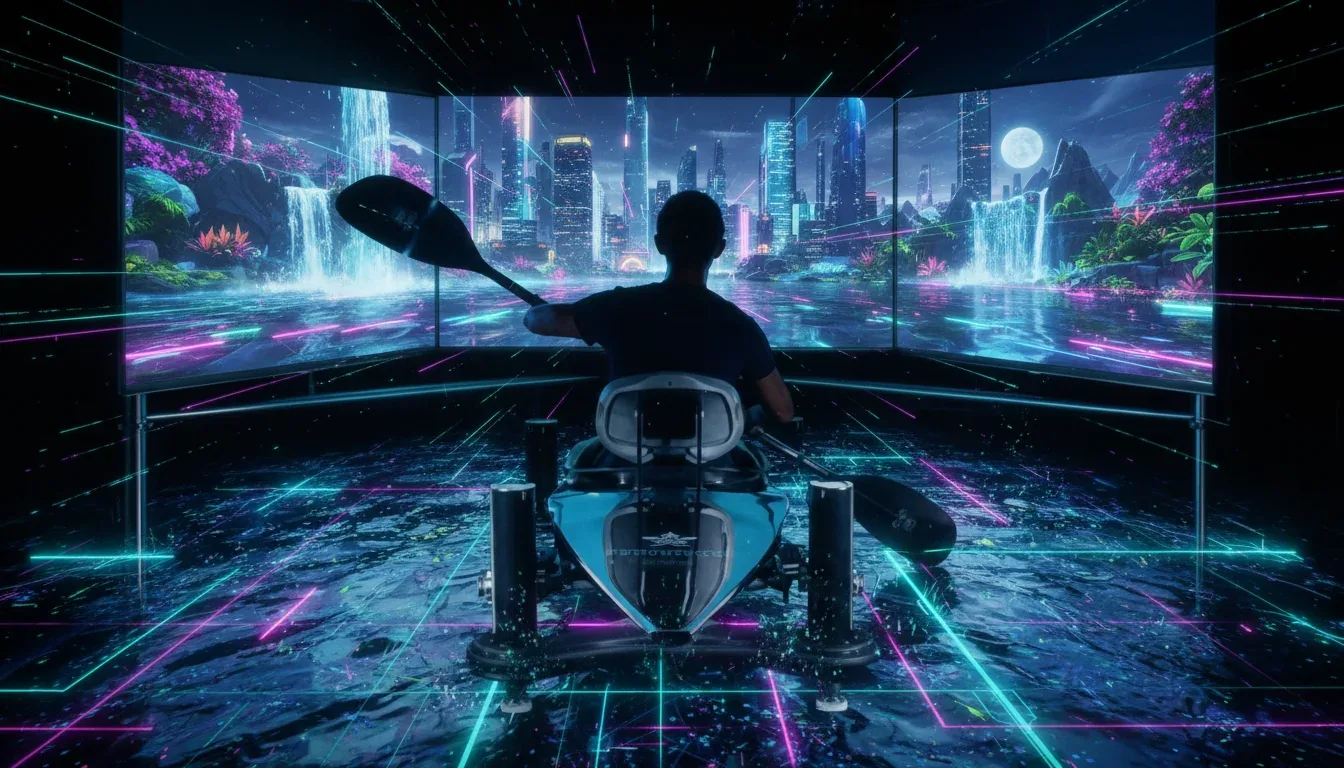
An Immersive Rowing Simulator combines an indoor rower with a water-route display for gyms, resorts and events. Model, movement clearance and integration are agreed for the venue; metrics, scene response and any resistance functions depend on the configuration.

Pricing depends on configuration and project scope

Request a quote
Rowing-machine model
Selected for the project
Movement data
Based on connection capability
Operating area
Measured on site
View all specifications

Product details

Specifications

Details tied to equipment and site

Rowing machine, display and route form the station. Model and platform determine integration functions; space and services require a survey.

Specifications
SpecificationHow it’s determinedConfirmation
Rowing-machine modelSelected for the projectApprove for configuration and site
Movement dataBased on connection capabilityApprove for configuration and site
Operating areaMeasured on siteApprove for configuration and site
DisplayTested for the siteApprove for configuration and site
Power and ventilationConfirmed before installationApprove for configuration and site
Specification approval boundaries

There is no universal fit, resistance, load or clearance; verify values in the exact model manual and integration documents.

  • Rowing-machine model — Record model, dimensions, seat and handle travel, adjustment, resistance, usage limits and care from its manual.
  • Movement data — Name metric sources, measured or calculated values, connection mode and scene response at stop or signal loss; verify force measurement or resistance control separately.
  • Operating area — Map equipment, full movement envelope, side access, display, operator, maintenance and waiting using the manual and survey.
  • Display — Test display position, mounting, sightline, reflections and instructions from rowing positions.
  • Power and ventilation — Match supplies, cables, connectivity, ventilation and sound to component manuals, unit count and venue conditions.

Description

What is an Immersive Rowing Simulator?

An Immersive Rowing Simulator combines an indoor rowing machine with a screen or projection surface showing a visual water route. It suits gyms, resorts and events planning an indoor rowing activity. A compatible connection can use machine data to update route progress; the model and software determine available readings and scene response.

After a briefing and equipment adjustment under its manual, the participant chooses a route and follows the start and finish instructions. This configuration uses a display in front of the user; accessories belong in the technical proposal. Review the five specification fields and quote checklist before approving the station.

Standalone rower, video or connected route?

A standalone machine suits a session based on rowing and its available metrics. Independent water scenery may suffice when the brief is a view in front of the participant. A responsive route needs data, a compatible connection and software, and an acceptance trial. Separate a machine purchase and app subscription from a complete venue installation.

Choose the station function
OptionDisplay behaviourBuyer check
Machine and monitorEquipment displays supported metricsModel, readings and operating manual
Independent videoContent follows its playback timelineRoute rights, legibility and stopping
Connected routeScene progress uses approved inputsData source and start, stop and signal-loss response

Which data moves the route?

Stroke rate counts rowing strokes per minute. Pace may appear as time per 500 metres where that metric is supported; power is expressed in watts. Concept2 PM5 guidance explains these units, and its stroke-rate reference explains the rate measure. More strokes alone do not establish higher power. Ask for each reading’s source, calculation and software use.

EXR compatibility guidance makes connection dependent on the model, performance monitor and connectivity. Bluetooth or FTMS alone does not guarantee every function or accurate readings. Record the machine or sensor, software, display and expected behaviour at start, stop and disconnection. These references do not imply that a Marafei proposal includes that platform or equipment.

Resistance, force and scene response

The equipment manual determines how resistance is set, by whom and when. Request separate evidence if the proposal includes direct handle-force measurement or software resistance commands. A calculated power reading or moving boat does not establish those functions. Have the technician identify and test the supported mode under manufacturer instructions.

Agree on scene behaviour when strokes stop or data is lost, along with the session-end, handle-return and reset procedures. A stopped image should not be assumed to stop equipment parts or change resistance.

Specifications to approve before ordering

The station includes a rowing machine, display and route content. Machine type, integration and metrics are configuration choices; space and services need a survey. Dimensions, usage limits, adjustments and resistance provisions come from the exact model manual, not a similar machine.

Five specification fields and acceptance evidence
FieldRequired evidenceOwner
Rowing-machine modelModel, dimensions, movement, adjustments, resistance and usage limitsSupplier and technician using the manual
Movement dataMetric sources, connection mode, route response and signal lossIntegration team with recorded tests
Operating areaPlan, full movement length, side access, maintenance and waitingVenue team and survey
DisplayMounting, sightlines, reflections and readable instructionsAV team and operator
Power and ventilationComponent supplies, cables, connectivity, airflow and noiseVenue and IT teams

Seat and handle travel and side access

Begin the plan with the complete machine and movement envelope for the model, then add the display, operator and maintenance access and delivery route. Keep waiting, circulation and cables outside the operating area. Check floor stability, ventilation and sound for the planned unit count, and test seated visibility through the movement.

The RowErg manual index illustrates model-specific documentation, not a specified Marafei machine or universal station size. Check seat and handle travel, footrest adjustment and finish procedures against the selected manual. Storage footprint does not define operating clearance.
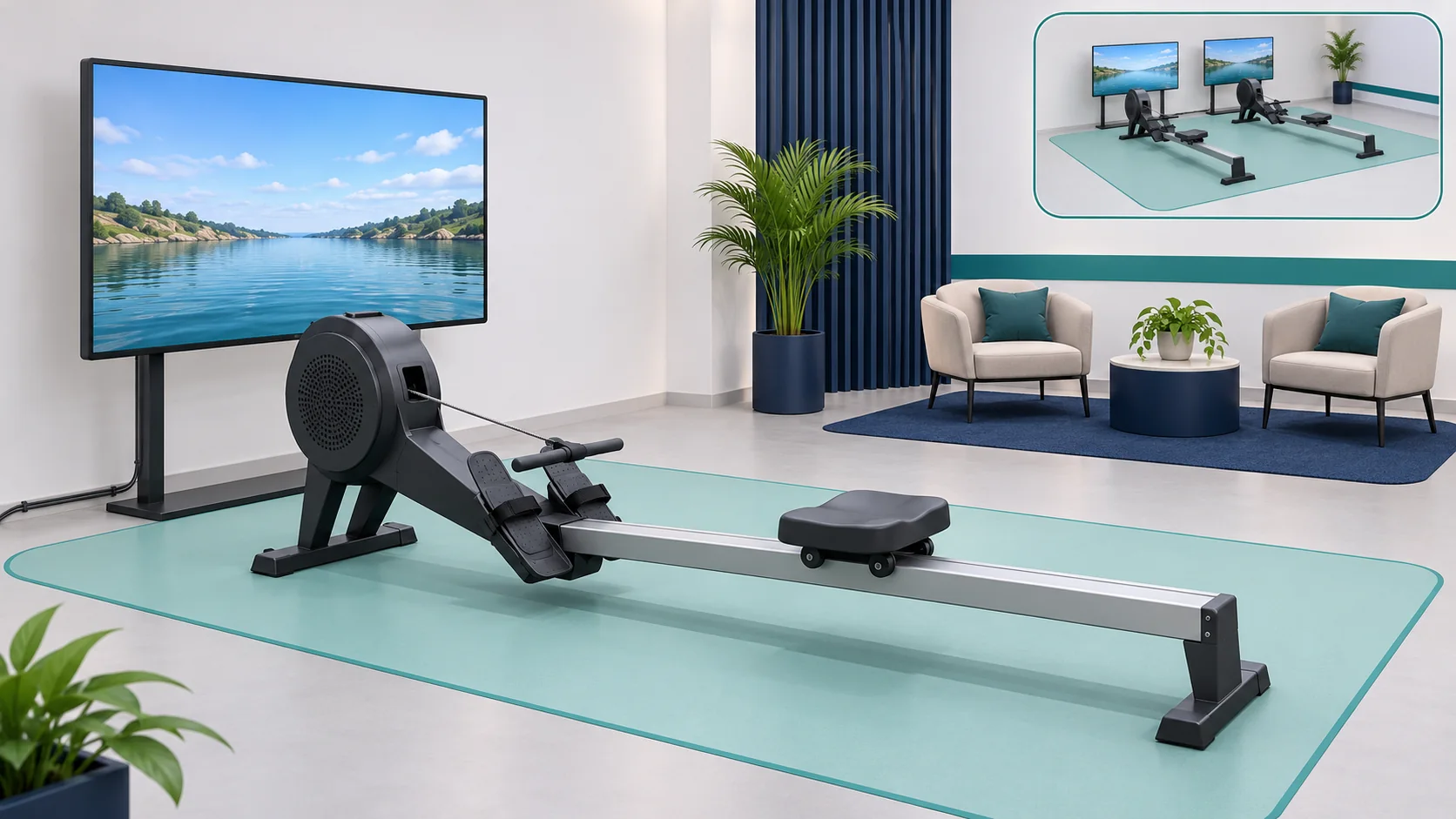
Concept of an indoor rower facing a water-route display with longitudinal space, side access and separate waiting
Unscaled illustration, not an approved model or operating-clearance plan. Check machine and user movement against the manual and site plan.

A session for a gym, resort or event

In a gym, assign equipment checks, route management and shift handover. In a resort, try the start instructions with a first-time participant. At an event, time the full cycle from briefing and adjustment to rowing, dismounting and cleaning. Use the rehearsal to plan stations and supervision rather than assuming a fixed capacity.

The venue defines participants and usage conditions from the model and supervision policy. Explain the moving scene and finish procedure before use, and consider a separate viewing position for non-users. Station appearance does not establish suitability for all ages or fitness levels.

Water routes, language and usage rights

Approve a short scene showing route selection, start, progress and finish before producing the remaining content. Test Arabic and English from seated positions and use cues that do not rely on colour alone. Review scene pace, legibility and stopping, using Smithsonian exhibition accessibility guidance as a general design reference.

Clear rights for water and location footage, maps, audio, fonts and branding, including licence duration. Specify file ownership, editing access, update cost and retesting. River, lake and coastal routes are content options to assess against platform capability and rights, not a guaranteed library in every quote.

Several stations or a shared challenge

First define whether sessions are independent or show participants together. Each machine needs an identifier, pairing and assigned route or on-screen participant. Review network, licences, power, ventilation, operator access and waiting, then verify that each machine affects the intended destination.

For competition, agree start signals, timing, results, reset and disconnection behaviour. Run stations together and test resetting one under the approved rules. A shared race needs separate approval from simply operating adjacent machines.

Temporary rental and permanent supply

Rental and permanent scope
ItemEvent rentalPermanent setup
Period and ownershipDates, days, hours, units and availabilityHardware ownership, licence duration and account access
ServicesDelivery, installation, pairing, rehearsal, staffed hours and removalMounting, training, documentation, maintenance and updates
Venue provisionSpace, utilities and delivery/access arrangements as quotedSite readiness, daily ownership and maintenance access
AcceptancePre-opening test and venue handbackFunction tests and handover of manuals, rights and support duties

For immersive rowing simulator rental, request inclusions and exclusions for the dates. To buy an immersive rowing simulator, review ownership, licences, warranty, parts and support in the configuration-specific proposal. Transport, staffing and removal should be explicitly included or excluded.

Commissioning and operator handover

Record model, software, route, inputs and expected result for each test. The venue witnesses stability, clear seat and handle travel, access and display legibility. Authorised staff demonstrate footrest settings, handle return and the model’s finish procedure; the technician then tests scene response, strokes, stopping, connection loss and recovery.

Test extra functions only where the configuration supports them. Rehearse contact-surface cleaning and next-user preparation, and hand over inspection, support and retest responsibilities. These are proposed acceptance criteria, not test results for an actual unit.

Daily operation, connectivity and session data

Operators follow the opening checklist and approved handle, seat and footrest cleaning instructions. The venue defines when sessions pause, who may restart them and the support route for display or connection faults. Reset the display and check the machine before admitting the next participant.

Identify local content and functions requiring an account, streaming or licence checks. Test session start, finish and restart offline if required. Before enabling accounts, review displayed, retained and shared results, permissions and reset clearing with the data owner.

Documented rowing examples

Concept2 documents a shared virtual course, participant progress, pace and stroke rate in Real Time Loop. A proposed Saudi club setup could use a clear progress display, testing seated legibility and next-user reset. The example does not include that service in a Marafei quote.

World Rowing’s 2026 virtual indoor championship report describes competitors connected from homes and clubs. For a proposed local challenge, test start timing, machine-to-participant assignment and disconnection behaviour. Tournament procedures do not confer competition certification or automatic functions on a Marafei product.

The Saudi Rowing Federation’s 2025 indoor championship announcement includes individual and team races in Riyadh, Jeddah and Qatif. It provides local event context, not evidence of an immersive display at that event. A proposed challenge can rehearse changeover, operator duties and queue placement. These are attributed external examples, not Marafei portfolio projects.

Price, cost, lead time and quote inputs

Immersive rowing simulator price depends on model, unit count, display, integration, route production and venue services. Separate setup from ongoing immersive rowing simulator cost, including applicable licences, maintenance, support, content and staffing. Compare quotes with matching units, functions, duration and inclusions.

Lead time follows the survey, confirmed supply, content and rights approval, access windows and rehearsal. Send city, venue, dates, hours, units and audience, plus photos and a plan of the movement envelope, access and utilities. Specify routes, languages, requested data and staffing, and request acceptance, warranty, support and availability terms for that setup.

For other activities, review the Immersive Cycling Simulator, Immersive Running Simulator and Golf Simulator.

Request a rowing simulator quote for your venue

Installation & operation

Equipment, input, processing, and display

Components follow the objective and site review.

Specified rowing machine

The movement platform selected for audience and operation.

Movement input

A connection or sensor that passes supported data.

Processing and control

A unit managing content, session, and component connections.

Front-facing display

A visual surface placed at an appropriate distance and height.

Water-route content

Licensed or custom scenes within the project scope.

Surrounding setup

Flooring, ventilation, audio, and cable protection for the site.

From route selection to session completion

Scene response depends on the configuration.

Choose an environment

The user or operator selects an available route and level.

Adjust the equipment

Check seat and handle movement, footrests and resistance settings under the model manual before the session.

Begin rowing

Movement starts and the system presents route progress.

Follow the session

The user follows the interface and guidance within venue policy.

Finish and reset

End the session using the approved equipment procedure, then check route state and prepare the station for the next participant.

Longitudinal space and clear circulation

The environment is reviewed before selecting equipment and display.

Dimensions

Full equipment length, side access, and maintenance area.

Floor

A level, stable surface with appropriate movement protection.

Screen visibility

A position that does not obstruct movement or force poor posture.

Ventilation

Airflow and temperature suitable for activity and session volume.

Inspection and cleaning

A between-user routine for seat, handles, and rails.

Permanent installation or temporary scope

The proposal defines equipment, content, and services.

Venue implementation

Agree equipment, ownership, licences, content, mounting, update access and training and support scope.

Event rental

Confirm availability for the dates and transport, setup, calibration, operation and removal scope, including venue-supplied items.

Multiple units

Review independent or shared sessions, pairing, licences, space and services; test each machine-to-route assignment.

From objective to a ready session

Timing is confirmed in the proposal.

Understand use

Define session, audience, units, routes, integration and supervision.

Select the setup

Review model manual, clearances, delivery access, display and services; approve the site plan.

Install and test

Install approved components, document integration and have authorised staff test the route and stopping using manufacturer procedures.

Train and hand over

Hand over checking, supervision, recovery, session clearing and support responsibilities; document results and retests.

Session setup and access

Follow equipment instructions and approved venue policy.

Equipment adjustment

Check seat and handle movement, footrests and resistance settings under the model manual.

  • Check seat and handle movement, footrests and resistance settings under the model manual.
Clear area

Keep obstacles and cables away from the seat and user route.

  • Keep obstacles and cables away from the seat and user route.
Start and finish procedure

Follow approved model instructions for starting, ending and reset.

  • Follow approved model instructions for starting, ending and reset.
Motion sensitivity

Explain moving scenery and allow users to stop when uncomfortable.

  • Explain moving scenery and allow users to stop when uncomfortable.
Data privacy

Define purpose and permissions before user accounts or analytics.

  • Define purpose and permissions before user accounts or analytics.

Frequently asked questions

Capabilities follow the selected model and software.

Does the immersive rowing simulator respond to rowing intensity?

A compatible setup can use data such as pace or power to change the scene. Ask what the machine measures or estimates and see how the selected route responds at start, during rowing and at stop.

What are stroke rate, pace and power on a connected rowing machine?

Stroke rate counts strokes per minute. Pace may be shown as the estimated time for 500 metres. Power is expressed in watts where supported. Ask which values are available and how the software uses them.

Can the rowing simulator change resistance as the route progresses?

Ask how resistance is adjusted on the selected machine and whether the software can control it. Have the supplier identify the supported mode and demonstrate it if included in the proposal.

How does a connected rowing route differ from a scenery video?

A video can play at a fixed rate. A connected route can use rowing-machine data to advance the scene. Specify the behaviour you need and ask to see it in the proposed setup.

Does the immersive rowing simulator need a headset?

The documented product uses a screen or display surface in front of the machine. Confirm the display, installation position and any accessories in the technical proposal.

How can staff introduce an immersive rowing simulator to beginners?

Use the selected machine manual and venue policy to define participation and supervision. Show the adjustment and start and finish procedure before the first session. Keep instructions visible from the station.

How much space does an immersive rowing simulator need?

Plan for the machine, complete travel of the seat and handle, side access, screen, operator and maintenance. Put the waiting area outside the movement zone and check measurements against the selected model.

What should staff check at the seat, footrests and handle?

Follow the model manual to verify their condition and settings and to demonstrate the end-of-session procedure. Keep the operating area clear and show the checks to staff at handover.

Can several rowing simulator stations operate together?

Check space, power, ventilation, connection and staffing for the unit count. Agree independent or shared sessions and test that each machine moves the intended route or participant on the display.

Can the venue use custom water routes or its branding?

Review what the proposed platform can customise, including the route, instructions and visual identity. Approve a sample and agree rights, language and responsibility for later updates.

What should an immersive rowing simulator rental quote include?

Ask for dates, machines, display, route content, delivery, setup, connection checks, staff coverage and removal. Confirm venue-provided items and when the area must be handed back.

What should a venue check before buying an immersive rowing simulator?

Request model and screen details, supported inputs, ownership, licence terms and training. Check warranty, maintenance, spare parts and support against the installation and handover scope.

What affects the cost of operating an immersive rowing simulator?

Ask which licences, staff time, servicing and content updates recur after installation. Clarify who checks the machines and who restores the software when a route fails.

Why does the price of an immersive rowing simulator vary between quotes?

Compare machine and display, integration, unit count, route production and venue work. Check whether transport, setup, supervision and removal are included in each quote.

What information does a supplier need to quote for an immersive rowing simulator?

Provide city, venue, dates, hours, unit count, audience and a dimensioned plan. Add delivery access, power, route and language requirements, desired data and staffing.

Can the immersive rowing simulator operate without internet access?

Confirm which routes run locally and which depend on accounts, licences, streaming or shared play. Test a complete session and restart offline if this is a requirement.

What happens if the rowing simulator loses data from the machine?

Agree what the scene displays when it stops receiving data and what the operator should do under the machine procedure. Test signal loss, recovery and reset during commissioning.

How is a rowing simulator tested before opening to guests?

Check stability, seat and handle travel, side access and screen visibility. Have the technician demonstrate route response and the operator show adjustment, the session end and reset. Record any issues and who will check them again.

How should staff prepare a rowing simulator for the next participant?

End the session as instructed, inspect the contact points and clean the handle, seat and footrests under the approved procedure. Restore the display to the start screen before the next participant arrives.

Can a rowing simulator store a participant's results?

Confirm what the device or software displays, keeps or shares. Set staff permissions and the expected reset behaviour with the venue's data owner before enabling accounts or results tracking.

How can an event producer plan queues for a rowing simulator?

Time briefing, adjustments, rowing, dismounting and cleaning in a rehearsal. Use that full cycle and the available waiting area to plan the number of stations and supervision.

What power and ventilation does a rowing simulator need?

Check model requirements for the machine, display and controller against venue power and cabling. Assess ventilation and sound with the planned number of machines operating.

Does the Immersive Rowing Simulator have a fixed warranty or delivery time?

Request warranty duration, coverage, exclusions and delivery dates for the specified configuration; a universal warranty or immediate availability is not assumed.

Can Immersive Rowing Simulator routes be updated after handover?

Review update access, licences, source files and platform capabilities. Agree cost and testing before releasing a new route.

Can rowing simulator results be compared across different machines?

Review metric sources, calculations, equipment modes and platform rules before comparing results. Different machines do not necessarily produce equivalent readings simply because the units match.

Can the Immersive Rowing Simulator be relocated without review?

Review transport, mounting, clearances and services against the model manual; recheck display, integration and stopping with the approved procedure before admitting visitors.

Sources and references

  1. PM5 101

    Concept2

    Accessed:

    Design or external-example reference; not proof of a Marafei model or proposal inclusions.

  2. Rowing stroke rate explained

    Concept2

    Accessed:

    Design or external-example reference; not proof of a Marafei model or proposal inclusions.

  3. Compatible rowing machines

    EXR

    Accessed:

    Design or external-example reference; not proof of a Marafei model or proposal inclusions.

  4. RowErg manuals and schematics

    Concept2

    Accessed:

    Design or external-example reference; not proof of a Marafei model or proposal inclusions.

  5. ErgData Real Time Loop

    Concept2

    Accessed:

    Design or external-example reference; not proof of a Marafei model or proposal inclusions.

  6. 2026 virtual indoor championship report

    World Rowing

    Accessed:

    Design or external-example reference; not proof of a Marafei model or proposal inclusions.

  7. 2025 indoor rowing championship announcement

    Saudi Rowing Federation

    Accessed:

    Design or external-example reference; not proof of a Marafei model or proposal inclusions.

  8. Accessible Exhibition Design

    Smithsonian

    Accessed:

    Design or external-example reference; not proof of a Marafei model or proposal inclusions.

Publisher

Marafei

Publisher: Marafei

This product content was prepared, written and reviewed by Marafei’s team of specialists, consultants and technical engineers.

Marafei team

Don’t hesitate to
contact us.

You can book a demo with us by filling out this information, and we will get in touch with you as soon as possible

Business Hours

Sunday–Thursday
8:00 AM–6:00 PM