Skip to content

Interactive Book

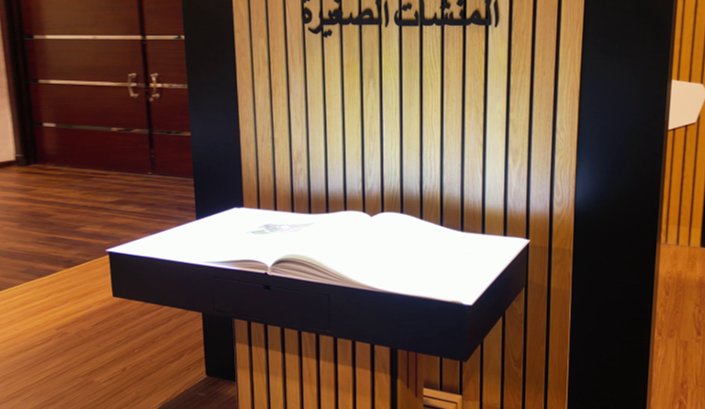
An Interactive Book is a physical book-shaped exhibit that connects page turns, touch or gestures with digital content, depending on configuration. It suits museums, visitor centers and exhibitions presenting a story in stages, with size, controls, languages and operation agreed for the venue.

Pricing depends on configuration and project scope

Request a quote
Book size
By design, audience and venue
Page count
Defined by the story map
Interaction method
Page turn, touch or gesture by configuration
View all specifications

Product details

Specifications

Specifications agreed for story and venue

The core concept is a book-shaped exhibit linking input to content. Equipment, pages and size vary by configuration; lighting, access and audio are reviewed at the venue.

Specifications
SpecificationHow it’s determinedConfirmation
Book sizeBy design, audience and venueSurvey and reach trial
Page countDefined by the story mapContent approval
Interaction methodPage turn, touch or gesture by configurationModel and prototype trial
Lighting and displayDepends on model and room conditionsOn-site test
AudioDepends on content and venue noiseScope and listening trial
What specification approval needs

Approve values after equipment selection, content definition and survey; there is no universal size, sensing accuracy or page count.

  • Book size — Separate book dimensions, stand footprint, approach, queue and delivery access.
  • Page count — Count physical leaves, digital scenes and language versions separately.
  • Interaction method — Document equipment and controls; test forward, back, repeated input and any alternative.
  • Lighting and display — Check position, shadows, glare and legibility from reading positions.
  • Audio — Specify any requested audio equipment; test narration and the written alternative when muted.

Description

How does a visitor use the Interactive Book?

An Interactive Book is a physical exhibition display shaped like a book. A page turn, touch or gesture opens the associated text, image or media clip. It suits museums, visitor centers and exhibition stands with a story that visitors can explore in stages. Controls and media depend on the selected configuration and are tested at the venue.

The opening page explains the controls. A sensor or control sends the action to the software, which displays the assigned content and provides a way back or a return to the start. Agree the idle state and how the next visitor begins, whether through operator action or a reset supported by the program.
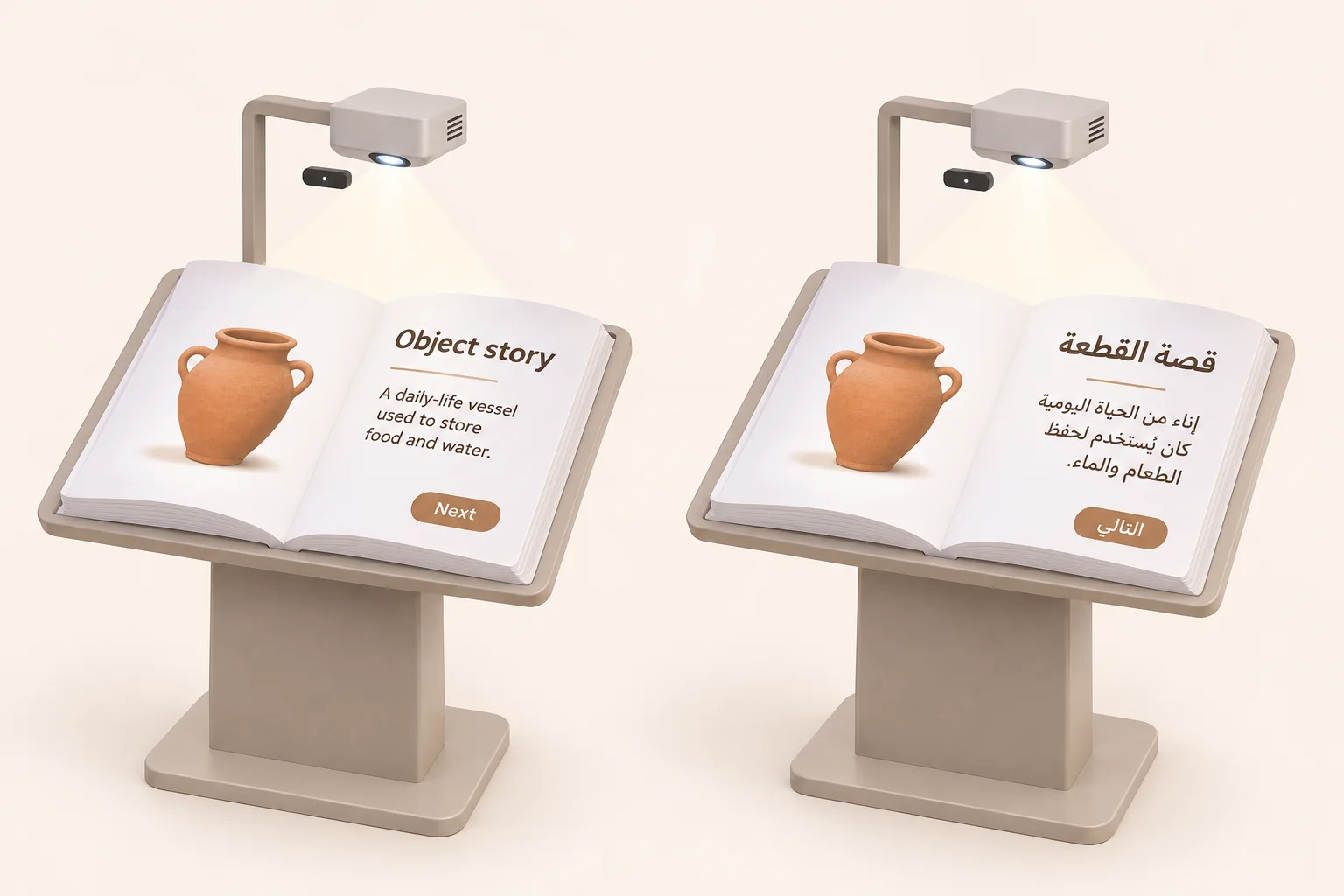
Example of the same object story on Arabic and English interactive book displays, with overhead projection and sensing
Example layouts for the same story page in Arabic and English.

When does the book format suit the story?

A museum visitor could start with an object image and reveal its use or context. An exhibition visitor could explore project stages without waiting for a full video to restart. In a teacher-led activity, participants could select a story step and discuss what appears. These are proposed uses to test with the intended audience.

A conventional screen or panel may be sufficient for directions or a quick list. Choose the book format when turning or uncovering a page has a role in the narrative. For a separate writing and media commission, see Interactive Book content development.

Equipment and quotation scope

The core concept connects visitor input to digital content in a book-shaped installation. Construction, equipment, sensing and page count are project choices. Request the actual equipment list, model documentation and service scope before accepting a proposal.

Configuration items to approve
ItemPurposeWhat to specify
Book and standDisplay surface and visitor approachSize, materials, height, movable leaves or a fixed surface
DisplayShows text, images and mediaProjection or another display method, with model, mounting and venue visibility
Sensing and controlsMaps input to the intended pagePhysical turn, touch or gesture, sensing area and an alternative control if needed
Computer, software and soundRuns content and navigation statesCompatibility, licensing, connectivity and any requested audio equipment
Content and site servicesPrepares the narrative and operating setupPages, languages and media, plus transport, installation, training and support scope

Choosing page turning, touch or gesture

Physical turning needs pages and a sensing method that recognizes their position. Touch needs a clearly identified control area within reach. Gesture control needs an agreed movement and a sensing area suited to the room. These are configuration choices; approve the method after a prototype trial.

Test forward, back, repeated movements and another person passing near the sensor. Record extra turns or missed responses, including what happens when a visitor holds a hand above the surface. Request an alternative when the main movement is difficult, such as a clear button if the system supports it, or operator assistance.

Size, circulation, lighting and sound

Separate the book dimensions from the stand footprint and from approach and queue space. Check reading height and reach from seated and standing positions as appropriate, including companions and equipment service access. Review the delivery route, doors, power and mounting clearance before choosing a size.

Test a spread containing text and an image under normal venue lighting from the intended reading positions. Look for glare, hand shadows and unreadable detail. If narration is included, test it against room noise and nearby exhibits. There is no universal height, brightness or sound level for every installation.

The Smithsonian accessible exhibition design guidelines address clear instructions, usable controls and alternatives to audio. Use them as a design reference while the venue specialist reviews applicable local requirements.

Story planning and the test spread

Start with a question visitors can follow and give each page a purpose: identify an object, reveal an image or compare stages. Match text and clip length to the available reading time, with optional detail where the design supports it. Count physical leaves, digital scenes and language versions separately.

Approve a complete sample spread before producing the rest. An object story might show an approved image and explanation, with narration and written text where included. Its page record should name the visitor action, expected result, language, media asset and permission, return path and acceptance check.

Arabic, English and media permissions

Approve reading direction, layout and navigation for each language. Check Arabic shaping, numerals and foreign names within Arabic text. The W3C Arabic and Persian layout reference explains text direction and mixed content. It is a draft reference, not confirmation that a particular exhibit program supports Arabic.

Decide whether changing language retains the current story step or returns to the opening page. Test that rule alongside forward, back and reset. Review copy, captions and narration within the agreed scope, including whether essential content remains understandable with sound muted.

Supply the page map, approved copy, identity assets, original images, video, audio and available translations. Record each rightsholder, approver and permission for display, adaptation, translation and reuse. The Saudi Authority for Intellectual Property guide describes these rights. Having a file does not by itself establish permission for its intended use.

Interactive Book rental or permanent acquisition?

Interactive Book rental is planned around event dates, operating time, access and removal. If you plan to buy an interactive book for a permanent venue, also consider file ownership, updates, training and maintenance. The proposal confirms the available configuration and its inclusions.

Responsibilities to agree for each option
ItemTemporary rentalPermanent installation
VenueTransport, access window, assembly, calibration and removalFinal mounting, power and service access
ContentLoading existing assets or a separate event-story production scopeApproved narrative, languages, operating files and update rights
OperationHours, staffing, visitor flow and resetStaff training, opening, shutdown and surface-care instructions
SupportFault reporting and responsibility during the eventMaintenance, support and written warranty terms for the configuration

Specify what the supplier provides and what the venue prepares. A new story, operator or transport is not automatically included in rental, and purchase does not establish unlimited updates.

Price, production time and ongoing costs

The quote depends on unit count, construction, display and sensing method. Content adds its own scope: pages, scenes, languages, writing, illustrations, clips, narration, permissions and approval rounds. Ask for these items to be separated from transport, installation, operating hours and support.

Compare proposals for the same story, duration and deliverables. For a permanent installation, review maintenance, replacement parts, content changes and license renewals where applicable. Agree asset delivery and sample approval milestones before confirming the production schedule. Later changes may require a revised scope and date. Ask the interactive book company to state price, availability, warranty and delivery terms for the proposed configuration.

Operation and witnessed acceptance

Before opening, the operator checks the installation, visitor route and surface care according to the material instructions, then starts the opening page and tests controls, language and media. Between visitors, confirm the agreed starting state. At closing, follow the shutdown, file-handling and fault-recording instructions.

Acceptance record for the actual configuration
CheckActionWhat to record
Pages and mediaMove forward and back, then repeat an inputCorrect content, extra turns and missed responses
LanguageChange between Arabic and English at the same stepText, direction and the story state displayed
Reading and soundTry visitor positions, room lighting and muted audioLegibility, essential meaning and the agreed alternative
Next visitor and recoveryPerform reset and the documented recovery procedureCorrect starting state and the operator's ability to restore it

Request the operating copy, delivered file and license list, care and recovery instructions and support contact. Test connectivity requirements and loss of connection for the actual program, and review any sensor recording before approving settings. Retest outstanding issues before closing acceptance.

What do museum examples demonstrate?

ZKM describes Masaki Fujihata's Beyond Pages as a virtual book projected onto a desk, with pages controlled by a stylus and visual and sound responses. For a Saudi reading space, it suggests testing seated control access and whether the narrative works with audio both on and muted.

In Drei Phasen der Digitalisierung, the museum describes a camera reading a physical book and relating its pages to digital content in a projection viewed through a polarizing filter. For a Saudi archive display, the useful acceptance check is whether forward and backward turns match the physical page to the intended content. These are external museum works; their equipment and mechanisms are not automatic specifications of the product offered.

Prepare an Interactive Book quote request

Send the city, dates, duration and audience, unit count, venue plan, lighting, noise and delivery route. Add the story subject, approximate page count, languages and available assets, preferred controls and any need for media production or onsite staffing.

Identify who approves copy and permissions, and when the sample spread can be reviewed. Share your venue and story to request an Interactive Book quote.

Installation & operation

Book, display, sensing, and digital story

Details follow content and site approval.

Book structure

A fixed book-shaped surface or movable leaves; size, materials and controls are agreed in the proposal.

Display system

Projection or another visual solution mapped to the pages.

Page and interaction sensing

Sensors identify page or gesture within setup capability.

Computer and control

Manages story, media, and response.

Digital content

Specify text, images, video, audio, languages and permissions within the content scope.

Base and surrounding setup

Support, access, cabling, light, and audio for the venue.

A story that progresses with the page

Sensing method varies by design.

Start the story

The operator launches the scenario and the opening page appears.

Turn the page

The visitor uses the agreed page turn, touch or gesture control.

Sense the state

The system identifies the page or available action.

Present the content

Matching media and interaction points appear.

Finish and reset

Agree return-to-start behavior, language state and reading time; the operator tests these at handover.

Space for reading and interaction

Visibility, access, and light are reviewed before implementation.

Stable base

A fixed position that supports page turning without movement.

Access clearance

Space for a user, companion, or small group without crowding.

Light control

Reduce shadows and glare across the pages.

Equipment position

Keep display and sensing away from touch with safe maintenance.

Audio and flow

Avoid conflict between narration, venue noise, and queue movement.

A permanent object or event story

Development time follows content and technology.

Permanent implementation

Agree construction, equipment, content, installation, operating files and training and support boundaries.

Temporary rental

Confirm availability and the scope of transport, assembly, calibration, content, staffing and removal.

Later content development

Review the feasibility of adding a story or language, file rights, cost and testing before an update.

From story idea to a working book

Timing follows writing, media, and technology.

Define the story

Audience, objective, messages, language, and experience duration.

Design the pages

Plan the book, interaction, media, and user sequence.

Develop and install

Produce content and prepare the structure, display, and sensing.

Test and hand over

Test page and media matching, languages, legibility, reset and recovery; hand over operating instructions and the agreed support scope.

Accessible and clear reading and interaction

Requirements follow audience and site.

Simple guidance

Explain turning, touch, and gestures without assuming technical experience.

  • Explain turning, touch, and gestures without assuming technical experience.
Page access

Consider height, distance, and users who cannot stand for long.

  • Consider height, distance, and users who cannot stand for long.
Clear text and audio

Use readable contrast and audio or text alternatives where available.

  • Use readable contrast and audio or text alternatives where available.
Balanced visual motion

Avoid disruptive flashing and allow enough reading time.

  • Avoid disruptive flashing and allow enough reading time.
Cleaning and privacy

Follow material instructions for surface care; review sensor data and any capture or recording before approving settings.

  • Follow material instructions for surface care; review sensor data and any capture or recording before approving settings.

Frequently asked questions

Details follow story and site approval.

Can I rent an Interactive Book for an exhibition?

Send the venue, dates and story outline. Ask which available setup includes transport, installation, content loading, an operator and removal.

What should I check before buying an Interactive Book?

Approve the display, control method, content rights, site conditions, training and support. Request a test spread and a handover checklist before committing.

What should I ask an Interactive Book supplier?

Ask for a demonstration of the proposed controls, a scope that names the equipment and content work, the operating instructions and the arrangements for faults or updates.

How does the Interactive Book know which page to show?

The configured sensor or control tells the software which action occurred. Match each action to its approved text or media and verify it during the prototype trial.

Does an Interactive Book exhibit need physical pages?

The proposed design may have movable leaves or a fixed book-shaped surface with projected page changes. Decide which best fits the story, audience and maintenance plan.

When is a touchscreen a better option than an Interactive Book?

A screen can suit fast lookups or long lists. A book format suits sequential stories where revealing a page or object is part of the experience.

Can the Interactive Book include video and audio?

Confirm supported media, length and rights. Test intelligibility in the venue and include captions or a written option for essential content where specified.

How many pages should the Interactive Book have?

Base the count on story steps and time available. List physical pages, digital states and language versions separately when requesting a quote.

Can an Interactive Book display Arabic and English?

Scope both versions and verify supported fonts, Arabic text direction, captions and navigation. Agree how visitors change language and whether they remain at the current story step.

What is needed for a bilingual Interactive Book prototype?

Provide approved Arabic and English text, the page map, artwork, media and captions, plus any layout or typography requirements. Identify the approver and rights for each asset.

Can archive photographs or museum footage be used in an Interactive Book?

Confirm who controls each asset and obtain permission for the intended display, adaptation and reuse. Record attribution and any expiry before using it.

How do we choose the venue and height for an Interactive Book?

Check clear approaches, display height, room light and queue space with representative visitors. Include seated reach and companion space where the audience needs them.

Will the Interactive Book be readable in a bright exhibition hall?

Test an approved spread under the actual room lighting. Look for glare, hand shadows and small text from the intended reading positions before approving the setup.

What if a visitor cannot perform the Interactive Book gesture?

Ask whether the configuration can provide a reachable, clearly labeled alternative control or operator assistance. Test it alongside the main interaction.

How do you test for unintended Interactive Book page changes?

Agree which gesture or touch counts as a turn and test repeated input, a hand hovering over the pages and people passing nearby. Record missed or extra turns.

What changes between Interactive Book rental and permanent installation?

Event hire is scoped around dates, transport, setup, operation and removal. A permanent exhibit also needs ownership of updates, staff training and maintenance.

What drives Interactive Book price and production time?

Size, controls, content, languages, media rights, review rounds, venue access and support all affect the proposal. Ask which milestones depend on your approvals.

Does the Interactive Book need an internet connection?

Confirm the software, media location and license terms. Test the intended onsite setup and document any workflow that needs connectivity.

How should the Interactive Book reset between visitors?

Agree the idle or reset behavior and reading time. Have the operator demonstrate that the next visitor sees the approved opening page and language state.

What should we test at Interactive Book handover?

Witness forward and back, the correct media and language, readable text, optional audio or captioning, and the idle or restart procedure. Log any defect and retest.

Can we add an Interactive Book story or language after installation?

Confirm who holds the files and licenses, how edits are approved and installed, and which testing and support are included in an update.

What should an Interactive Book quote request include?

Send the city, dates, venue conditions, audience, unit count, story outline, languages and available files. Note whether you need onsite staffing or media production.

Does the Interactive Book have a fixed warranty or delivery time?

Request warranty duration, coverage, exclusions and delivery dates for the specific configuration. A universal warranty or immediate availability is not assumed.

Does the Interactive Book sensor record visitors?

This depends on the equipment and software settings. Request a statement of processed data and any recording or storage, and agree access permissions before operation.

How should the Interactive Book surface be cleaned?

Follow the approved material and equipment care instructions. Assign responsibility, cleaning method and shutdown timing; confirm a cleaning product is suitable before applying it.

Can the Interactive Book be installed outdoors?

Outdoor suitability is not assumed. Request evidence for the equipment and materials at the proposed site, and assess lighting, mounting and operating conditions before approval.

Sources and references

  1. Smithsonian Guidelines for Accessible Exhibition Design

    Smithsonian

    Accessed:

    Design, rights or external-example reference; not evidence of a model specification or Marafei proposal inclusions.

  2. Arabic & Persian Layout Requirements: Group Draft Note

    W3C

    Published/updated:

    Accessed:

    Design, rights or external-example reference; not evidence of a model specification or Marafei proposal inclusions.

  3. دليل حقوق المؤلف / Copyright guide

    Saudi Authority for Intellectual Property

    Accessed:

    Design, rights or external-example reference; not evidence of a model specification or Marafei proposal inclusions.

  4. Beyond Pages: Masaki Fujihata

    ZKM

    Accessed:

    Design, rights or external-example reference; not evidence of a model specification or Marafei proposal inclusions.

  5. Drei Phasen der Digitalisierung

    ZKM

    Accessed:

    Design, rights or external-example reference; not evidence of a model specification or Marafei proposal inclusions.

Publisher

Marafei

Publisher: Marafei

This product content was prepared, written and reviewed by Marafei’s team of specialists, consultants and technical engineers.

Marafei team

Don’t hesitate to
contact us.

You can book a demo with us by filling out this information, and we will get in touch with you as soon as possible

Business Hours

Sunday–Thursday
8:00 AM–6:00 PM