Skip to content

Interactive Floor

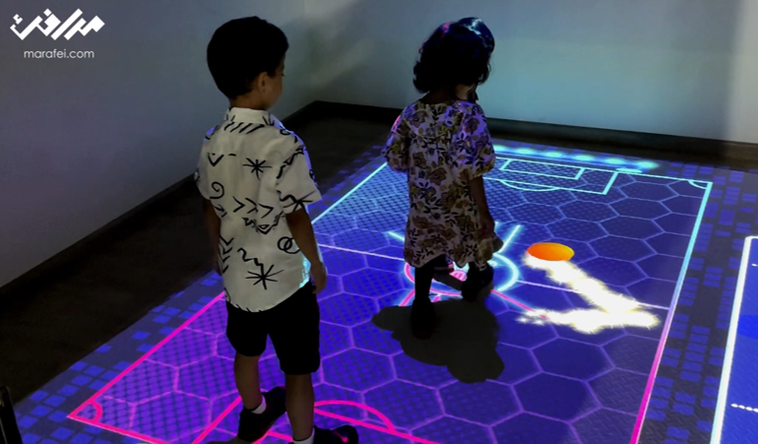
An Interactive Floor uses projection and motion sensing to change a scene or game as visitors move. It suits exhibitions, visitor centers and learning activities, with image and sensing areas, mounting clearance, lighting and surface agreed for the venue.

Pricing depends on configuration and project scope

Request a quote
Coverage area
Measured on site
Projection height
Defined for the site
Ambient light
Tested
View all specifications

Product details

Specifications

Details confirmed during the site survey

The product connects visitor movement to the scene. Equipment varies by configuration; coverage, mounting height, light, sensing and surface require a survey and testing.

Specifications
SpecificationHow it’s determinedConfirmation
Coverage areaMeasured on siteApprove for configuration and site
Projection heightDefined for the siteApprove for configuration and site
Ambient lightTestedApprove for configuration and site
Sensing capabilityBased on sensorsApprove for configuration and site
Floor surfaceReviewed before deliveryApprove for configuration and site
Specification approval boundaries

There is no universal size, brightness, sensing accuracy or concurrent capacity; document values for the selected model and setup.

  • Coverage area — Record image and active areas, entry, waiting and circulation; the venue approves the plan.
  • Projection height — Measure fixing clearance above the finished floor including beams and lights; check lens, distance and service access.
  • Ambient light — Test contrast, reflection, shadows and activity boundaries under operating light from the entrance.
  • Sensing capability — Check center, edges and passers-by outside the zone; test required concurrent use for the setup.
  • Floor surface — Review material, color, level, stability, transitions and cleaning with the venue before delivery.

Description

How does an Interactive Floor work?

An Interactive Floor uses projection and motion sensing to change an image, game or story as a visitor moves within a defined area. It suits exhibitions, visitor centers and learning activities where movement is part of participation. The operator selects a scene; software connects detected movement to a visual response and resets according to the agreed settings.

For example, stepping onto a place on a map reveals its story. Define that action and response before selecting equipment. A visual floor display may suffice if no visitor input is required. Start with the five specification fields and venue suitability.

Choose an activity that fits the audience

At an exhibition booth, consider a short game that visitors understand at the entrance and that allows time for the group to leave. A visitor center could trial a map with selectable stops. For a learning activity, start with a slow step revealing a pattern or stage, and observe whether participants understand the response without repeated explanation. Supervision depends on age, movement and agreed capacity; running or jumping needs specific venue approval.

Consider an Interactive Wall for a vertical interface, or an Interactive Sandbox for shaping a physical material. For commissioning and integrating a complete experience, see the Interactive Floors service.

Projection and LED floor tiles

This floor displays content through projection. LED floor tiles are a purchasing comparison; confirm any alternative within the specific Marafei proposal. A moving floor image alone does not establish response to footsteps. Request a demonstration of a defined action and its result.

Compare display arrangements
ItemProjected floorLED tile comparison
ImageProjector position, lens and surfaceFloor modules and assembly
VenueMounting clearance, light and shadowsStructure, transitions and cables
InputSensor zone aligned with the imageActual sensing and model capability
EvidenceProjector and lens documentation plus site testModel documents for loading, surface and sensing

Epson’s guide relates projector position and image size to room configuration. ROE Visual’s Black Marble documentation describes a particular LED floor system. Its values or certifications do not transfer to the proposed floor here.

Usable space and mounting clearance

Separate image dimensions from sensing boundaries, then plan entry, exit, waiting and circulation. Some image elements may be decorative, while every selectable element should respond at its expected position. There is no universal size for all models, lenses and venues.
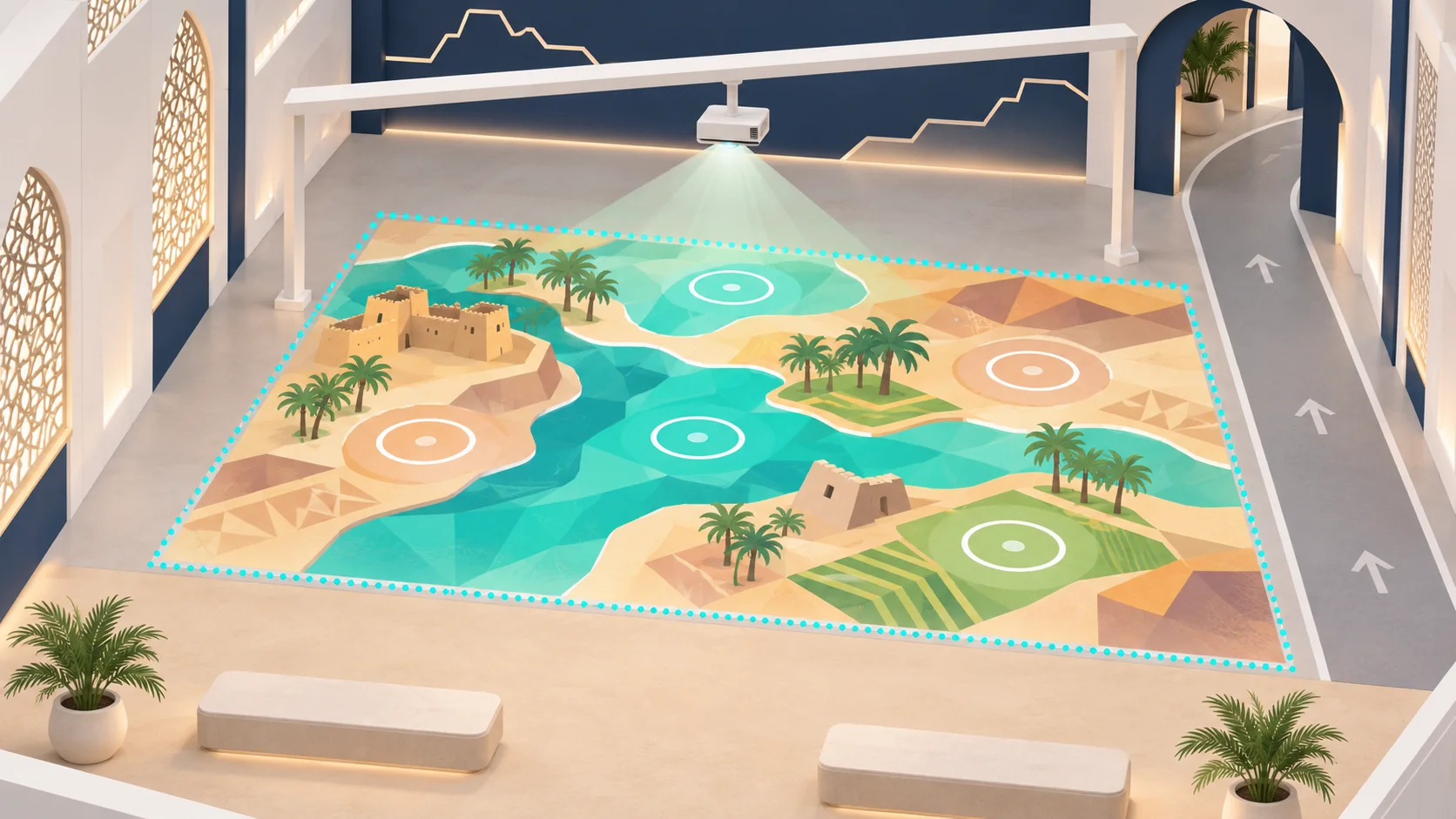
Concept of floor projection with activity boundaries, waiting space and a side route
Unscaled illustration. Mark the image and sensing boundaries separately on the venue plan; the drawing establishes no mounting height or capacity.

Measure the permitted fixing point above the finished floor, not just ceiling height. Show beams, lights, obstructions, service access, power and cables on the plan. The technical team compares available distance with the lens and image size; the venue approves mounting before installation.

Specifications to agree in the proposal

The product connects movement to a scene. Equipment and content are configuration choices; area, mounting height, lighting and surface need a survey. Document sensing accuracy, brightness, response time and capacity only for identified equipment under known test conditions.

Five fields and their verification
FieldRecordOwner and check
Coverage areaImage, active zone and waiting spaceTechnical and venue teams: measurement and rehearsal
Projection heightFixing point, obstructions and distanceAV team: lens documentation and image trial
Ambient lightOperating light, reflections and shadowsContent team: legibility from entry
Sensing capabilityInput bounds and concurrent participationTechnical team: center, edges and passing traffic
Floor surfaceMaterial, level, stability and transitionsVenue lead: surface and edge inspection

Surface, access and visitor flow

Review floor color, texture, reflection and stability. If an added covering is required, the venue approves its material, fixing, transitions and cleaning method. Keep cables and obstructions out of movement routes. HSE’s slips and trips guidance supports checking floors and walkways; it is not a safety certificate for this setup.

Trial entry and participation from a seated position or with a mobility aid, and agree an alternative where the action is unsuitable. Consider the Smithsonian accessibility guidelines alongside venue requirements. For busy periods, keep queues clear of the through-route and assign admission control; HSE crowd-risk guidance is a planning reference for that review.

Content, language and session reset

Start with a complete scene covering entry, movement, response and ending. Test Arabic and English instructions from the entrance, activity selection and the idle interval that triggers reset. Time group entry, participation, exit and reset; use the rehearsal to plan turns.

Agree scene count, languages, images, fonts, audio and permissions before production. Specify editing access, source files and licences. Test whether progress is understandable with audio muted, and review fast or flashing effects and a calmer display option for the intended audience.

Interactive Floor rental or permanent installation

Temporary rental starts with event dates, use duration and setup and removal windows. When buying an Interactive Floor, include ownership, licences and maintenance in the comparison. Confirm availability, supply options and price inclusions for the specific request.

Commercial scope checklist
ItemTemporary eventPermanent venue
EquipmentHardware, survey and calibration for the hireEquipment, mounting and ownership
ContentRequired scenes, branding and languagesFiles, licences and update access
OperationOperator hours and turn managementTraining, operating guide and responsible person
WorksTransport, setup, removal and reinstatementServices, maintenance access and floor preparation
SupportEvent intervention and recovery procedureMaintenance, spare parts and warranty terms

Ask which items are included, optional or supplied by the venue. Transport, an operator and development of a new game are not automatically included in rental.

Cost and lead-time factors

Operating area, mounting clearance, lighting, floor preparation and sensing affect equipment selection and site work. Scenes, languages and permissions affect content production. Compare transport, setup, removal, operator hours, support and licences against the same scope.

Tie the schedule to surface, configuration and content approval, site access and rehearsal. Ask about the effect of area or scene changes before approving them. Confirm price, delivery date, availability and warranty coverage in the proposal; an example or illustration does not establish those terms.

Acceptance and daily operation

Begin acceptance with the venue’s surface and transition checks, then boundary visibility under operating light. Test movement at the center and edges, a passer-by outside the zone, session end, restart and recovery. For group use, rehearse adjacent or crossing routes within the approved activity and participant count. Record room conditions, action, expected response, observation and retest owner.

Before opening, the operator checks the floor, lighting and sensing. Wetness, obstructions or crowding require pausing admission and coordinating correction and reopening with the venue. Assign scene recovery and support escalation. Identify local and network-dependent functions and test disconnection if offline operation is required. For image or movement data, document processing, storage, transfer and access before enabling them.

Two examples of movement as input

NTT ICC documents Scott Sona Snibbe’s Boundary Functions, in which floor boundaries change with participant positions. A Saudi science center could prototype a distance activity away from the through-route and check the boundary as a participant moves or two approach. This is a proposed adaptation, not a completed project result.

The MIT team documents Stomping Ground, using an instrumented carpet, motion sensing, music and visuals. It illustrates movement input through a prepared surface; it does not establish that this product uses the same carpet. For a Saudi learning space, trial slow steps revealing story stages and test understanding with sound muted. Both works are external examples, not Marafei projects.

What should a quote request include?

Send the city, venue, dates, duration and operating hours, floor photos and dimensions, plan, permitted mounting clearance and operating lighting. Describe the audience, expected peaks, activity, languages and available assets. Include access windows, permitted fixings and any operator requirement.

Request a response identifying equipment, image and sensing boundaries, inclusions, exclusions, venue responsibilities, delivery and acceptance checks.

Request an Interactive Floor quote

Installation & operation

Display, sensing, processing, and content

Final selection follows site conditions.

Display surface

A floor area reviewed for level, color, and reflection.

Projector or projectors

Position and brightness selected for coverage and mounting height.

Motion sensors

Detect users within the area supported by the setup.

Processing computer

Runs content and converts movement signals into responses.

Content software

Scenarios, games, and scenes selected or developed for scope.

Mounting and cabling

Protected access for equipment and maintenance without obstructing visitors.

From visitor entry to scene response

Sensing precision and user count vary by configuration.

Launch the scenario

The operator selects content and checks the display area.

Enter the interaction zone

The visitor moves inside visible, defined boundaries.

Sense movement

Sensors detect position or motion within capability.

Update content

The system processes the signal and changes the image or game.

Reset

Agree and test return-to-start behavior before acceptance, including recovery from a stalled scene.

Floor, display, and circulation without conflict

A survey supports clear content and safe movement.

Suitable surface

Level, clean, and able to display content without excessive shine.

Height and mounting points

Safe positions for projection, sensing, and maintenance.

Light control

Reduce light or reflection that weakens the image.

Visitor flow

Separate play from through-traffic when necessary.

Power and network

Protected services for equipment, content, and updates.

Permanent installation or temporary activation

Hardware and content change with project duration.

Permanent system

Agree equipment, ownership, licences, content, mounting, update access and training and support scope.

Event rental

Confirm availability for the dates and transport, setup, calibration, operation and removal scope, including venue-supplied items.

Content development

Review additional scenes or languages, file rights, cost and retesting before updating.

From interaction idea to operation

Timing follows site and content testing.

Define the objective

Define audience, visitor action, content, languages and target simultaneous use.

Survey and design

Measure the surface and floor area, assess light and approve equipment positions, mounting and cables.

Content and installation

Approve a scene prototype before production, deliver the agreed scope and calibrate input for the venue.

Calibrate and hand over

Test center, edges, passing traffic, languages, reset and recovery; document results, operating instructions and agreed support.

Clear interaction and safe movement

Requirements follow the site and do not represent certification.

Visible boundaries

Show the interaction zone and entries without confusing visitors.

  • Show the interaction zone and entries without confusing visitors.
Clear surface

Prevent cables, obstacles, and slip risks within movement space.

  • Prevent cables, obstacles, and slip risks within movement space.
Motion and flashing

Avoid disruptive effects and provide a suitable stop or alternative.

  • Avoid disruptive effects and provide a suitable stop or alternative.
Supervision at volume

Manage user count, collisions, and children where relevant.

  • Manage user count, collisions, and children where relevant.
Sensing privacy

Define data type, avoid unnecessary recording, and explain any imaging.

  • Define data type, avoid unnecessary recording, and explain any imaging.

Frequently asked questions

Details follow the site survey.

How does an interactive floor respond to movement?

The sensors detect movement within a defined area. The software connects it to a response, such as revealing a place on a projected map. During setup, check that each active element responds where visitors see it and that the activity returns to idle after a turn.

Can an interactive floor be installed on the venue's existing floor?

Survey the surface colour, texture, flatness, reflection and suitability for the expected use. If a temporary covering is proposed, ask the venue to approve its stability, transitions and cleaning method. Check the image and visitor movement again on the finished surface.

How does a projected interactive floor differ from interactive LED tiles?

A projector casts an image onto a separate surface. LED tiles produce the image at floor level. Ask for a demonstration of how the chosen system senses input and responds. For a walk-on LED setup, review model-specific load and surface documentation, transitions and cable routing with the venue.

What ceiling height does an interactive floor projector need?

The required mounting distance depends on the proposed lens, image size and mounting position. Measure from the permitted fixing point to the finished floor and note any lights or beams in the way. Ask the AV team to calculate the image footprint and confirm it on site.

Can a projected interactive floor work under bright show lighting?

Ask for a test with the lights set for opening hours. Check visibility from the entry, reflections and shadows at the places people will stand. The test informs placement, lighting adjustments or whether the venue needs a different display option.

Is the whole projected image an active part of the interactive floor?

That depends on the layout and sensing configuration. Ask for a diagram of the projected area and the portion that detects input. Check that the content makes the active area apparent and test the outermost interactive elements after calibration.

How many people can use an interactive floor at the same time?

Capacity depends on sensing, space and how the activity handles several participants. Agree whether people share one activity or take turns. If simultaneous use is required, test adjacent and crossing paths and the proposed participant count before opening.

How can children use an interactive floor at a public event?

Choose an age-appropriate action, such as stepping on a large marker. Put the instruction where children and accompanying adults can see it before entering. Agree how many people take a turn and who supervises it. Rehearse the activity at the expected pace.

Can visitors using a wheelchair take part in an interactive floor activity?

Check the approach and transitions, the sightline from a seated position and whether the selected input recognises the intended movement. If a particular action is difficult to perform, evaluate an alternative way to take part or reach the same content.

How can an exhibition keep the aisle clear next to an interactive floor?

Mark a clear approach, waiting area and exit on the floor plan. Keep queues out of the main circulation route and check where visitors stop to watch. Rehearse the route with someone taking part and someone passing outside the sensing zone.

Can interactive floor games and graphics be customised?

The software and approved scope determine which scenes, graphics, languages and actions can be tailored. Agree one working example before approving the remaining scenes. Define what can be changed by the operator and what needs a content update.

What should an interactive floor rental quote cover?

Ask the supplier to itemise the rental period, equipment, content, transport, installation, calibration, operator coverage and removal. Include venue access dates, event hours and who supplies power and mountings. Confirm availability and scope for the specific site and dates.

What should a venue check before buying an interactive floor?

Clarify ownership of equipment, software licences and content files. Ask who can update the scenes, what documentation and training are delivered, and what warranty or maintenance terms apply to the selected configuration. Confirm purchase and installation scope with the commercial team.

What does a supplier need to price an interactive floor?

Send the city, venue and dates, the floor dimensions and photos, permitted mounting height, operating lighting and a description of the audience and content. Include opening hours, languages and staffing needs where known. If you have a venue plan, mark the proposed activity and access route.

Why can two interactive floor quotes cover different costs?

One quote may include surface preparation, scene development or on-site operation as part of the package. Another may price those separately. Compare the active area, equipment, content, transport, installation, strike, licences and support against the same project brief.

How much lead time should a venue allow for an interactive floor?

Plan backwards from the opening date. Reserve time for the site survey, content approval, load-in and rehearsal. Have the venue and supplier confirm access and approval deadlines before accepting the schedule.

How should an interactive floor be checked before doors open?

Ask the venue to witness a complete session under show conditions. Check the surface and transitions, boundary visibility, response at the centre and edges, and behaviour when someone passes outside the area. Record the expected response and who will sign off any repeat test.

What should the operator do if the interactive floor gets wet?

Pause entry and have the venue follow the cleaning procedure for the selected surface. Before restarting, check that the surface is dry and stable and that transitions are clear. Agree in advance who can authorise reopening.

How does an operator recover an interactive floor after a scene stops responding?

Use the handover procedure to pause entry, check sensing and relaunch the scene. Agree an alternative display if the brief includes one. Rehearse the restart and define when the operator contacts support.

Does an interactive floor need internet access during an event?

Ask which scenes and controls run on the local system and which features use a network connection. If offline operation is required, rehearse the full activity and a restart with that connection unavailable.

Do interactive floor sensors record visitors?

The answer depends on the sensing and software configuration. Ask what input is captured, what is processed live and whether anything is stored or transferred. Have the responsible team confirm access, retention and any visitor notice before enabling recording.

How can a producer estimate interactive floor throughput?

Time a full cycle from entry through the activity, exit and reset. Record how many people can take part at once and watch the queue during rehearsal. Use the measured cycle and circulation to plan session length and when to pause admissions.

Does the Interactive Floor need retesting after equipment is moved?

Review image position, input boundaries and calibration with the technical team after relocation. Test selections, passing traffic and reset before reopening the activity.

Does the Interactive Floor have a fixed price or warranty?

Price depends on configuration, content, venue and duration. Request warranty duration, coverage and exclusions for the proposed equipment; a universal warranty or immediate availability is not assumed.

Can an Interactive Floor operate outdoors?

Outdoor suitability is not assumed. Review equipment and material documentation for the proposed conditions, lighting, mounting, services and protection before approving the site.

How should the Interactive Floor surface be cleaned?

Follow the approved material and equipment instructions. Agree responsibility, shutdown timing and care procedures at handover; confirm that a cleaning product suits the surface before using it.

Sources and references

  1. Throw Distance and Positioning

    Epson

    Accessed:

    Design or external-example reference; not proof of a Marafei model or proposal inclusions.

  2. Black Marble LED floor system

    ROE Visual

    Accessed:

    Design or external-example reference; not proof of a Marafei model or proposal inclusions.

  3. Boundary Functions

    NTT ICC

    Accessed:

    Design or external-example reference; not proof of a Marafei model or proposal inclusions.

  4. Stomping Ground

    MIT Media Lab

    Accessed:

    Design or external-example reference; not proof of a Marafei model or proposal inclusions.

  5. Slips and trips prevention

    HSE

    Accessed:

    Design or external-example reference; not proof of a Marafei model or proposal inclusions.

  6. Assess crowd safety risks

    HSE

    Accessed:

    Design or external-example reference; not proof of a Marafei model or proposal inclusions.

  7. Accessible Exhibition Design

    Smithsonian

    Accessed:

    Design or external-example reference; not proof of a Marafei model or proposal inclusions.

Publisher

Marafei

Publisher: Marafei

This product content was prepared, written and reviewed by Marafei’s team of specialists, consultants and technical engineers.

Marafei team

Don’t hesitate to
contact us.

You can book a demo with us by filling out this information, and we will get in touch with you as soon as possible

Business Hours

Sunday–Thursday
8:00 AM–6:00 PM