
What does a home theater installation include?
Identify the display or projector, speakers, AV receiver, playback devices and controls you need. The quote should distinguish equipment you supply from supplied hardware, mounting, cabling and adjustment. Room construction, finishes, isolation and support need their own stated scope when included.
For an existing system, share model numbers, connections, condition and the issue you want to solve. You can have retained equipment and a phased upgrade assessed as part of the brief. Test the retained path before ordering replacements or closing a surface that will be difficult to reach later.
Which room are you commissioning?
A shared media room has daylight, established furniture and everyday household activity. Identify the seats used most often, whether films, sports or games matter most, and who selects the source and adjusts volume. The operating routine needs to suit those people.
A dedicated cinema allows seating, light, picture and sound to be considered together before fit-out. A second seating row adds a sightline check; an adjacent bedroom adds a question about sound transfer. A private hospitality screening room also needs a routine staff can use to restore its settings after each visit.
For business slides and staff meetings, see meeting room projector installation. Its presenter connections and reading tasks call for a different brief.
TV or projector: compare them in the room
Test the proposed display from actual seats under the lighting you use. Epson's brightness guidance relates projector requirements to the room and ambient light, so review the selected model with the intended image size and site conditions. Projector brightness guidance.
| Decision | Direct-view display | Projector and screen |
|---|---|---|
| Normal lighting | Check reflections and the view in the shared room | Assess light on the screen and available light control |
| Active image size | Check the proposed size against seats and wall space | Match image width to the exact projector and lens range |
| Installation space | Approve the mounting surface and cable route | Approve projector position, screen and projection path |
| Operation and access | Test apps and controls; review port access | Test sources and controls; review ventilation and servicing |
Include a direct-view display in the comparison when daylight is difficult to control. In a room with controllable light, test projection at the proposed size. Assess resolution alongside the room conditions and the viewing test.
What should the site survey capture?
Provide clear room dimensions and ceiling height, seats, doors, windows and shades. Mark light sources and the proposed screen location. Identify shared walls and occupied spaces above or beside the room if sound transfer is a concern.
Add power locations, signal routes, equipment storage, ventilation and service access. Before walls and ceilings close, routes can be coordinated with the fit-out team. In an occupied home, agree what can be opened and made good, and who is responsible.
List existing displays, audio equipment, streaming devices and consoles by model. Include the city, fit-out stage, seat count and priorities. An optional plan or photographs can be shared through the agreed channel without personal information visible. Send room details for a site survey and installation quote.
Image size and sightlines from your seats
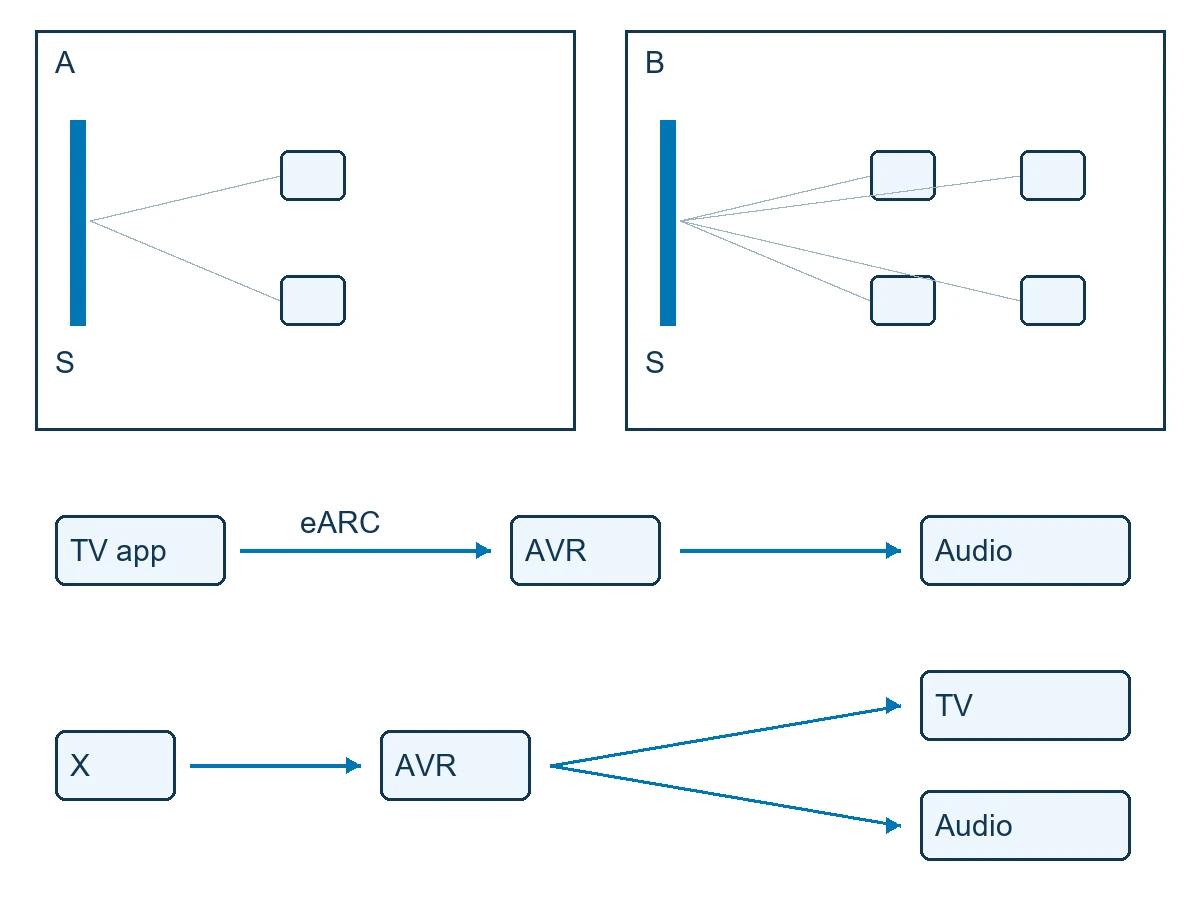
Viewing distance concerns the viewer and image. Projector throw concerns the projector and screen. Check image width against the exact lens and projector data before committing to the mount position. Throw distance and positioning.
Mark the active image width, height and lower edge, then check the nearest, farthest and side seats. Verify any lens-shift range on the selected model. Test a dark scene and Arabic subtitles at the proposed size and lighting, including whether a front seat obstructs captions for the rear row.
The conceptual sketch compares a single seating area with two rows. It provides no installation dimensions; your room layout, circulation and associated building work need their own review.
Surround sound and clear dialogue
The center speaker primarily carries dialogue. Front and surround speakers distribute sound around the listener, while height speakers provide overhead sound in suitable configurations. A subwoofer reproduces low frequencies. Dolby speaker roles.
In speaker-layout notation, 5.1 usually describes five main speakers and one subwoofer; 5.1.2 adds two height speakers. The content's low-frequency effects channel does not by itself determine how many subwoofers can be connected. Record the actual equipment count and layout in the proposal. Dolby Atmos installation guidelines.
Compare retained speakers, a soundbar or a discrete layout against the room and intended use. Atmos playback needs compatible content, source, audio equipment and speaker configuration. One device carrying the format name does not establish compatibility across the system.
Choose a reference seat and additional listening positions for checks. CEDIA/CTA RP22 provides a framework for audio design and performance; verification to a particular level needs an agreed project scope and evidence. RP22 immersive audio design reference.
Acoustic treatment and sound isolation
Dialogue obscured by reflections inside the room calls for an acoustic-treatment assessment. Sound heard in the bedroom above calls for an assessment of transmission through the building and its paths. Internal treatment and isolation between spaces address different problems. CEDIA/CTA RP22 recommended practice.
Acoustic panels alone do not establish sound isolation. If isolation is requested, identify the affected space and intended listening conditions. A qualified specialist should assess walls, doors, ceiling and other paths. Agree the work, responsibility and verification separately before committing to an isolation result or a building alteration.
Connecting TV apps, streaming players and consoles
A compatible TV can return its app audio to a compatible AV receiver or soundbar through eARC. An external source may run through the receiver before the display, or connect to the TV with an audio-return path, depending on the equipment. HDMI eARC explained.
| Source | Example agreed route | Check |
|---|---|---|
| TV app | TV displays the picture and returns audio to the sound system over eARC | App, supported format, ports and settings |
| External player | Player to receiver; video to display and audio to speakers | Picture and sound across the full path, including input changes |
| Console | Receiver or display connection according to compatibility, with a defined audio path | Required modes, sound, switching and return to viewing |
Review every port, cable and device in the route. Specify any required resolution, refresh mode or audio format by name, then test it using the actual source. Gaming and other advanced functions depend on the configured equipment, not an assumed feature set from a version number.
Can everyone operate the system?
Define a practical routine: start viewing, select an app or external source, adjust volume and shut down. Ask someone who was not involved in installation to follow it. For hospitality, include the staff procedure for resetting the room after a guest leaves.
HDMI-CEC may handle some controls when supported and configured across the devices; another control solution may suit the project. Test startup, input selection and volume before accepting unified operation. Keep a short manual procedure for restoring picture or sound if that workflow fails.
Sony guidance on HDMI-CEC controls.
Include lights and shades in the operating test only when their integration is quoted. Test the film, sport or console source that the room will use.
Who approves mounting, wiring and fit-out?
The AV team verifies the configuration, signal routes and adjustments. Qualified site specialists approve the structure, mounting loads, power and any building or electrical work. The fit-out contractor coordinates joinery, openings, finishes and access after closure.
Equipment ventilation, service clearances and mounts depend on the selected hardware and site. The electrical specialist determines applicable project requirements, using relevant references including the Saudi Electrical Code where appropriate. Saudi Electrical Code SBC 401.
Assign each task and approver in writing. State whether opening and restoring finishes or isolation work is included. Confirm suitability before mounting equipment or closing an important route.
From survey to commissioning, including upgrades
Following the survey, review picture, speaker and seating positions with the cable routes. Approve the scope, retained and supplied equipment, and site responsibilities. Coordinate work needed before walls or ceilings close.
Once the site is ready, installation is followed by picture and audio adjustment, source checks and control tests. If an older receiver, existing cable or proposed mount fails verification, review the alternative and its cost and schedule effect before proceeding. For a phased upgrade, state what will work at the end of the first stage and which limits the owner accepts until later work.
The owner or representative witnesses acceptance using the agreed content. Complete the issue record, operating guide and support terms before closing the job.
Installation cost and comparable proposals
Home theater installation cost depends on retained equipment, display and audio configuration, cable routes, room work, control and commissioning. Request separate equipment, installation, supporting work, user instruction and support items, with applicable taxes identified.
Give each home theater systems installation company the same room, seating, source and acceptance brief. Review exclusions and who pays for rework if equipment or positions change after finishes are approved. Separate equipment warranty terms from installation and maintenance responsibilities.
For a comparable quote, provide room details, existing models, desired content and a target budget. State Riyadh or your actual project city so survey availability and timing can be checked. The project proposal establishes price, availability and schedule.
Picture, sound and control checks at handover
Run acceptance checks with the room, seats, sources and lighting recorded in the survey. Record the actual result, issue, action and approver alongside the expected outcome.
| Acceptance check | Exercise | Record |
|---|---|---|
| Image and captions | Dark scene and subtitles from rear and side seats | Source, lighting, seat and any obstruction |
| Dialogue and channels | Familiar content and channel-direction checks | Configuration, listening level and observations |
| Bass | Listen from the main and an additional seat | Differences requiring adjustment |
| Source paths | Change from the TV app to an external device and back | Input, picture, sound and lip sync |
| Everyday recovery | Restart the system and follow the manual fallback | Steps the user can repeat |
Receive an equipment list, port and source map, operating notes and test results. Keep warranty terms, support contacts and maintenance limits with them. In a private hospitality room, have a staff member operate the system from the guide before approval.
Two external examples of cinema planning
Flotopia: two rows beneath a low ceiling
CEDIA describes how Die Zwei - Heimkino addressed a low ceiling and two seating rows in the private Flotopia cinema. The front seating area was lowered to support rear sightlines, while isolation work was coordinated around living spaces above. Flotopia project profile.
For a Saudi villa with two rows, review sightlines in a seating section and test captions from the rear. Where sound transfer upstairs is a project concern, commission its assessment separately from the picture check. A lowered-floor solution cannot be transferred to another building without structural review. This external project is not Marafei's work.
Buzzards Road: coordinating screen, speakers and control
In a feature published on 4 March 2026, CEDIA describes coordination between interior and installation teams at Buzzards Road, an acoustically transparent screen with speakers behind it, and unified controls for viewing activities. Buzzards Road project account.
For a Saudi private hospitality screening room, review screen and speaker positions with the fit-out lead before the front wall is closed. Check dialogue from side seats, then ask a staff member unfamiliar with installation to change sources and reset the room from written instructions. Carry out this proposed check in the new room before accepting the installation.