
What does the installation include?
Identify the equipment your organization already owns and the items it needs supplied: projector, separate lens where applicable, screen, mount, cabling and switching or control equipment. The proposal should assign responsibility for each item, the associated site work and the tests required before handover.
For an existing projector, share its model, condition and connections so the installer can assess reuse. An upgrade may retain a screen or cable route after compatibility checks. Room audio, cameras, microphones and wireless presentation need an agreed scope when they form part of the project.
What does the room need to show?
A boardroom may need people to read small financial figures. A training room may alternate between slides, video, the room PC and a trainer's laptop. Provide a representative file with sensitive information removed, and identify the smallest detail participants must be able to read.
For hybrid meetings, define both the local display and the content sent to remote participants. Name the meeting platform, equipment and people responsible for checking audio and shared content at each end. A projector connection alone does not establish that the conferencing system is complete.
When should you compare projection with a direct-view display?
Compare the options in the available room: image position, active image size and readability from occupied seats. Include light, service access and connection routes in the decision. Where possible, test the same representative file on the proposed options.
Detailed content or light falling on the image may change the choice. AVIXA's image system contrast reference covers direct-view displays and projection, and treats the environment as part of the system. Image system contrast reference.
A site survey card for your meeting room
The survey gives facilities, IT and meeting hosts a shared configuration to review. Prepare a simple layout or optional non-sensitive photographs through the agreed communication channel. Record constraints that need a decision before installation.
| Record | Project decision | Reviewer |
|---|---|---|
| Room dimensions and nearest, farthest and side seats | Image position and viewing checks | Room users and installation team |
| Display surface, ceiling and access | Screen, mount and service access | Facilities and qualified specialist |
| Window and ceiling light during meetings | Test conditions for the proposed setup | Users and facilities |
| Source devices, ports and guest policy | Connections, adapters and source tests | IT |
| Power, routes and preparatory work | Work boundaries and room availability | Facilities and contractor |
Include the city and preferred work date when requesting projector installation for a meeting room in Saudi Arabia. For Riyadh or another location, availability and scheduling are confirmed during project review.
Size the image around readable content
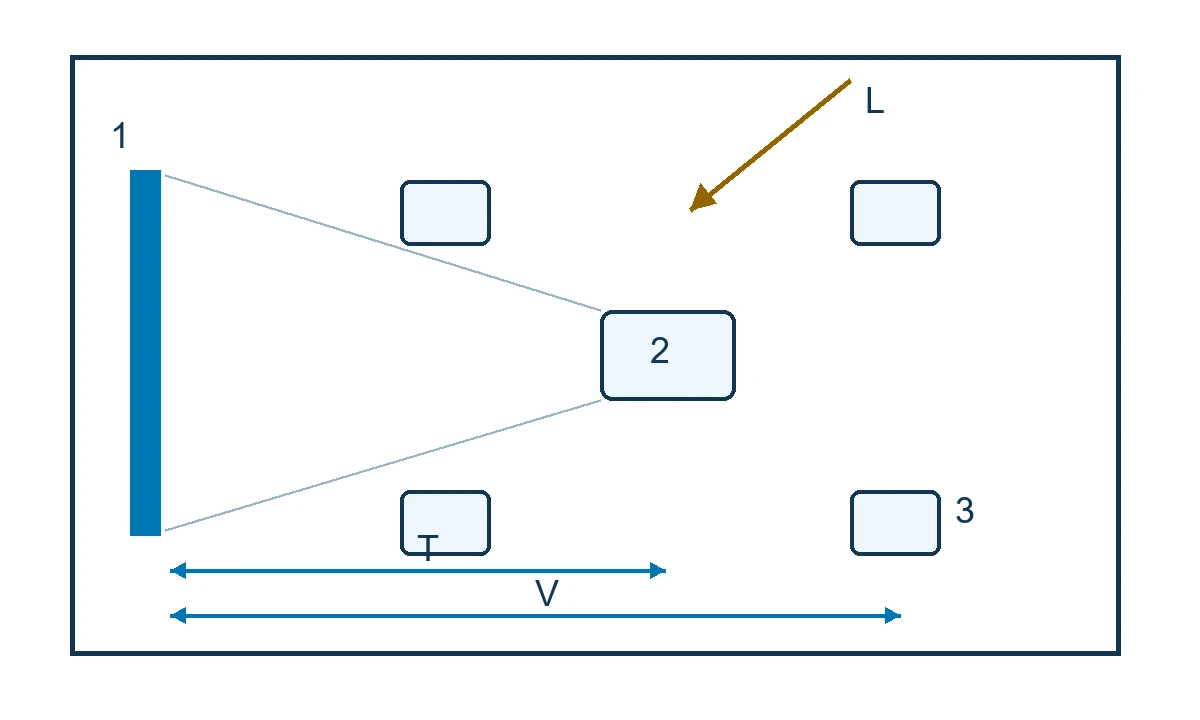
Record the active image width and height and its position relative to seated viewers. AVIXA's 2D image-size reference distinguishes basic and analytical decision-making needs and relates image size to viewing positions. Specify the reading task alongside the screen dimensions. Display image size reference.
Open a real bilingual slide or spreadsheet and identify a figure or label that matters to the meeting. Ask a room user to read it from the farthest seat and a relevant side seat. Record the file, zoom setting, lighting and seat position so the test conditions are clear. Any formal verification against a standard needs its own agreed scope.
Test lighting, brightness and system contrast
Review light falling on the display surface, blind positions and the lighting people need for reading and taking notes. Evaluate projector output, image size and screen together. If the room has different lighting scenes, test the normal meeting scene and the presentation scene that users will actually select.
AVIXA's contrast reference considers the display, sources, signal distribution and environment. Ask for the handover record to state the lighting used in the test. Acceptance should reflect the agreed operating conditions. Image system contrast.
Check projector position, lens and screen
Throw distance describes the distance from the projector to its image on the screen. Viewing distance concerns the audience's position relative to that image. Check the exact projector and lens data against the intended image width before fixing the mounting position. Throw distance and positioning.
Lens shift moves the image optically on models that support it. Digital correction reshapes the image to address distortion. Review the selected model's limits and inspect the actual content after adjustment; lens shift availability and range vary by equipment. Image position adjustment.
Confirm screen and mount compatibility and access for servicing in the configuration. A laser light source or a smart-projector label alone does not establish suitability for the room's throw distance or presenter devices.
Test staff and guest connections
List the devices and signal paths that need testing. VESA explains that a USB-C port without DisplayPort over USB-C support will not provide an image through that path. Check the source, cable, adapter or dock, then test the chain that the room will use. DisplayPort FAQ.
| Source | Define before installation | Operating test |
|---|---|---|
| Room PC | Output, signal path and control | Start, switch away and return |
| Staff laptop | HDMI or video-capable USB-C and required adapters | Show the file, disconnect and reconnect |
| Guest device | Approved access and presentation method | Join and present within agreed permissions |
| Wireless presentation, if included | IT approval, access flow and wired fallback | Change presenter and recover through the fallback |
If audio is included, play a representative video and check the selected audio output and volume control. A successful test on one laptop does not establish compatibility with every staff device.
Scope interactive and hybrid use
Specify interaction when people need to annotate, write or complete a training activity on the displayed content. Define that task, then verify the projector, surface, supported pen or touch function and source. Ask an actual user to perform it in the approved setup.
For hybrid meetings, list cameras, microphones, room sound, meeting platform and remote content sharing as deliverables when required. Acceptance of that scope needs a local and remote test, including how the room returns to its usual mode after the meeting.
Assign mounting, power and site work
Facilities and qualified teams approve the mounting location, structure, compatible hardware, power and cable routes. The installer reviews the actual equipment manual, including placement, ventilation and service requirements. Mounting requirements for one model should not be applied to another without verification. Example Epson placement manual.
Name the party responsible for openings, cable installation and making good, and the person who approves preparatory work. The electrical team checks requirements applicable to the project, including the Saudi Electrical Code where relevant. Saudi Building Code Center. Qualified site teams carry out electrical and suspension work within the approved scope.
From survey to commissioning
First confirm uses, seating, source devices and site constraints. Review the configuration, equipment and preparatory work, then have the client representative approve the deliverables and client-supplied items.
Prepare routes and the site within the agreed work window. Installation is followed by image adjustment and source checks. If a ceiling or cable-route constraint emerges, document its effect on the configuration, schedule and cost before approving the change. Recheck compatibility when a material equipment or route change is proposed.
Arrange commissioning when room users and IT can attend. Record who approves reopening the room once issues that prevent its agreed use have been addressed.
Installation cost and comparable quotes
Meeting room projector installation cost depends on the site, configuration and work scope. Separate equipment supply from the screen, mount, cables and routes, switching, control, labour, commissioning, user instruction and support.
Give each meeting room projector installation company the same survey card, source list and acceptance checks. Ask bidders to identify client-supplied items, exclusions and how changes are priced. Compare an upgrade with a new installation after checking the components proposed for reuse.
Prepare the city, room dimensions, farthest seat, lighting, ceiling, existing projector model if known, presenter devices and target date. Request a meeting room survey and quote.
Acceptance checks and handover
Agree the checks before installation. Record the configuration, result, issue, corrective action and approver. Adapt this acceptance card to the room's actual use:
| Check | Method | Record |
|---|---|---|
| Readability | Read the smallest important figure from the farthest and side seats under meeting lighting | File, seats, lighting and result |
| Presenter sources | Test each approved device and path, including reconnection | Device, port, adapter and image recovery |
| Presenter change | Move between staff, guest and agreed fallback connections | Operating steps and any interruption |
| Audio and control, if included | Play video, adjust sound and return to the usual mode | Tested settings and user observations |
| Handover | Have a room user operate the system using the guide | Short guide, connection map and support contact |
Review maintenance, parts, response conditions and support responsibilities in the proposal. The manufacturer's warranty, where applicable, has its own terms. Also identify who handles faults and whether the mount, accessories and installation work fall within the agreed coverage.
Two documented meeting and training installations
Toyota France: changing presenters
BenQ describes equipping Toyota France with a projector and wireless presentation devices to support meetings with changing presenters. This is a participating vendor's account of an external project. Toyota France case study.
For a Saudi boardroom, a proposed test is to have two staff members present from their devices, followed by a guest using IT's approved access method. Rehearse switching to a wired connection if wireless sharing stops, using a transition time agreed with the room owner. Equipment availability and transition time for a new installation need project-specific review and testing.
University of Texas at El Paso: training-room sources
Extron documents front projection, several source types and content routing in multipurpose learning rooms at UTEP. The system included an instructor PC and personal devices, with content sent to different displays. University of Texas at El Paso case study.
For a Saudi training room, test the same bilingual training table from the room PC and the trainer's laptop. A learner checks the smallest required figure from rear and side seats, and the operator returns the room to its standard mode. Select image size and configuration for that room. This is a proposed acceptance exercise; the published project is not Marafei's work.